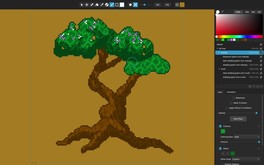
Pixelmash is an innovative new pixel art and animation tool based on non-destructive pixelization, perfect for game makers, artists, hobbyists, kids, and lovers of the 8-bit and 16-bit eras.
Modeled estimate, not a reported figure. How we estimate →
Media

About


Genres
Stats
All-time low is the lowest price we've recorded for this game since we started tracking it.
Languages: English
Engagement
Hours played at review time, across 40 reviews with recorded playtime.
Reviews
Perfect!
很好用,效果也不错,期待更多的功能~
Un logiciel d'animation pixel plutôt bien fait pour le dessin de vos objets. La gestion des frames n'est pas très aisée. MALHEUREUSEMENT, l'export des projets en Gif ou MP4 ne fontionne pas. A 20 euros, ça fait mal où je pense.
Po czasie niestety muszę stwierdzić iż program jest drogi w porównaniu do tego co oferuje. Edytowanie pixel artów w stylu wektorowym to świetny pomysł, ale w tym przypadku niewykorzystany. Edycja wektorowa jest na bardzo podstawowym poziomie, czyli nie można tworzyć kształtów typu koło czy prostokąt, a tylko krzywe. Efekty też są kiepskie i średnio działają (brak chociażby gradient mapy).
Ein toller pixelart creator
Good for pixel art! I like dynamic res I like ui. missing somethings but it can be improved. Planning to use it often now that it now has animation!
I CAN'T SAVE MY PROJECT!!!
Thanks :)
I tried the demo for Pixelmash and was won over pretty quickly. It's not as all-encompassing as some tools out there, but it does a narrow set of things very well, which makes it feel extra intuitive and comfortable to use in a way few other tools do. The layer system is great, and being able to nest a layer in another layer and use the parent's pixels as a mask for the child layer is a great workflow, especially when paired with the non-destructive ability to stack effects. You can, for example, create a base color on the parent layer, draw some random pixels on the child layer, and then put a particle effect on the child layer to turn those random pixels into a moving animation that never strays from the bounds of the parent layer. You can add automatic outlines, create patterns and then save them out to use as custom dither patterns, and do all sorts of other interesting things. The Auto Shade effect is especially powerful for quickly adding some depth to an image. Auto Shade, Particles, and the Gradient effect all work together in really powerful ways for creating things like smoke, fireworks, and the like. If I had to criticize anything, I wish that it was easier to get a good loop with the particle system. It doesn't really loop, so if you want a seamless loop rather than a one-off effect like a firework, you'll have to make the motion quick enough that you don't notice the jump when it resets to the start of the animation. It's still very usable, but I've found that animations with slower movement that have to loop in a non-distracting way are best created in a different software. But Pixelmash can do things other software can't, like layers that are non-destructively downscaled to a target resolution while actually being higher resolution behind the scenes. These react differently to being moved around than layers that are at the downscaled pixel resolution, and you can mix and match layers or render a dynamic layer to the current downscaled resolution. There's a lot of flexibility here, and when you combine that with some really solid palette quantization features, it makes Pixelmash very powerful for converting pictures to sprite art. I'm also a big fan of the animation workflow that can do tweening super simply, as well as how good the software is at downscaling .svg files into pixel art that retains the underlying shape of the vector art. All in all, this is a deceptively powerful piece of software despite how easy it is to use. In my search for different software to use as a crutch for my fairly weak art skills, Pixelmash has been one of my favorite finds so far.
EDIT 2: Still great but having tried the animation timeline tools there are even more issues: -The animation is FULL of problems and VERY barebones (there are no bones) which make animating a simple walk cycle almost impossible.. - Cannot drag or move multiple keyframes -You cannot select more than one keyframe at once. -When selecting a single keyframe it selects ALL the layers with that keyframe, so if you have your different body parts in different layer you can forget it. Not sure how they expect us to animate like this? - No rescale time/keyframe, no offts of multiple keyframes etc. EDIT: 6 months later there is still no modifier key to choose a colour from the image unlike every other art package in existence, instead the devs are more concerned with advanced features like animation rather than getting the basics right :( Please..this is the only thing keeping me from using the tool. :( This is almost amazing! 8/10 Does a lot of things right but there are some basic missing features. Note: These are all quite minor and I have no problem in recommending the program !! I'm posting them here in the hope that the devs eventually read them and one day address them. -There is no way to have a temporary colour picker for quick colour selection, the tool is selectable via the 'i' key and keys cant be configured. It should be a modifier key. I am using to just holding alt temporarily when I want to select a colour. The 'i key is way over to the right and so its just annoying to use. -When working with mirror you should be able to work in either side of the image. Currently you can choose to work in either the left or right but this just leads to confusion. -Auto Shade is an incredible tool but there should be more options. Currently there is just rounded and directional but we need different kinds of bevel options like flat, bevelled, curved edge along with bevel widths etc. -Vector and pixel layer should just work as one layer type without the confusion. -Cant seem to flatten layers. -No fast way to clear the contents of a layer as far as I can tell -No Merge layers -It would be really nice to be able to change the background colour of the transparent working area and the preview window. - It seems a bit confusing that if you want to add a noise effect to a new child layer that you first need to fill the child layer with a colour before applying the effect, otherwise you font see any change. -Would be nice if the temporary brush effects would appear in the preview window as they do in the main window. ie what the image will look like after I click the tool (erase, paint etc))
Related
Related
Trends
Modeled estimate over time, reconstructed from Steam's monthly review histogram.
Momentum
Pace estimated from the game's recent review growth (our daily snapshots) at its own sales-per-review ratio — a momentum signal, not booked sales.
Audience
Estimated from the language of this game's reviews — a proxy for where players are, not official Steam demographics.
Related
| Mr Toilet | $20.1K | 93 | 90% | $5.59 |
| Super Jigsaw Puzzle | $20.1K | 141 | 88% | $4.99 |
| RUINS Survival | $20.1K | 65 | 48% | $9.99 |
| HYPNOTIC EYES | $20.1K | 235 | 77% | $4.99 |
| Demon Lord Reincarnation | $20K | 121 | 68% | $7.99 |
| CRUSH DEPTH | $20K | 66 | 98% | $7.99 |