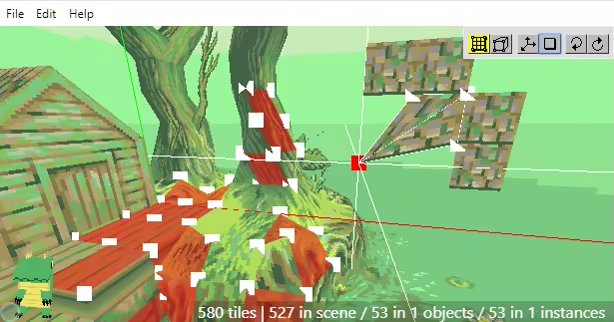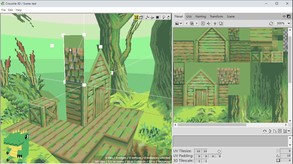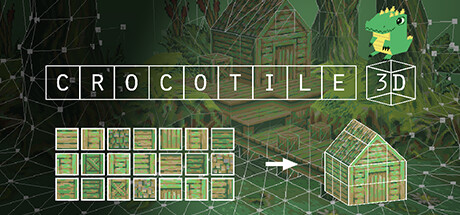
Crocotile 3D is a tile-based 3d modeling application. A great tool for creating lowpoly models and scenes with pixel-art textures. Select tiles directly from tilesets and place them into a scene to give them a third dimension. Use various tools to edit your tiles and shape your models.
Modeled estimate, not a reported figure. How we estimate →
Media

About
Crocotile 3D is a tile-based 3d modeling editor. Originally released back in 2015 it is the first of its kind to use 2d tiles to construct 3d scenes. In contrast to most 3d applications that are bloated and over-complicated, Crocotile 3D is a simple to use tool targeted at creating lowpoly models and scenes with pixel-art tilesets or low-res textures. Simply select tiles directly from tilesets and place them into a scene to quickly give them a third dimension. Use various tools to edit your tiles and shape your models, let your imagination go wild!

Features Draw and Edit modes to easily add/remove/edit tiles in 3d space.
Perspective & Orthographic projection.
Export to and use your creations in other programs or in your game development.
Import files from other applications and continue working with them in Crocotile.
Place blocks like minecraft!
Modify UVs on tiles, adjust tileset sizes.
Paint Editor tools for creating/modifying your tilesets.
Rotate, flip, mirror, reverse faces, verts and UVs.
Vertex colors.
Lights and Shadows.
Animated Tiles / UVs
Animation and Movie rendering.
Skinning and Rigging (Bones and Vertex Weights).
Split/cut tiles.
Copy/paste tiles.
Group tiles into objects/prefabs.
Nested Instances.
Translate, rotate, and resize tools.
Undo/redo any changes.
And much more! (Click to read the Manual)
Demo and more information is available on the Crocotile3d website.
Genres
Stats
All-time low is the lowest price we've recorded for this game since we started tracking it.
Languages: English, French, Spanish - Spain, Polish, Russian, Simplified Chinese, Spanish - Latin America, Swedish, Slovenian
Engagement
Hours played at review time, across 40 reviews with recorded playtime.
Reviews
Themes across 40 recent reviews and how positive each mention is. A keyword signal, not full sentiment analysis.
positive critical· bar length = how often the theme comes up
Reviews
To be honest, I could never really wrap my head around the complexities of Blender or any 3D software like that. Crocotile 3D makes 3D modelling dead simple. Just playing around with it, I've already made some pretty complex objects in a really short span of time. If you have an inkling of how 3D game objects and characters are made and are looking to make low poly assets for a game project or just for fun, i can guarantee you'll probably get the hang of this pretty quickly. Even if you don't, the tutorials are pretty in-depth and easy to understand. Definitely worth a shot if you're looking to get into 3D.
this shi like minecraft but with a cool crocodile in the corner
this is by far the single piece of software that actually made it feel like I personally could 3d model. sparking a genuine and deep love for this medium. Crocotile 3d being light-weight enough that a complete newbie could feasibly learn every single feature with enough depth to actually use all of the features rather than forgetting niche use cases. I highly recommend crocotile 3d and personally consider it the best way to start learning 3d modeling.
Super easy to use at the cost of being relatively narrow in what you can easily do.
Great tool to transition from 2D pixel art to 3D modeling! It's pretty much perfect for my workflow, and learning the program has been a treat with the developer's YouTube tutorials. If you're a pixel artist wanting to make a lowpoly 3D game or diorama, this is a great option!
An analogy to my experience is: 1) Open up app 2) Be unable to figure out anything 3) Go to their website for help 4) Find out you have to learn Japanese upside-down to continue. I was taken aback at how unintuitive this is and how nonsensical the default settings and controls are. Could be sooo SO easy to have a little pop up to explain the basics that the user can check a box when they no longer want to see it anymore. Why can't I just press right click or middle mouse button and move my mouse to rotate the environment. Clicking on a big crocodile (that stays on screen at all times for some reason), is the only way that I could get rotate my point of view. The keys they said would do it did nothing. And so many controls and rules are the way they are... seemingly just because? Every single action that I see in the trailer COULD have key bindings that could feel more natural, but just aren't. There is a Help button on the Menu bar that takes you to their website where they PROMISE you it's intuitive. I was trying to follow along their Getting Started section. I have a tile selected and am pressing the different keys that are supposed to do different things but literally nothing was working aside from the ones that would move the axis of the environment orthogonally. I know I barely spent any time in it, but I spent a bunch of time perusing their website and they really need to figure out how to make it more approachable and intuitive. After reading their website, the controls are so unnatural and against any conventions anywhere. Asking you to spend quite a bit of effort to get used to their really weird control system that will serve you literally no where else. Also I wasn't able to view the tiles I place from behind by default. Maybe there is a way to change that but it doesn't feel worth the trouble. Like I have spent a bunch of time learning programming languages, game engines, blender etc, but many of those are free and there are so many examples out there of practical use cases that it felt like it was worth investing the time into learning those apps. This feels like I'm going to have to blow way passed the refund window and spend a TON of time to know if it has a practical place in my workflow or not and with the controls being so weird, I unfortunately will not find out. Overall it was a bummer, because what I see in the trailer looks like a super neat, super cool tool to get lost in, but I don't feel like learning Japanese upside-down right now. Edit: Wanted to add, I have seen you respond to some of the negative reviews and it sounds like you care and I really appreciate that, but the users you listened to for control suggestions *were the wrong ones* because holy moly. I am still "Following" the program now, and will stay tuned updates.
you don't always need a maximalist program like blender and crocotile's grid based approach to modeling allows for rational creation of low poly models
it advertises itself as being tailored for low-poly ps1 stuff, but the 3d tilemap system also just makes it really good for creating environments in general. this thing has especially been a lifesaver for me when it comes to modeling interior room layouts, because you normally have to stay consistent with rigid angular stuff like door width/wall height/etc. and if i didn't have this thing to help me then all my environment models would probably look incredibly wonky. only downside is $30 is kind of ridiculous for what you get (it should be $15-$16 like Aseprite) so i had someone gift it for me.
Highly unintuitive controls but undeniably good at providing a streamlined workflow for creating very specific environments/art styles. Gets a lot of love from the developer, so I would certainly recommend this at full price if you find the store page examples compelling and want to work with these tools / in that style. Good export/import features too.
i could be the crocodile
Related
Related
Trends
Modeled estimate over time, reconstructed from Steam's monthly review histogram.
Momentum
Pace estimated from the game's recent review growth (our daily snapshots) at its own sales-per-review ratio — a momentum signal, not booked sales.
Audience
Estimated from the language of this game's reviews — a proxy for where players are, not official Steam demographics.
Related
| Lords of the Realm II | $117.9K | 1.7K | 96% | $2.99 |
| Clea | $117.8K | 409 | 98% | $13.99 |
| 汉尘:腐草为萤 | $117.9K | 413 | 71% | $7.99 |
| VERSUS SQUAD | $117.9K | 584 | 78% | $7.99 |
| CFS (Chinese Football Simulator) | $117.9K | 306 | 70% | $9.99 |
| Please Be Happy | $117.8K | 405 | 99% | $19.99 |