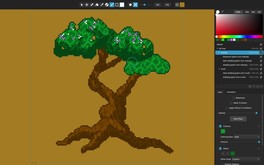
Pixelmash is an innovative new pixel art and animation tool based on non-destructive pixelization, perfect for game makers, artists, hobbyists, kids, and lovers of the 8-bit and 16-bit eras.
Modeled estimate, not a reported figure. How we estimate →
Media
About


Genres
Stats
All-time low is the lowest price we've recorded for this game since we started tracking it.
Languages: English
Engagement
Hours played at review time, across 40 reviews with recorded playtime.
Reviews
This review is a warning. I detected misleading reviews saying features are not available, luckily, those comments can't change the date they were posted. One common issue is the lack of straight line tool, it's available AND documented. Just right click for the first point and left click for the second point, Available since version 1.0.11 (So, all reviews after December 2029 saying there is no line tools are purposely misleading) Also, circle and rectangle tools are there since version 1.2.00 (So, circa 2019), same idea, comments after 2028 telling it is lacking those tools are misleading. As of today, it has a lot of tools including custom dither patterns. The only tool I miss is a tilemap tool.
This is some nice software from nevercenter. I use it in my pixel art pipeline to convert high res renders to sprites.
Honestly, this is a fantastic piece of software. Really intuitive to use, easy to figure out. I haven't explored the extents yet, it's only been a few hours, but I'm using it for game sprites. Really enjoy it!
A wonderful full featured lightweight sprite editor. Pixelmash receives regular updates along with new features very often. The interface is well thought out and intuitive, with useful tools sets to help unlock the full power of editor.
Pixelmash is my favorite pixel art tool. It's like a swiss army knife for pixel art and keeps getting better with every update. It's not overly complicated and offers everything I need to make great pixel art, sprites and gifs.
Después de probar muchos programas similares, me ayuda a realizar mis animaciones con RESULTADOS. Ojalá tenga actualizaciones constantes, pero lo que ofrece funciona bastante bien.
Nice
Bár én csak egy pár funkcióját használtam eddig, color limiter és átméretezés, de nem tűnik hasztalannak! Sőt! Trailerben látottak elég meggyőzőek. Szerintem sokkal jobb elismerést érdemelne, mint amennyi jelenleg az értékeléséből levonható!
EDIT 2: Still great but having tried the animation timeline tools there are even more issues: -The animation is FULL of problems and VERY barebones (there are no bones) which make animating a simple walk cycle almost impossible.. - Cannot drag or move multiple keyframes -You cannot select more than one keyframe at once. -When selecting a single keyframe it selects ALL the layers with that keyframe, so if you have your different body parts in different layer you can forget it. Not sure how they expect us to animate like this? - No rescale time/keyframe, no offts of multiple keyframes etc. EDIT: 6 months later there is still no modifier key to choose a colour from the image unlike every other art package in existence, instead the devs are more concerned with advanced features like animation rather than getting the basics right :( Please..this is the only thing keeping me from using the tool. :( This is almost amazing! 8/10 Does a lot of things right but there are some basic missing features. Note: These are all quite minor and I have no problem in recommending the program !! I'm posting them here in the hope that the devs eventually read them and one day address them. -There is no way to have a temporary colour picker for quick colour selection, the tool is selectable via the 'i' key and keys cant be configured. It should be a modifier key. I am using to just holding alt temporarily when I want to select a colour. The 'i key is way over to the right and so its just annoying to use. -When working with mirror you should be able to work in either side of the image. Currently you can choose to work in either the left or right but this just leads to confusion. -Auto Shade is an incredible tool but there should be more options. Currently there is just rounded and directional but we need different kinds of bevel options like flat, bevelled, curved edge along with bevel widths etc. -Vector and pixel layer should just work as one layer type without the confusion. -Cant seem to flatten layers. -No fast way to clear the contents of a layer as far as I can tell -No Merge layers -It would be really nice to be able to change the background colour of the transparent working area and the preview window. - It seems a bit confusing that if you want to add a noise effect to a new child layer that you first need to fill the child layer with a colour before applying the effect, otherwise you font see any change. -Would be nice if the temporary brush effects would appear in the preview window as they do in the main window. ie what the image will look like after I click the tool (erase, paint etc))
Related
Related
Trends
Modeled estimate over time, reconstructed from Steam's monthly review histogram.
Momentum
Pace estimated from the game's recent review growth (our daily snapshots) at its own sales-per-review ratio — a momentum signal, not booked sales.
Audience
Estimated from the language of this game's reviews — a proxy for where players are, not official Steam demographics.
Related
| Human Fast Food | $20.7K | 83 | 90% | $6.99 |
| Natsumi and the Absurd Academy | $20.7K | 63 | 92% | $12.99 |
| IZON. | $20.7K | 63 | 97% | $12.99 |
| Complex Loop | $20.7K | 71 | 93% | $9.99 |
| Cricket Captain 2025 | $20.7K | 53 | 72% | $13.99 |
| Dullpain | $20.7K | 91 | 85% | $10.99 |