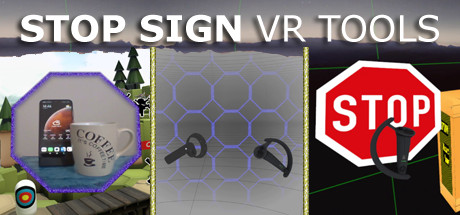
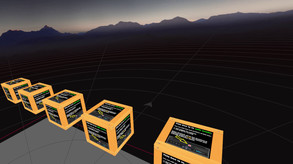
A set of tools that run in VR while you play a game: Cam Circle shows the real world in a circle in front of you. Activate it by double tapping the headset or by pressing both grip buttons. Boundary++ is a warning system showing your walls and ceiling. Boxes warn you for impacts with real objects.
Modeled estimate, not a reported figure. How we estimate →
Media

About
Genres
Stats
All-time low is the lowest price we've recorded for this game since we started tracking it.
Languages: English
Engagement
Hours played at review time, across 45 reviews with recorded playtime.
Reviews
Themes across 45 recent reviews and how positive each mention is. A keyword signal, not full sentiment analysis.
positive critical· bar length = how often the theme comes up
Reviews
he program did not work at first but!!! developer was in constant contact asking what was wrong with app and what components my PC had. developed a of of app seeings screen and then also made a BETA for my Graphics card and now app works perfect totally recommend to anyone who uses VR this will keep you from smashing things and best customer service ever!!!!
Pretty much an essential app for VR in a shared space. Being able to places boxes where objects are in space actually makes more space available to be used. Instead of having a huge wall where your coffee table would be, you now have a small box at your feet while you can still use the space above without issue. I'm honestly surprised this functionality isn't built into the chaperone system.
Terrible software, my first experience was a massive list with tons of bool values which was extremely confusing, didn't know what i had to do. I was setting up all the boxes and then i wanted more blocks, so i added more blocks and hopped back into vr and noticed all of my progress was completely reset, i then decided to continue, after setting everything up perfectly which took me 1 hour, i changed from editing mode to locked in place and all of the boxes were reset again! I had lost all my progress without any warning or indication of what caused it!
As clunky as this is (I understand it is early access), this is the most useful guardian/chaperone addon there is. I've tried the others (including openVR advanced settings) and this one is straight to the point and no one can misinterpret the big stop sign. The best feature is that you can position the zones rather than have a blanket warning equally around the whole play space. I really only wanted to cover the front and back, not the sides, so this works perfectly. [strike] Some thoughts though as I'm thankful you left the settings file editable as I was able to get what I wanted by fiddling with the file. I like the idea of the predictive motion, although I found it too sensitive where it felt like it was just assuming I'm throwing the controller with every swing. It might work better if it recognizes the entire body moving in a direction, but I understand this is a difficult motion problem to solve regardless. In the end, since I can't adjust the predictive sensitivity, I removed the big alert stop sign altogether (along with no stop signs for the guardian limits, since they're decent enough) and functionally replaced it with a large "silent" stop sign by swapping the size and audio. The end result are large stop signs that appear exactly where I want them to (a little past the guardian and only along the front and back). For future features, I'd suggest varying the activation/predictive/visible distances per box rather than a global setting but otherwise this is great. [/strike] Seems this update resolves all of that! I look forwards to configuring. Edit: After reconfiguring, the fact that I can change the predictive sensitivity is great on its own. My only other feature request is to allow the boxes to be fully invisible without needing to remove the reference to images (If I try to later edit, they come back and I have to delete the lines again). I mainly like this program for the giant stop sign when over stepping your bounds and don't want to see the boxes in normal play, although they are a welcomed option. Thanks again. I hope you continue with this program, and I wouldn't concern yourself with fancy features, just keep it simple and allow for easy editing.
Because windows mixed reality software is god awful, you can't adjust any of the chaperone settings its either they are ON or OFF. You can't adjust the activation distance or anything. I play in a very small area with a bed in front of me and a 70 inch desk on the other side behind me. This program is perfect because it lets me put an invisible wall behind me where my desk is so I know where I am facing in vr. If I see the invisible box outline I just simply turn away so I don't risk slamming my desk. Perfect for people who don't want to use guardians but still want to prevent themselves from hitting things. It would be cool if the dev can make a "fake steam vr guardian" that can be manually placed around your room and adjusted like the crates which would be fully adjustable with activation distances and everything. Would be really helpful for Windows Mixed Reality users who have limited ability to change stuff like that in mixed reality portal.
It's really helpful if you have a low ceiling and if you want to mark those objects in your room. I only wish the Headset would not trigger the ceiling chaperone all the time. Because it's constantly dipping framerate performance that way. But then again.... if it wouldn't show up all the time, Controllers would crash more likely :-] edit. Oh, and I also like the way how the chaperone blends in.
Essential for WMR users as WMR boundary is barely visible.
the app does "work", but it is very buggy and if you need some more advanced settings it does not work, it doesn't even remember my room set up, and I usually don't leave bad reviews, but there is little no help or videos explaining how this works! I'm disappointed
Just picked this tool up so that I could actually see a SteamVR boundary for my vive trackers when streaming from a Vive XR Elite. Works perfectly with OpenVR Space calibrator and even with non streaming headsets, it provides the perfect mix of unobtrusive to genuine warnings. Much better than the default steamVR chaperone and much more configurable I especially like the warning boxes, I was able to place boxes around things in my room like my ceiling light, monitors, dressers just outside of my play area, ect. I was even able to make my monitor only warn if a controller is near, not my headset, which was an unexpected, but very much welcome feature. I wish the advanced settings menu was a little smoother to work with and the UI is a little rough, but other than that, this tool is excellent and I'd recommend it to anyone that moves around in VR a lot.
🛑
Related
Related
Trends
Modeled estimate over time, reconstructed from Steam's monthly review histogram.
Momentum
Pace estimated from the game's recent review growth (our daily snapshots) at its own sales-per-review ratio — a momentum signal, not booked sales.
Audience
Estimated from the language of this game's reviews — a proxy for where players are, not official Steam demographics.
Related
| Assetto Corsa | $88.7M | 172.2K | 93% | $19.99 |
| Beat Saber | $38.1M | 76.2K | 96% | $29.99 |
| Wreckfest | $34M | 41.1K | 88% | $29.99 |
| Rooftops & Alleys: The Parkour Game | $6.2M | 6.9K | 95% | $24.99 |
| Session: Skate Sim | $3.7M | 13.4K | 84% | $9.99 |
| Drunken Wrestlers 2 | $1.9M | 18.7K | 87% | $3.99 |
Related
| Infectious | $7.8K | 82 | 66% | $3.99 |
| Speed Dates Summer Edition | $7.8K | 96 | 60% | $3.99 |
| Secret Saga: Xamadeon Stone | $7.8K | 72 | 78% | $6.99 |
| EarthNight | $7.8K | 112 | 78% | $4.99 |
| Vectorium | $7.8K | 77 | 78% | $4.99 |
| Delirium | $7.8K | 91 | 87% | $4.99 |