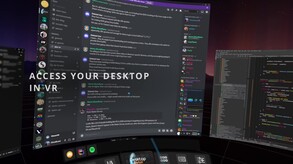
Access your desktop from within VR, stay engaged with your stream chat, and manage your music with Desktop Portal!
Modeled estimate, not a reported figure. How we estimate →
Media

About
Genres
Stats
All-time low is the lowest price we've recorded for this game since we started tracking it.
Languages: English
Engagement
Reviews
Themes across 40 recent reviews and how positive each mention is. A keyword signal, not full sentiment analysis.
Reviews
The developer abandoned development of the application, leaving it raw.
I initially had issues with this not working with windows on my portrait monitor. But to the devs credit, they got in touch pretty quick and pushed out a fixed version that solved this issue. No hacky workarounds required or excuses made, it just got fixed. Imo the UX in this is better than XSOverlay and now that it's working with all my windows perfectly i'll be setting this up as my go-to overlay app.
I love posting ♥♥♥♥ through vr
Related
Related
Trends
Modeled estimate over time, reconstructed from Steam's monthly review histogram.
Hours played at review time, across 40 reviews with recorded playtime.
positive critical· bar length = how often the theme comes up
Still has a couple of bugs when displaying windows with weird border properties, but is far and above other virtual desktop programs out there. If you are a person who has used any sort of Oculus hardware and have switched to a steamVR based system, this is the software for you. The interface very closely resembles Oculus's touch bar and window system.
Good application had very little issues setting it up and I can have tabs open when playing my vr games and see my twitch chat.
Great software for having your desktop in vr. Easy to use and no noticeable performance impact.
UI is clunky and hard to use. I'm using the Index and I just uninstalled it because it was so annoying and hard to setup and adjust.
The system seems good at first, probably because I was excited to use it, but it is super clunky. Getting the page you want is awkward as well as managing its placement. I will select my popped out twitch chat window and if any other screen covers over it the portal will recognize this and cover over the chat so I will have to make sure the chat window is on top of all the layers on my screen. even though you select the portal to show your chat page. The cropping feature works about 10% of the time. I can crop top to 100% and nothing will change. If you have placed a window and pinned it down "so it doesn't move" and you want to reselect it to make some changes it will unpin itself and go right back to the starting position of selecting it in the first place. It remembers nothing so you must reset everything back up every time you want to use it. There is no way of deleting a selected window once you have created a "portal" to it unless you restart the program. Very poorly made product but I like the idea of it. TLDR: Clunky, Modifying Window settings Rarely work, Can't delete added pages unless you restart program, Doesn't remember anything even if you just set it up.
Works fine with HP Reverb G2 & WMR controllers. Desktop Portable is very stable and I had no issues navigating my desktop, pulling up various media types and watching online videos. With that said, the way the app is design mirrors what you are watching on to your desktop & as far as I can tell there is no way to disable mirroring. The issue with this is that it utilizes more system resources than necessary when watching videos so playback from a website like Youtube is a bit sluggish from my experience. I have an Alienware Aurora R9 that can pretty much handle all VR titles with few exceptions. I have no video playback issues with other VR players so it's most likely the mirror that needs to be disabled but I don't see any such options within Desktop Portal. It's a pretty stable and solid application otherwise that simply needs a few more tweaks to make it just right.
Nun, ich muss sagen, dass es eine kostengünstige Alternative zum OVR Toolkit ist und sein Geld definitiv wert ist. Gelegentlich gibt es zwar kleinere Fehler, wie zum Beispiel das Verschwinden von den Armen, aber der Entwickler ist immer über Discord erreichbar. Er antwortet in der Regel sofort und gibt hilfreiche Lösungen für etwaige Probleme. Trotz dieser kleinen Fehler empfehle ich dieses Tool, da es (fast) genau die gleichen Funktionen wie das OVR Toolkit bietet, dabei etwas erschwinglicher ist und der Support immer erreichbar ist. Ich empfehle es voll und ganz
Momentum
Pace estimated from the game's recent review growth (our daily snapshots) at its own sales-per-review ratio — a momentum signal, not booked sales.
Audience
Estimated from the language of this game's reviews — a proxy for where players are, not official Steam demographics.
Related
| Heroes of Myth | $12K | 73 | 79% | $7.99 |
| Elephantasy: Flipside | $12K | 58 | 83% | $9.99 |
| Black Light Kills | $12K | 88 | 75% | $3.99 |
| Tiny-Tasy Town | $12K | 199 | 58% | $1.99 |
| Graveyard Gunslingers | $12K | 222 | 59% | $2.79 |
| Attack Core | $12K | 87 | 98% | $5.99 |