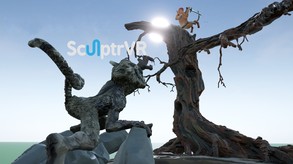
SculptrVR's 10,000x zoom enables massive creations with tiny details. SculptrVR makes it easy to create, explore, and share incredible sculptures with friends. With SculptrVR’s intuitive tools, but powerful tools, you can make anything!
Modeled estimate, not a reported figure. How we estimate →
Media
About
Genres
Stats
All-time low is the lowest price we've recorded for this game since we started tracking it.
Languages: English
Engagement
Hours played at review time, across 46 reviews with recorded playtime.
Reviews
Themes across 46 recent reviews and how positive each mention is. A keyword signal, not full sentiment analysis.
positive critical· bar length = how often the theme comes up
Reviews
The ability to scale in and out to play with everything in a macro and micro level is awesome! Just like the videos show, you can create rooms, trees, mountains, and everything your mind can conceptualize and then zoom in and out to add unreal levels of detail. The demo videos showing a tree-within-a-tree-within-a-tree isn't exaggerating slightly: it really has about 6-7 levels of "trees" in their demo scene. The most fun I had with this was in multiplayer. Fire up a team Skype call with your buddies (or coworkers or mortal enemies, or what have you), launch multiplayer, and build a project together. You can often find random people hosting their own public Multiplayer world, and go check out what they, and other visitors, have created together. We used multiplayer SculptrVR at work FOR work, actually. Everyone was "drawing" all over every surface like they were 3D whiteboards. I watched my teammates as they drew Godzilla-sized in the air over my head, while I marched around the front of my sculpture like an ant, adding detail to my schematics. We could see, in real-time, every stroke of everyone around us, and designing levels where you actually DRAW the levels together was a blast. When we were done, everyone saved a copy of the world to their offline folders, so we could review them later at our leisure. Where a picture paints a thousand words, this tool explodes that by an order of several magnitudes. The concept was simple, but incredibly well-executed. Updates have been frequent, with features like a color picker that expands the types of materials and colors from 16 predefined "flat" textures to a palette of "any" color with some reflective and emissive textures thrown in. A "standing platform" was added to help those of us with height/falling issues be able to not get queazy when standing in the air (or on the edge of something). Adding support for multiple VR systems (Oculus Rift, I'm looking at you) even makes it so MORE people can pick up this (game? tool? app?) and collaborate in multiplayer.
I actually like this better than TiltBrush. In SculptrVR you can build a castle the size of yourself and then shrink down and explore it and build the details. I spent an hour making a little fort on the side of a cliff with trenches and underground passageways, chiseling out tunnels and building walls Minecraft-style with the block tool. And yes, the hang glider is as fun as it looks. The game comes pre-packaged with tons of huge destructible maps, and one of them is a massive tree structure. You can shrink down to ant-size and and hang glide between the leaves, each of which is as big as a church. Playing 3D Pictionary is a lot of fun, too. EDIT: I just realized you can export builds as a .obj file, which means [b]you can 3D print the sculptures you make.[/b] That's freaking incredible.
SculptrVR is uniquely great. It is a much more powerful experience than Tilt Brush which seems comparable at first glance. In SculptrVR you get a sense of volume in the space right away with even the default ball of voxels. The ability to scale and teleport gives you the ability to change your perspective in a big way. The most telling thing is that my daughter made an entire island in SculptrVR as the first thing she ever did in the Vive. She made a hut with a bed, a pool, a boat and waves. Then she'd walk around in them and acted as if they were completely real. In Tilt Brush she made flat drawings vertically in space and labeled them with names. That was despite having seen people use Tilt Brush on youtube and being very excited about building a house. Tilt Brush just isn't quite set up for her to be immersed in the environment like she wants (and SculptrVR is). I had to lift her up to let her finish the head and hair on one person. She did draw herself a portal and stepped through it when it was time to quit though, so that was cool.
SculptrVR is very nice modelling program. The interface is very simple and you don't need precision in numbers. It's already very precisie thanks to endless world space and you can zoom in far and out almost endless. This means you can create small or big worlds what you like! Use layers to keep everything separated. I did also checked MasterpieceVR which has almost same work system and goals as SculptrVR. (Google Tiltbrush is not made for pure modelling - it has no export options to edit further in Blender because Tiltbrush has own finishing work) SculptrVR and MasterpieceVR can both export for final editing in Blender or other 3D editing programs. Now let me say what are the differences between both programs. M.VR has no layers and the world is limited in the big box. But M.VR has support and numbers for precision. It has grid for correct edges and perfect cubes. And M.VR has more sculpting features so it's more made for precision modelling of a figure. It's not made to make a big world (lack of layers and limited world size). If you want made something serious for 3D games then M.VR is better suited. M.VR is also only program who can import models in the modelling (you seems can remodel them, or you use them als reference for your model). And M.VR has quick rendering with lights to see the result. M.VR has also much more painting tools than SculptVR. If you want create big worlds and don't need high precision, SculptrVR is best choice. You can make final work in SculptrVR and show to others. You can even invite 15 friends and make fun of it. M.VR is more to create fast for Blender, to reduce work time thanks to 3D workspace. (and invite one friend to help you) M.VR cannot used for commercial work, you need another license for it. SculptrVR seems have no rules for it, if i am not wrong. I use it with WMR headset, everything is worked great. But no joystick support. You need only touchpad and other buttons for it. Though i hope it has grid support... because sometimes i want good horizontally placed areas. High recommended, and it has good price for powerful modelling program.
As far as I can tell, SculptrVR is the first of its kind in that people can use it to build at vastly differing scales. I've dreamed of an app like this for a while now, so it's not surprising that it kept me busy for several hours. However, in case the developer is open for suggestions, there are a couple of things that can be addressed: There aren't very many options for tools; just sphere, cube, rocket, spraycan, and this one projectile-orb thing that I can't get to work (plus their eraser equivalents). I could think of a few tool ideas right off the bat that would certainly make building things faster (straight-line box fill, rectangular-prismic box fill, resolution of boxes in drawing spheres, cut/copy/paste, recolor, sunlight direction, bezier curve box fill, etc). Also, there are only 16 possible colors for boxes, all of which appear to have the same color scheme as wool blocks in Minecraft. This is really one of my lesser complaints; I can understand if 16 colors is for memory-saving purposes, because I can tell the program was made with space-saving in mind. (I'm going to take a wild guess and say that every heterogeneous block is defined by eight smaller blocks, some of which might recursively consist of eight even-smaller blocks and so on.) Despite this, a color palette that allows users to decide which 16 colors are used would be nice. Because this program is so new, I'll excuse these minor issues and say that I recommend this game, because let's be honest: creating worlds of vastly differing scales is an awesome and undervisited idea. I see so much potential as to what SculptrVR could become; in particular, I'm excited to see what you mean when you say "Game inside the scupted worlds" on the list of things that are coming soon. Edit: I'm not very good at actually writing reviews, so my bad if this was a little unfair-sounding.
This is an amazing application. Nothing else in VR lets you scale yourself down to the size of a bug all the way to a size of a mountain, with just the swiping of the thumb. Creating huge worlds is incredibly easy, intuitive, and satisfying. Very hard to describe, but even a non-artist like myself can space out in this insanely awesome app. Can't recommend it enough. I bought this when the vive first came out, and thought it was cool, but I had so many other things I wanted to try in vr. Four months later and I'm playing this more than nearly all my other 80+ apps. And with multiplayer, the awesomeness of this only multiplies... imagine doing insane creations with your friends. This is just incredible.
designed with the vive controller in mind To use the undo / redo buttons one has to aim their dominant hand at their other and manually select the respective buttons, it is awkward. The extra buttons on the index controller are unable to be mapped to anything.
Great idea but not for WMR users: Controllers don't work properly on reverb G2: missing funcionallity with inflate / deflate and resizing the brush
I only use the app professionally for modeling, so the review is only from that perspective. The ability to scale in and out to play with everything in a macro and micro level is probably the best feature, and opens up so much possibilities! The export function is robust, though prone to errors with complex scenes. For professional use, the app has incredible potential and is quite robust but unfortunately, probably due to the non-professional target audience, is not fully realized. I would pay many times the price for a version that would cater to a more professional audience and include features like simple mesh to voxel import, a larger "brush" selection, the ability to move and copy planes in the plane manager. Also the possibility to set the often used functions from the left hand as quick access and to customize the interface a bit, or to keep options like brush details in the settings saved after restart. In general though, a sculpting app like no other, and incredibly powerful!
Not sure if it was my fault somehow but several actions in the game caused it to nearly crash, and needed a restart to fix the lag anyway. Like taking a picture with the camera, also i have no clue what i'm doing. It just throws you straight in, not even a menu screen you just get right to sculpting. It looks like the controllers are based off of vive controllers... (i'm on oculus) so some of the buttons i don't have, and i tried all of the buttons to see if maybe they were just mapped to one of them and i missed it, but no. (the buttons above and below the trackpad) I checked the settings, didn't really find anything useful. It's not to difficult to find out what each tool does, but the two buttons i couldn't press seemed pretty important, It also seems a bit lacking for 20$. So yeah not a great time. The website doesn't give any information on how to play either, as far as i saw. I don't think i should have to bother contacting any sort of support just to learn basic controls, and it did seem like it could be good fun, but it's been out for 5 years and this is all we get? No thanks.
Related
Related
Trends
Modeled estimate over time, reconstructed from Steam's monthly review histogram.
Momentum
Pace estimated from the game's recent review growth (our daily snapshots) at its own sales-per-review ratio — a momentum signal, not booked sales.
Audience
Estimated from the language of this game's reviews — a proxy for where players are, not official Steam demographics.
Related
| District Steel | $40.9K | 79 | 94% | $24.99 |
| Nancy Drew®: The Phantom of Venice | $40.9K | 207 | 91% | $9.99 |
| Ship Simulator: Maritime Search and Rescue | $40.9K | 115 | 51% | $9.99 |
| Despair: Blood Curse | $40.9K | 148 | 84% | $11.99 |
| Metal Drift | $41K | 146 | 62% | $9.99 |
| Delicious - Emily's New Beginning | $41K | 115 | 95% | $19.99 |