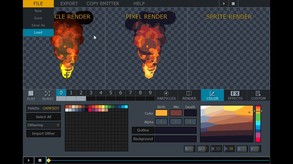
Pixel FX Designer allows you to create incredible particle effects just by tweaking sliders and punching buttons.
Modeled estimate, not a reported figure. How we estimate →
Media
About
Genres
Stats
All-time low is the lowest price we've recorded for this game since we started tracking it.
Languages: English
Engagement
Reviews
Themes across 50 recent reviews and how positive each mention is. A keyword signal, not full sentiment analysis.
Reviews
Amazing tool for pixel artist and FX designers, can save you a huge amount of time. But need export option in single png files. 9/10
This is some really cool software and there's lots of customization. You can even import your own visual assets to use so there's plenty of opportunity for creative, outside the box kind of thinking. If you're good at this sort of thinking, you can do some very cool stuff with Pixel FX Designer. However the program can crash on you sometimes, so SAVE OFTEN. I'm a bit frustrated that there isn't good documentation on the software. The one on their site has some basic stuff, but there isn't anywhere that explains how to use motion paths properly, how to use the timeline and how to keyframe. This should be addressed sooner rather than later. Especially if someone new to this sort of thing tries the software out.
Related
Related
Trends
Modeled estimate over time, reconstructed from Steam's monthly review histogram.
Hours played at review time, across 50 reviews with recorded playtime.
positive critical· bar length = how often the theme comes up
This would be infinitely more useable if the canvas wasn't so limited. i don't see the reason to limit it like that. if this gets resolved, this will be an essential tool
Speeds up the process of creating subtle effects like blood splashes, flames and fog ten fold! It's also great for things like spell and magic effects or even RPG battle attacks. A solid program but could do with some work on the UI. it doesn't scale perfectly when using full screen and the sliders seem overly sensitive making it hard to get things spot on. If you are looking for professional looking subtle effects, this is the tool for you.
I really like the capabilities of Pixel FX designer. However, there are some bugs and such. The developer seems to be less than interactive with the community, despite having released a major update recently. My biggest issue is that the pre-frames option and the frame delay option does not work at all. This means that the particle render will always be looping. It will never start and then render afterwards. This makes it extremely difficult to do effects that have different emitters starting at different times, similar to one of the examples in the purchase page. I really like what it's capable of, but it is lacking in other ways. If this is ever changed, I will gladly change my review. I am pleased with what it can do but morbidly disappointed with what it cannot. Thank you!
Pretty cool software, I think it has a lot of potential BUT I had waaay too many crashes. I really do hope that the devs keep working on it so we can give this program a proper use. I had previously downloaded the demo version, to check it out, and worked for a long time having fun with it. The crashes were a common thing, naively I thought it was because of the demo version. I was mistaken, same crashes happen with the full version. So if you buy this a little tip: SAVE, SAVE, SAVE! If they manage to fix these issues, I'll give this a thumbs up, because again, I think it's a pretty good software... It's a big IF though...
This software is very close to being something I'd recommended, because you can get some cool results if you're willing to spend some time with it. However, in its current state, there are way too many crashes and the UI is too clumsy and confusing. Edit: I've used Pixel FX Designer longer than what Steam is showing. I bought it from Itch.io
As far as I can tell you can only export a looping animation if there are 60 frames of animation (You hit the loop button and the export frame range changes to 60). This means your resulting sprite sheets for each animation will be HUGE!! eg I want a 400*400 anim of a sparkle..really I only need about 8 frames but because it forces me to have a minimum of 60 frames. I cant use the animations like this and I cant find any forum/help email to get support.
It is worth mentioning that if I'm being stupid or things change, I'll gladly change my review. TL;DR: 4/10, I know a lot more can be done with it, but depending on what you use it can be either fantastic or not so great. The resolution of the render is too limited, you can tweak it, but there is very little reason you'd change the 400 max limit. Some people would probably want at aroung 512, or even more, because this is actually quite good to some special effects, but my problem with it is that if any particles go to the edge, that is it, you'll have a cropped image. On the other hand, low resolution particles is just flat out impossible, first because scaling things proportionally to your resolution can be quite hard, and because for the life of me I don't know why you can't zoom in. I know this is made on game maker, and I assume each screen is what we call a "view", if so it would be great to implement a zoom function. I can resize the end product, but i can't zoom in to see what is going on there. Oh right, don't bother testing things on "burst", is pointless, the render will work with the stream iirc.. Speaking of render, I have not found an easy way to toggle which render I want, a very smooth one or a pixel one. Also, since this works on GML, it would be cool to have a print code, it would solve some of the resolution problems if some people like my team are working on uncompressed images and all, it is what I'm using on a program that is 10 years old by now. Yours is way more intuitive, and better in many regards, but the limitations there and a few more kinda blocked me from using any further, maybe a future project?
[h1] Pixel FX Designer is a powerful, light-weight tool for sprite-sheet creation of effects [/h1] What drew me into Pixel FX Designer is the length of time it takes to hand-craft sprites and animations (especially those that need to loop) of certain effects. From fire, to water, to galaxy effects, to explosions, this tool works exceptionally well for sprite-sheet creation specifically. However, this tool is not a substitute or replacement for hand-crafted sprites. While this tool can practically do anything, it is limited to what it can export the project as, and the limited canvas sizes can prevent the creation of large-scale effects that look nice (without being clipped by the borders). I've already spent a considerable amount of time on this application, making roughly 35 different effects for Looping GIF animations. There's a lot of depth to this tool, and should you find yourself needing to work quickly on making effects such as detached special attacks and the like, you can most certainly do that with this tool. [h2]Is it worth the asking price of $20.00 ($19.99) USD?[/h2] Absolutely. Whether you are a Novice, Intermediate, or Advanced artist and sprite creator, this tool is most certainly worth looking into if you require such software. I highly recommend picking up [i]Aseprite[/i] as well, as that will let you further modify the exported GIF animation, as well as syncing the animation with any attack movement. [h2]What does it mean for Hand-crafted Sprites?[/h2] Those will always stick around, because there is a lot more control to be had when animating. This tool, from my short 20 hour experience, is more for the creation of effects that do not directly involve a character's movements. Melee attack animations themselves are not possible, but the slash effect itself is. [h2]Features[/h2] [list] [*] Exports to GIF, PNG sequence (series of PNGs), a PNG sheet of all frames rendered, and JSON. [*] Colour palette option to maintain aesthetic consistency. [*] Various movement options that impact the particles and/or the emitter(s). [*] Options to adjust spawning behaviors of particles. [*] Options to adjust particle size during and prior to spawn. [*] Saves as a .PPD system file. [/list]
Momentum
Pace estimated from the game's recent review growth (our daily snapshots) at its own sales-per-review ratio — a momentum signal, not booked sales.
Audience
Estimated from the language of this game's reviews — a proxy for where players are, not official Steam demographics.
Related
| Wallpaper Engine | $42.3M | 1M | 98% | $4.99 |
| Aseprite | $8.2M | 26.3K | 99% | $19.99 |
| GameGuru Classic | $1.5M | 2.1K | 72% | $19.99 |
| Leadwerks Game Engine 5 | $427.8K | 393 | 73% | $49.99 |
| YoloMouse - Cursor Changer | $387.6K | 2.9K | 92% | $4.99 |
| Black Ink | $360.2K | 520 | 81% | $34.99 |
Related
| Demon's Rise - Lords of Chaos | $26K | 142 | 82% | $6.99 |
| Cargo Company | $26K | 67 | 58% | $9.99 |
| Savior of the Abyss | $26K | 265 | 78% | $6.99 |
| The Waste Land | $26K | 103 | 51% | $9.99 |
| Osteoblasts | $26K | 174 | 85% | $7.99 |
| Gladiator Manager | $26K | 116 | 78% | $7.99 |