
No revenue estimate for the App Store: Apple publishes no install counts, and its star-rating counts don't calibrate to sales the way Steam's written reviews do. Reviews and prices only.
Mercy Counter
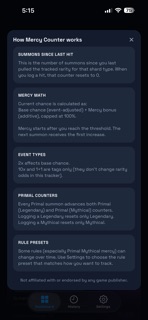
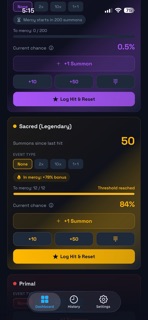
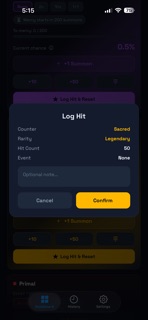
Mercy Counter helps you manually track mercy/pity progress during summon sessions—fast. Set your current counts once, tap as you summon, and see your updated odds with a clear breakdown of base chance + mercy bonus. Designed for speed and clarity, Mercy Counter makes it easy to stay organized during pulls without spreadsheets or guesswork. How it works Set your current “summons since last hit” for each shard type (you don’t have to start from zero) Tap +1 Summon (or +10 / +50 / Custom) as you summon When you hit a top rarity, Log Hit & Reset to record it in history and reset the counter View your current chance, mercy bonus, and how close you are to mercy at a glance Features Mercy tracking for multiple shard types Separate counters for key shard categories Primal tracking includes Legendary and Mythical counters with independent resets Built-in mercy math Displays your current estimated chance Transparent breakdown: Base chance + Mercy bonus = Total Progress-to-mercy indicator so you can see what’s coming next Event tagging Tag summon sessions with None / 2x / 10x / 1+1 2x affects base chance; 10x and 1+1 are recorded as session tags History log Automatically records hits/resets with timestamp, shard type, event tag, and “summons-at-hit” Optional notes for your own reference Edit counts anytime Adjust starting counts or correct mistakes from Settings Offline-first No accounts required Your data stays on your device Notes Mercy Counter provides estimates based on configurable mercy rules and your manual entries. Game rules and rates may change over time—always verify with in-game information if needed. Disclaimer Not affiliated with or endorsed by any game publisher. All product names are the property of their respective owners.
Screenshots
All 6 screenshots →


Trends
Historical charts
Price$1.99
$1.99
Price over time on the United States storefront, quoted in USD — from our own daily price tracking. Other markets are listed under "Price by market" in the Prices tab; they are not on this axis, because one line cannot be two currencies.