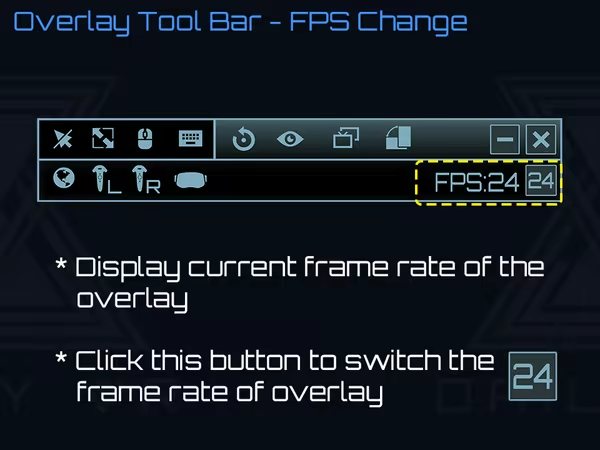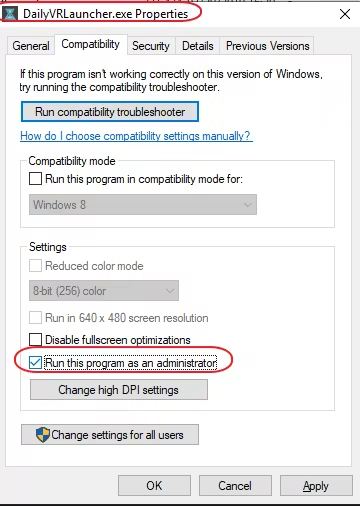
Daily OVR make you simply view and use your desktop apps in VR. You can adjust the position, size and transparency, bind desktop windows to controllers, HMD or the world, type with a VR keyboard, customize button settings, detect and display objects (ex: keyboard) by machine learning.
Modeled estimate, not a reported figure. How we estimate →
About


Stats
All-time low is the lowest price we've recorded for this game since we started tracking it.
Languages: English, Japanese, Simplified Chinese
Engagement
Reviews
Themes across 44 recent reviews and how positive each mention is. A keyword signal, not full sentiment analysis.
Reviews
I've had this software for a long, long time, well before there was a free version. The free version would have been nice for a while, but having the paid version has its benefits... obviously. I totally recommend this software over all the other overlays out there. There's an open source one I also have been enjoying very recently, but it takes more effort to use and doesn't seem to be as stable or as easy to use in general. Daily OVR is still my go-to solution for seeing chat windows, youtube videos, anything browser-based, obs, everything within VR. There are some minor gripes: 1. The dev never adds anything new to this. The last update was just to add the free version. 2. There is only 1 built-in app, the clock, and it's not customizable. 3. The keyboard button is on the top of each window rather than on your wrist menu or at the bottom. The bottom of the window should be an option at least. I would prefer a wrist menu keyboard shortcut. 4. Sometimes, Liv thinks it needs to capture DailyOVR. The workarounds are to either minimize DailyOVR and launch Liv with a game already open or to load DailyOVR after Liv has already launched something. This isn't really DailyOVR's fault, but I would like to figure out how to load DailyOVR without the splash screen, which is what Liv tries to capture. 5. After over 1000 hours, I still haven't figured out the gestures system and I can't seem to turn it off, so sometimes, I accidentally gesture for input. The major pros of this software: 1. Gestures seem neat if I only understood how to use them. 2. Built-in clock is nice-looking and can be handy when you're trying to keep an eye on the time. I use this when playing Beat Saber because I often will play that game for many hours without realizing it. Very easy to open and close. 3. The menu button toggle is very easy to understand and remember, though it does get in the way of a few games which also use that button. I think you can customize this button press using SteamVR's input mappings, though I was happy with it as-is, so I didn't try that. It would be nice if the app gave you a lock to disable it within SteamVR's dashboard. 4. The overall UI design is pretty good. It won't win any awards, but it looks decent and has a small footprint in games. Obviously, try the free version first. Try all the free options before purchasing anything. You might like something else more. Daily OVR just was priced well at the time I needed something and has worked well for quite a while. It continues to remain stable and never give me any major issues.
Media

Related
Related
Price dynamics, follower growth, revenue and sales trajectories with interactive tooltips
This and every other Pro feature is free until October 20, 2026. A free account is all it takes.
Hours played at review time, across 44 reviews with recorded playtime.
positive critical· bar length = how often the theme comes up
A solid VR overlay for viewing different windows or entire desktops with great performance overall. There are a few quirks you have to deal with but it doesn't detract too much from the overall experience. Pros: - I was trying another VR overlay that was having difficulties running things like YouTube or Twitch at a smooth framerate but this handles such cases with ease. - You can at least attach windows to your headsets or controllers if you need to. Cons: - It doesn't have a lot of bells and whistles to it so don't expect to do anything more than placing windows around for your convenience. - Every time you start a new VR session, the windows may be located in a completely different spot and you'll most likely not be able to find them. Windows are one-sided so you can't see them from the back which makes this even more annoying. The only way to deal with it is to use the Reset Overlay option in the desktop app and place the windows again. - The overlay has a good chance of closing any desktop windows you associate with the program which can be annoying for some. You may want to use a spare temporary browser window for use with Daily OVR. Feedback: - It would be nice to group windows so it'll be easier to move all of them at once if they're not in an ideal spot every time a new VR session is started. Possibly having a group object that windows can be parented to for example. - Being able to see windows from the back aka two-sided, mainly for locating them easier when the need arises. Possibly have an option to toggle this on/off so performance isn't wasted once the user has the windows where they want it.
Runs like a dream I'm able to play VR games and have other windows open, i can watch netflix while flying around in Elite Dangerous, have discord or other chat windows open and have netflix open while i play PokerstarsVR, as long as i have the desktop space then i can have up to 5 'windows' open at a time. I even use it sometimes to watch films or play games on as big a screen as i want as close or as far away from my eyeballs as i would like. I would like the ability to save to a profile so i could quickly change setups between games but speaking to the developers through their Discord channel its something they are looking into it. another good point from Daily OVR is they are always active in their Discord channel and any issues that do come up they do all they can to rectify with their next patch.
Not great... I really wanted it to work, but it causes issues. You cant even select between obs and web browser without having problems with loading as well as sound. I was playing vivecraft, and when i used it. It would remove volume from my game until i clicked the game on my desktop so it wasn't minimized. Usually that wouldn't be a problem, but if im in vr. it's difficult. I think it's fantastic in concept, and design. However the parts themselves don't work. If you want to support this product as i'm sure someday it will work. i do recommend getting it. I think however steam should of included something like this themselves in the software.
I use this in Elite Dangerous. I have much the same ambition as other reviewers: in the cold of space, on long journeys, to watch Netflix to idle away the hours; or to hunt down commodities and destinations via Chrome without leaving the VR world. It works well for me, though, being in a HOTAS environment, I have to do what I can with Voice Attack to counter the issue of not holding VR controllers. I use an environment of three VR windows, open in the port, bow and starboard windows of my ship - showing (usually) Spotify, Netflix, and the Voice Attack dialogue. I'm hoping one day to be able to do things like move, resize, or set transparency, of the VR Windows directly with the mouse. The developers, who are both active and responsive, have it under consideration. Meanwhile, all those functions are available using the VR controllers, and I'm very happy with what I've got.
I spent 2.4 hours trying to get this program to work and it won't. Well outside Steam's 1 hour return policy. I managed to get my twitch chat up on screen but when I pressed the hide hand overlay button on the control panel nothing happened. Don't waste your time or Money on this program
Auf der Suche nach nur einem Programm was mir den Twitch Chat in der VR Umgebung anzeigen lässt, bietet Daily OVR noch vieles mehr. Für mich als Oculus Rift S Benutzer klappt es für meine Verhältnisse sehr gut. Mann muss aber noch erwähnen das diese Oberfalche/Overlay nur in SteamVR funktioniert nicht im Oculus VR. Man hat diverse Möglichkeiten seine Programme im Raum zu platzieren oder an die ein oder andere Hand zu punkten. Man hat die Einstellungen mit wie vielen Frames ein Programm pro Sek aktualisiert wird, um Performance zu sparen. Und es gibt noch so vieles mehr, genau was ich gesucht habe. Für den Preis von 9,99€ kann man nicht meckern. Ich hoffe es kommen noch weitere Updates. Aus meiner Sicht, eine klare Empfehlung.
Resulted in SteamVR crashing multiple times, and had one fatal crash requiring full system reboot.
非常希望有窗口大小调整!!!! 窓のサイズを調整して欲しいです!!!! Very hope to have window size adjustment!!! Я очень надеюсь на изменение размера окна
The best overlay program... stable and light.
Selling now
See how fast this game is selling right now — estimated copies and revenue per day from recent review growth.
Players by region
Where this game's players are, estimated from review languages.
Related
| Game | Estimated lifetime revenue | Reviews | Review score | Price |
|---|---|---|---|---|
| $5.9M | 104.5K | 96% | $4.99 | |
| $1M | 2.1K | 69% | $24.99 | |
| $901.7K | 1K | 88% | $29.99 | |
| $830.2K | 2.1K | 72% | $19.99 | |
| $741.9K | 5.2K | 92% | $7.99 | |
| $696K | 685 | 92% | $18.74 |
Related
| Game | Estimated lifetime revenue | Reviews | Review score | Price |
|---|---|---|---|---|
| $4.1K | 75 | 93% | $1.49 | |
| $4.1K | 77 | 91% | $2.99 | |
| $4.1K | 62 | 94% | $2.99 | |
| $4.1K | 107 | 93% | $1.99 | |
| $4.1K | 165 | 68% | $1.49 | |
| $4.1K | 136 | 88% | $1.99 |