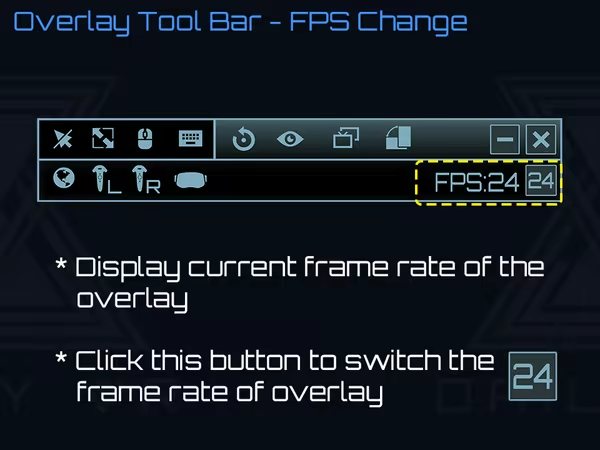
Daily OVR make you simply view and use your desktop apps in VR. You can adjust the position, size and transparency, bind desktop windows to controllers, HMD or the world, type with a VR keyboard, customize button settings, detect and display objects (ex: keyboard) by machine learning.
Modeled estimate, not a reported figure. How we estimate →
Media

About


Genres
Stats
All-time low is the lowest price we've recorded for this game since we started tracking it.
Languages: English, Japanese, Simplified Chinese
Engagement
Hours played at review time, across 44 reviews with recorded playtime.
Reviews
Themes across 44 recent reviews and how positive each mention is. A keyword signal, not full sentiment analysis.
positive critical· bar length = how often the theme comes up
Reviews
Returned it thinking it wasn't working, but couldn't resist trying to get it working via the demo. When I finally figured it out, it worked stupendously and I immediately repurchased. I can watch Netflix or Youtube while playing Elite Dangerous, which was hitherto impossible. Can't wait to see where they take this!
YES! This is exactly what I needed. Only issue that I ran into is that the software does not boot properly when I have the auto launch setting enabled. Aside from that, its great. Edit: forgot to mention that I mainly use this for keeping up with my discord chats while in game.
I have tried several Overlay programs in an attempt to use a browser in VR but nothing has come close to what i needed... until this. Finally a simple and smart system of accessing a chrome window (with all my saved page links), netflix/youtube window and many more. Best of all the screen adjustment and placement is simplistic, allowing page size adjustment and transparency alteration at the touch of the controller button. I use this in all vive games, but most importantly in ELITE DANGEROUS VR in which i can access trade routes and commodity resources while remaining in game. Only one suggestion, when using the mouse on a browser, it means the HOTAS isn't working until you put the curser back on the ED window... a minor hassle, but something i can do blind.
Amazing piece of software! I just had a blast watching Netflix, voice chatting through Discord and even playing Xbox games. Just simply launch DailyVR and bind your custom apps, you can do anything as normal on your desktop. Great app and worth every penny, it make my Vive limitless! 10/10.
Note: The software has apparently undergone changes that address some of the below issues. However, I've refunded it in May 2019 and can not confirm the improvements myself. Please see the comments and Developer's response to this review. Original review: It kinda works if you're willing to do the setup every single time you enter VR. Sadly, if anything related to you window changes (e.g. it's moved to the background), DailyVR renders the foreground window's contents in its place instead. If this happens, you need to set up the original window again. This is tedious. Apart from that, the button stuck to your left pad lags a bit behind your movements. It's not a deal breaker, but it's clearly visible. I like how all of the interface is collapsed once you press that button, though. This is a nice feature that minimizes the impact on gameplay, and you're still able to see windows bound to the underside of your pads, without the app's interface obscuring your view. Anyway, the core feature I bought it for - viewing Twitch chat in VR - only works if you do everything right and don't touch your PC afterwards. Any change and it requires re-setup. I'll stick to looking at desktop via SteamVR's built-in viewer.
[h1]Played On: [b]HTC Vive[/b][/h1] Have you ever been in a VR game and thought "Hey! This would be a great time to stream some Netflix, or listen to some Spotify, or watch por...errr browse the internet"? Well DailyVR aims to help you do all of those things and more by helping you to create up to five custom overlays that can be accessed at any time, and supposedly in any game. There's one "custom app" option where you can pick from any running application on your PC, and beyond that you can choose from Google (Chrome or Firefox), Netflix, Spotify, YouTube, and a few others which all open in a web browser. A huge feature that made me want to try this software out is the mobile phone notification system; whenever you get a text message or call on your mobile device, you can receive an alert in-game so that you don't miss any potential emergencies. Sign me up, what a great idea! Sadly, I couldn't get this to work. I downloaded the mobile app, I fiddled with the setting on the PC software... nothing. There's no way that I found to sync the two. There's no account option, no link codes, nothing. So the only possible way that this feature seems to be able to be set up is via Bluetooth, and I'm just not willing to leave my PC's built-in Bluetooth on; not to mention, very few people have built-in Bluetooth on their PCs, as it has only recently become a standard on expensive motherboards. The most detrimental downside to DailyVR is the fact that everything has to be set up tediously perfect. What this software does, is it opens whatever applications you have set to it on your actual desktop. All in separate windows. So prepare to have Spotify open, along with your PrawnHub account in a window, your Twitch chat in another, your YouTube in another, etc.. And we all know how much RAM that Chrome hogs up. I saw my frames start skipping on simple things like Steam Home VR due to just how much this thing opens. Even if you're just using it for something simple like changing your Spotify tracks or getting it up and running while you're in-game is a challenge since everything has to be on top. If it's not on top, it shows whatever is on top in that overlay portion instead. For example, I had my Spotify set up so that when I looked under my controller, I saw the application. That way I could play some music while smashing faces in Gorn. When Gorn launched, the desktop mirror overtook my Spotify application and under my controller I instead saw Gorn. There's no "keep on top" options or anything like that, so you're going to have to take your headset off and readjust everything every single time you launch a game. Another deal breaker is the obnoxiously large logo button that makes this thing work in every game. It sits on your left controller, quite exceeding the width of even the cumbersome Vive Shovels™. It also causes any controller skin that you may be using to be replaced with the boring default one instead. Why this couldn't be some small, non-intrusive dot is beyond me, or just showing up when games are paused. I was just in a game where I couldn't actually make the menu open up anyway. Furthermore this giant logo shows up on everything, totally breaking the immersion of any game that you may be in that doesn't show your controllers for your hands. This is indeed something that needs to be remedied ASAP in my opinion. While DailyVR sounds good in theory, it's simply unusable in practice unless you want to go through a lot of aches and pains every single time you launch into VR. Applications like this should be as self-sustaining, non-intrusive, non-immersion breaking, and non-cumbersome as possible. There's a really good idea here, but there needs to be some radical improvements before it's worth checking out. The only benefit are for those who want to see their Twitch chat easily in-game, but even then there are other options out there that have been around since the early days of VR. Especially at the price point, it's well worth skipping over this one for now. [h1]Rating: [b]1.5/5.0[/b] - It's Bad.[/h1] The VR Network [url=https://store.steampowered.com/curator/33182845-The-VR-Network/]Curator[/url] | [url=https://steamcommunity.com/groups/thevrnetwork]Group[/url] Click for More [b]The developer provided a free copy of this game for review, through The VR Network's Curation page.[/b]
Very nice overlay tool! It's simple to use and works exactly as expected
This is great. Has an issue with auto launch. when on, the laser(cursor) doesn't work, rendering the app useless. Un-tick it. And only one application at a time ? I think a few more would be appreciated if possible. I'd like to add task manager, a productivity app, and others...
I known DailyVR from my VRChat friend. I joined DailyVR channel in Discord and developers give the quick answer first and also arrange enhancement for user feedback. This software is really good. The only one suggestion is keeping keyboard stays open when using mouse.
VRchat内でNOXを操作したくて購入しました。 実際に使ってみると操作性はかなりいいと思います。 問題があるとしたらAPPタブから一つしかタブが出せない。たとえばNOXのようなものを二個出すなど。 YouTubeなどはアプリないで開けるようですが、私の環境だとAPPから開いたもの以外は画面が白くなって映ってくれませんでした。 今後のアップデート等に来たいです。 VRCHAT内でNOXを使う方にはおすすめできます。操作の仕方も変えられますのでいいと思いました。
Related
Related
Trends
Modeled estimate over time, reconstructed from Steam's monthly review histogram.
Momentum
Pace estimated from the game's recent review growth (our daily snapshots) at its own sales-per-review ratio — a momentum signal, not booked sales.
Audience
Estimated from the language of this game's reviews — a proxy for where players are, not official Steam demographics.
Related
| Wallpaper Engine | $42.3M | 1M | 98% | $4.99 |
| 3DMark | $11M | 20.7K | 93% | $29.99 |
| Aseprite | $8.2M | 26.3K | 99% | $19.99 |
| Crosshair X | $7.5M | 41.7K | 93% | $9.99 |
| Soundpad | $5.3M | 102.8K | 96% | $4.99 |
| Action! - Gameplay Recording and Streaming | $5M | 7.5K | 85% | $29.99 |
Related
| Residue: Final Cut | $4.1K | 121 | 60% | $1.99 |
| Pretentious Game | $4.1K | 121 | 79% | $1.99 |
| Pitty Meaty | $4.1K | 134 | 83% | $1.49 |
| Kinduo | $4.1K | 105 | 96% | $1.99 |
| 3D Hardcore Cube 2 | $4.1K | 68 | 57% | $2.99 |
| Hidden Cats in Istanbul | $4.1K | 64 | 100% | $3.99 |