AquaSnap is a powerful window manager that helps you arrange and organize multiple applications on your desktop with minimum effort. It allows you to achieve maximum multitasking, especially if you own a high-resolution monitor or a multi-monitor setup.
Modeled estimate, not a reported figure. How we estimate →
Media
About

Genres
Stats
All-time low is the lowest price we've recorded for this game since we started tracking it.
Languages: English*, French*, Italian*, German*, Spanish - Spain*, Danish*, Dutch*, Greek*, Hungarian*, Japanese*, Korean*, Polish* +8 more
Engagement
Hours played at review time, across 44 reviews with recorded playtime.
Reviews
Themes across 44 recent reviews and how positive each mention is. A keyword signal, not full sentiment analysis.
positive critical· bar length = how often the theme comes up
Reviews
Very handy little software. It made managing my windows quite easy. I especially like the feature where you can make any windows "always on top". Saved me quite some time minimizing/maximizing programs aswell. I use Windows 7 so it can give me features Windows 10 has (Even better versions of those features) A+ recommended app!
[h1]A cool piece of kit you don't necessarily need.[/h1] [i]Full disclosure; I have a theme that is included with all installations of AquaSnap 1.17, named F5000, inspired from WipeOut 64. Nonetheless, the inclusion of this theme will not define the basis of this review, presenting it as clearly and as unbiased as possible.[/i] Before anything else, it should be understood that I am just a regular desktop user with a single display, so I could not take advantage of the multi-monitor features. That being said, I also represent the majority of desktop users, so this review should apply to most people. Remember when Windows Snap was a thing you could do in Windows Vista? I don't blame you, I don't use this feature as much either, but it was there and it lets you precisely snap windows on either side, then later on, top to bottom, this feature that was a staple of many Linux environments (along with NTFS symbolic links) was a welcome and well-integrated addition in Microsoft Windows. Recently, in Windows 10, snapping to corners was another feature, and if two windows are snapped together, then you can scale them both at once. There are some issues with some programs (Skype, for instance likes to always screw up when trying to scale a separated friend list with conversations), but it pretty much does what it needs to in most applicatinons. AquaSnap also apes some features from different open-source desktops and window managers, but those are available only for open-source operating systems. Honestly, what's already there in Windows is good enough for most users, so it makes you wonder: do you really need to spend fifteen dollars just to improve upon these features, even if only a little bit? Seems quite useless, until you look at the other features this software provides; [b]AquaSnap[/b] This feature doesn't just improve upon the idea of snapping WIndows, it also adds other small extras like having a snap indicator to tell you how exactly the window will be placed, as well indicators that show a little graphical representation of what will happen. A little redundant, but if you like to customize the icon overlays are capable of being modified rather easily to suit your theme. You can even have child windows (the windows inside of windows) use specific settings, if you wanted to take it that far, and limit yourself to snap options that make sense to you, leaving the rest if you don't want those specific features; The default snap functions in Windows doesn't allow for this degree of customization. [b]AquaStretch[/b] This is more at-home for users of some open-source desktops where maximize horizontally and maximize vertically are options. This really makes little sense for parent windows, but for children windows this feature might come in handy, allowing for a child window to take up space in one direction whule leaving space for others, to be stretched in the same way. While it's nice, as a regular desktop user with a single display it seems fairly useless to me. [b]AquaMagnet[/b] This feature is very, very similar to window snapping in Compiz, an open-source desktop compositor, with some extra bells and whistles; You can snap [i]inside[/i] other windows, and snap at corners on top of snapping at the screen edge and outside other windows, and these features can be disabled at-will to make the snap feature work as much as you need it to. This is surprisingly useful if you find yourself needing to snap two windows of dispariate sizes, or two windows that open as the same size, but not taking up all available screen real estate. [b]AquaGlue[/b] This is truly an interesting feature; You can not just move multiple windows, but also resize multiple windows so you can scale that one window while also not having the other windows nearby overlap. This does a neat trick Windows 10 doesn't do out of the box; You can scale more than two windows at once, independent of what application they are, and independent of where they are at on the screen. so long their edges or corners are touching. A practical use of this is having four windows open at once, snapped at the corners, all of them being resized at once. Not just that, you can move entire sets of windows as if they were one big multi-document application, so if your screen is of the same size, then AquaMagnet's edge snapping allows you to just be near a top corner to snap all four windows at once. [b]AquaShake[/b] By default, the AquaShake feature allows you to put a window always on top by "Shaking" it (with rapid mouse movements), and also make the window semi transparent. Certainly better if you like a constant opacity for all windows, instead of having to both define always on top and opacity in other open-source environments. You can also revert to the "AeroShake" functionality, whereby shaking the window minimizes all other windows. This is where criticism is needed because it could had easily been done so AeroSnap is default, but AquaSnap requiring a modifier like all the other Aqua features, which would avoid the need of having to choose from one or the other, since both behaviours have their advantages. [b]AquaGlass[/b] An entirely frivolous feature but there if you need it; If you ever wanted window dragging to be like file dragging, where you can see [i]underneath[/i] what you're dragging, then this is all the AquaGlass feature does. [b]Other stuff[/b] If you wanted to go balls to the wall in productivity, and have a multi-function mouse or like to use the keyboard a lot more than your average person, then you can configure both mouse and keyboard to act exactly how you want, and how you perform most quickly. This means you can ditch geatures entirely and more-or-less replicate any open-source desktop of your choosing. Features can be customized rather extensively, which means window manipulation works exactly the way you want it, and no more. Or maybe you want more, options are there for [i]lots[/i] more as well. But the lack of a modifier for AquaShake is a bit of a bad mark when all other Aqua features are enabled the same way, and the explanations of these features in the AquaSnap UI can at worse be so vague that you need to try it in order to see it. But overall it works, and collectively, it all comes together in a way that will aid productivity for people who remember they have it, and can remember how they have it set up. So the question remains; [i]Do you need all these features?[/i] The answer to that is still no, because you can get along with the default features of Windows. But these are all features you might [i]want[/i], and if you think fifteen dollars is worth it for all the extra stuff you can do with your windows (as well, fix how some programs handle snapping), then it is well worth the purchase. If you don't think it is, just wait for a sale and grab it then, or you can try out a majority of these features in the free version available from Nurgo Software's website.
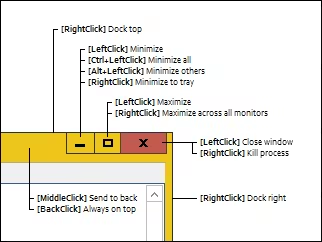
It works as described. Very handy tool if you have a habit of working with multiple windows open. Size of the software installer only ~4mb takes up about 10mb space on your computer when installed and takes up about 1mb of physical memory when its running. The shortcuts are pretty easy to remember. [url=http://cdn.akamai.steamstatic.com/steam/apps/391050/extras/HotClicks.png?t=1450894286] AquaSnap Window Manager Shortcuts in a nutshell [/url] The simplicity of its shortcuts is what makes me like it.....its not another chore to remember the hotkeys like some other hotkey shortcut functionality softwares.
Well, let me start by saying the software is great and absolutely worth paying for. There are [url=https://alternativeto.net/software/aquasnap/?platform=windows]alternatives[/url] that are no cost with similar features, but in my experience the feature set available via AquaSnap is unmatched. That said, do [b]NOT[/b] buy it on Steam. The dev does not appear to care about this release branch, this version of the program is buggy, has issues launching on startup, and a bunch of other small QoL issue that make an app that's supposed to improve QoL; pointless. If you're going to buy it, do it directly from the [url=www.nurgo-software.com/products/aquasnap]Nurgo Software[/url] website.
Awesome app and BEST software support. Steam version has an issue of "Not Logged into Steam" on Win10 OS. So, I wrote a support ticket to the developer, then I got a non-Steam version license key! (ツ)b
It's a scam. I'd been using it for a few years. Suddenly it started telling me I have a free version. And since then every single time I move a window between screens it crashes. EVERY. SINGLE. TIME. I tried reinstalling, updating. Nothing helps. I messaged the support over a month ago and still no response. UPDATE: The newest 1.23.11 update fixed the license and the crashing issues. But it still took like 3 months to fix. Even tho the program is great and I love it I won't remove the negative review until at least I get a response to the e-mail I sent to their support on this matter OVER 2 MONTHS AGO.
Requires you to be logged into Steam to work. Great app unfortunate Steam Restriction. The developers contacted me on this one as you can see by response below. I've got to say, I'm am extremely grateful to them and thankful. If only all developers were as friendly and helpful. Soooooooooooo, I'm changing this to a positive. There is Steam restriction and it isn't really the developers or their software that is an issue. To anyone thats gonna buy this. I would advise go to Nurgo software's main site and grab it there to avoid Steam restrictions. If you use multiple monitors, this is a must have Program. Thank you Nurgo. You guys are A*
DO NOT BUY THIS. Suddenly started telling me I have the free version, even though I paid for it years and years ago. No issue until now and suddenly features are restricted.
Since I started using AquaSnap, certain programs have decided to permanently open in stupid positions, and with their windows scaled larger than my screen resolution. I don't think this bug is program specific but the two programs which have developed this bahaviour are 3ds Max, and VLC Media Player. In both cases AquaSnap worked fine, and at first, I didn't have any problems. But then after a couple of days, 3ds Max suddenly decided that it wanted to open too large for my screen vertically, with the top border almost off-screen, and refuses to remember any other previous scale or position when it's closed. Luckily there is a thin strip of the border visible so that I can drag the window down, then scale it properly, then reposition it. It's irritating though when it's a program I use constantly. Then yesterday, after once again using the double click window edge to snap to the edge of the screen, the same thing happened to VLC. It now refuses to remember it's previous position and always opens larger than my screen resolution, positioned down and to the right, so I can only see the top left hand corner of it. Again, this means resizing, and repositioning VLC every time I play a video. I've uninstalled AquaSnap, deleted the folders from program files and appdata, and cleaned my registry with CCleaner but the behaviour persists with both programs. I think it just messed up the way windows remembers the last position and scale of those two programs or something, I don't know. I asked for advice in discussions but didn't get any response. I assume the developer has no interest in supporting this software. I wouldn't recommend buying this software. It's cost me far more time than it could ever save anyone. P.S When I just tried to submit this review I got a message saying "You need to have used this product for at least 5 minutes before posting a review for it (1 minutes on record)." I've used the software for weeks so ignore my "time played" on Steam. I had to sit there pressing the Launch button to increase the time to 5 minutes. Each time you press launch the program says "Running" in the Steam library for about 5 seconds. I'm just noting this in case anyone else is unable to leave a review for the same reason.
I cannot recommend this software. The deciding factor for me buying it 2 years ago was that they promised that they would add a cascade feature to the software because I use a lot of terminal windows to monitor servers on multiple 4k windows and it is annoying having to manually size each one everytime i startup my computer. They promised 2 years ago that they would implement the feature in a future update. So I purchased the software waiting for the notification that never came. They no longer support this software. They didn't stand by a promise and I cannot recommend this software.
Related
Related
Trends
Concurrent players on Steam, sampled daily since tracking started.
Momentum
Pace estimated from the game's recent review growth (our daily snapshots) at its own sales-per-review ratio — a momentum signal, not booked sales.
Audience
Estimated from the language of this game's reviews — a proxy for where players are, not official Steam demographics.
Related
| Chasmal Fear | $48.6K | 64 | 53% | $19.99 |
| 背后3:阴戏 | $48.6K | 183 | 96% | $6.99 |
| Bounty Train | $48.6K | 1.7K | 70% | $0.99 |
| Pocket League Story | $48.6K | 185 | 90% | $8.99 |
| Pocket Rumble | $48.6K | 205 | 76% | $9.99 |
| Sculplings | $48.6K | 172 | 99% | $10.99 |