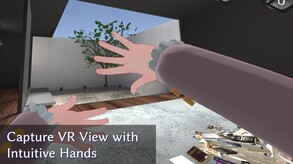
VRHandsFrame is a epoch-making VR overlay application that allows you to crop your VR view with intuitive hand gestures.
Modeled estimate, not a reported figure. How we estimate →
Media

About
VRHandsFrame is an innovative VR overlay application that lets users capture and analyze their VR view using intuitive gestures.
In VRHandsFrame, the core interaction is a gesture that creates a "frame" shape with your hands.
With this intuitive gesture, users can translate text visible in VR, as well as save and analyze captured images.
VRHandsFrame includes a variety of convenient features designed for users living and spending time in VR.
📚️ Text Translation
Recognize text contained in captured images and translate it into any language.
🔖 Image Memo Feature (Bookmark Feature)
Temporarily save captured images and keep them as quick-access image memos.
🔎 2D Code Scanning
Instantly scan 2D codes displayed within VR. You no longer need to switch between multiple apps just to access a creator’s website.
🖼️ Image Sharing
Share images directly in VR with Steam friends who also own VRHandsFrame.
You can also copy captured images to the clipboard and freely share them between applications.
✨️ AI Comment Feature
An AI-powered feature that analyzes captured images and responds with unique comments.
Whether as a companion for exploring VR worlds or brainstorming ideas for VR creations, it brings a fresh layer of fun to your VR activities.
VRHandsFrame is like a secret tool that gives your VR life a Slightly-Futuristic experience.
Genres
Stats
All-time low is the lowest price we've recorded for this game since we started tracking it.
Languages: English, Japanese, French, Italian, German, Spanish - Spain, Portuguese - Brazil, Russian, Simplified Chinese, Traditional Chinese, Korean, Polish +8 more
Engagement
Reviews
Themes across 41 recent reviews and how positive each mention is. A keyword signal, not full sentiment analysis.
Reviews
最近の日本語レビューが見当たらなかったので、気になっている方向けに。 Q. 2026年2月現在も使える? A. 使えます Q. XSOverlayと同時に使える? A. 問題なく使えています Q. 誤作動はどう? A. 今のところ意図せず起動したことはありません Q. 翻訳の精度はどう? A. 簡単なゲームワールドくらいでしか使っていませんが、良い感じです ピクセルフォントでも問題なく翻訳ができています どうしてこんな便利なものが流行っていないのか不思議ですね。 これがあれば突然英文に襲われても生き残ることができます。はじめて行ったワールドで情けなくもフレンドに英文を読んでもらっていた私のような雑魚には救世主です。ありがとう、VRHandsFrame。もう恥をさらさずに済むよ……(ほんとぉ?) こういった便利ツールは、機能が多くて使いこなせなかったり設定が複雑なこともありますが、これには短時間ですぐに使い方を覚えられるチュートリアルがついていて親切でした。 シンプルでとても使いやすいです。買って損はないと思います。 ところで、秘密の実績の[spoiler]"らりるれろ"[/spoiler]ってなんなんですか。
No support for linux and even the outdated Booth version of the app doesn't work as well. When I was on windows, the app would stare at a black screen, never showing my games meaning every time I took a photo, it was always a black image, and I was never able to fix the issue whatsoever. I have spoken to the creator, but not even them could not figure out the issue. I will have to rely on other methods to take images
Related
Related
Trends
Modeled estimate over time, reconstructed from Steam's monthly review histogram.
Hours played at review time, across 41 reviews with recorded playtime.
positive critical· bar length = how often the theme comes up
VERY useful when exploring worlds in vrchat that don't have english translation, making it possible to enjoy more worlds. Also really useful for sharing images with friends and such, its basically being able to do screenshots but VR style (Though cant exactly lock the frame into place before taking screenshots due to it always resizing from hand gesture... would be cool if you could lock it to your head after resizing so you can also get images of menu's and such that are attached to your hands)
VRHandsFrame is an unusual but surprisingly practical virtual reality utility developed and published by Eureka Works. While many VR applications focus on entertainment, immersive storytelling, or social interaction, this software is designed to solve everyday problems that arise when spending long periods inside virtual environments. Its goal is not to impress users with visual spectacle or complex gameplay systems. Instead, it seeks to make VR more convenient, productive, and accessible by providing tools that allow users to capture, translate, save, and share information without ever leaving their virtual space. The application's central concept revolves around a simple hand gesture. By forming a frame shape with their hands, users can select and capture a specific area within their field of view. This action becomes the foundation for several useful features that transform the software into a versatile VR companion. The gesture feels natural within a virtual environment and takes advantage of the immersive nature of VR rather than forcing users to navigate through traditional menus. This approach creates a workflow that feels intuitive and well suited to the medium. One of the most useful capabilities is real-time text translation. Virtual reality has become an increasingly international space where users frequently encounter content created in multiple languages. Whether exploring social platforms, attending virtual events, or visiting community-created worlds, language barriers can quickly become a challenge. VRHandsFrame addresses this issue by allowing users to capture text and translate it directly within VR. The feature removes the need to switch applications, use external devices, or temporarily leave the virtual environment. For users who regularly interact with international communities, this function can significantly improve accessibility. The software also serves as a convenient visual note-taking tool. Captured images can be stored as temporary references, allowing users to save important information for later review. This feature is particularly valuable when attending virtual meetings, exploring large environments, collecting creative inspiration, or simply remembering useful information encountered during a VR session. Instead of relying on memory or external screenshots, users can quickly create a collection of visual reminders without interrupting their activities. Another standout feature is integrated QR code and two-dimensional barcode recognition. As virtual spaces increasingly incorporate links to websites, downloads, community pages, and online resources, QR codes have become more common. Traditionally, interacting with these codes often requires removing a headset or using a separate device. VRHandsFrame streamlines this process by enabling direct scanning within VR itself. While this may sound like a minor convenience, it greatly reduces friction and helps maintain immersion during extended sessions. The image-sharing functionality further expands the application's usefulness. Users can exchange captured images with others using the software, creating opportunities for collaboration, communication, and information sharing. The ability to transfer visual information quickly can be beneficial in social VR spaces, collaborative projects, and educational settings. In addition, images can be copied for use outside the application, making it easier to integrate VR activities into broader workflows. A significant strength of VRHandsFrame is its focused design philosophy. Many utility applications attempt to include as many features as possible, often resulting in cluttered interfaces and confusing workflows. VRHandsFrame takes the opposite approach by concentrating on a handful of practical functions and executing them effectively. This focus helps the software remain lightweight, responsive, and easy to understand. Users can quickly learn its core systems and incorporate them into their regular VR activities without a lengthy adjustment period. The interface itself supports this accessibility. Menus are generally straightforward, and most actions can be performed with only a few gestures. Once users become familiar with the controls, interacting with the application becomes second nature. This ease of use is essential because productivity tools are most effective when they feel like a seamless extension of the user's workflow rather than a separate application demanding constant attention. The software's limitations stem largely from its specialized purpose. Casual VR users who spend only occasional time in virtual environments may not fully appreciate its feature set. Many of its strengths become most apparent during long sessions involving social interaction, work, learning, or exploration. Additionally, some users may wish for expanded functionality, deeper customization options, or broader integration with other VR applications. However, these concerns do little to diminish the value of what is already offered. What makes VRHandsFrame noteworthy is its recognition that virtual reality is evolving beyond gaming. As more users adopt VR for communication, productivity, education, and creative work, tools that simplify information management become increasingly important. The software anticipates these needs by providing practical solutions that feel genuinely useful rather than experimental. It demonstrates a strong understanding of how people actually use VR on a daily basis. VRHandsFrame is not the kind of application that generates excitement through dramatic features or flashy presentation. Its appeal lies in how effectively it improves everyday VR interactions. By combining gesture-based controls, translation tools, visual bookmarking, QR scanning, and sharing functions into a cohesive package, it delivers meaningful utility for dedicated VR users. For those who spend significant time in virtual environments, it can become one of the most valuable tools installed alongside their favorite VR experiences. Rating: 8/10
Muy util para 3 funsiones fundamentales 1 tomar fotos i hacer gif 2 escanear codigos QR en mapas de VRChat 3 la traducion Me gusta literal muy util
ワールド内のものだけが翻訳できると勘違いしがちだがメニュー内のワールド説明なども翻訳できるので翻訳だけでもお買い得 翻訳をメインに使いたいのに毎回切り替えするのが面倒と思っていましたが 前回のモードを記憶させたり設定は結構細かく出来ます。 英語をカタカナで書いてくれる時があり英語解らねーよとなったりもたまにある 撮影した画像をAIに聞くことが出来る。しかもAIキャラの画像を差し替えたりカスタムプロンプトも入力可能 『VRHandsFrame』を持っているフレンドに撮影した写真を気軽に送れるため離れていたり別のワールドに居るフレンドにも画像が送れる 至れり尽くせりかもしれない
缺点:我平常会玩外国的解密图需要翻译,不知道用什么翻译器翻译的,很生硬,甚至有时候能把原文的意思给曲解了!这个应用刚出来,翻译效果不是很好,32块钱的翻译结果不如浏览器谷歌免费翻译的精准。 缺点说完了说说优点,我玩的VRChat,拍照功能、扫码功能以及翻译功能的唤醒方式和游戏内的键位都不冲突,这点做的很好。拍照不说,毕竟游戏里有自带的拍照功能。翻译功能可以说给我带来了不少的方便,以前要截屏然后到浏览器去谷歌翻译,现在双手一摆就好了!所以希望在翻译上多下功夫(毕竟我买这个软件的目的就是他方便的翻译功能,我想也有不少人也是如此)。扫码……怎么说,有的时候还真有用,但是仅限于VRChat,其他游戏就很少有用了。
used for almost 3 hours and i can say this is a really good tool for taking photos , used it on vrchat and taking photos was so seamless. also it somehow brought back my steam bar which dissapeared whenever i opened a game
とても便利! SteamVR(OpenVR)で起動できる全てのゲームで使えます!! BOOTH版を使っていましたが更新終了とSteam版が最新版なので購入しました。 私は、VRChat以外のVRゲームで翻訳メインで利用しています。 環境:Virtual Desktop + Meta Quest 3 使用オーバーレイ:fpsVR , XSOverlay , OVR Advanced Settings SteamVRのオーバーレイ機能が使える全てのゲームで使えます!!OpenXRで起動するものには使えないので注意 このツールは、ハンドサインで切り取った場所の文字を翻訳したり写真を撮ることができるツールです 他にもQRコード読み込みでWebページ開いたり、Gif動画を作ったり、撮った写真の事をAIに聞いたりする事も出来ます。 ハンドサインの操作は、変更したり、タイミングを細かく変えることも出来ます。 BOOTH版と比べて、文字認識や翻訳精度が向上してます。他にも便利機能が追加されててかなり嬉しいアップグレードです。 ブックマークという機能があるんですが撮った写真をメモのようにすることができるんです。 ゲーム中に地図やクエストをメモ代わりに取っておくことができるのでかなり便利です。 AIが撮影した画像に対して一言コメントを残してくれるのは、かなり癒やしです。 このAIもカスタムできるみたいなので本当に至れり尽くせり! 画像もMeta機能で撮影するよりキレイに撮れるので本当にいい買い物でした。 あと、SteamVRのシアターモードでフラットゲームをプレイすれば翻訳や写真、QRコードも読むことが出来ました。 こうゆう使い方してる人はいないと思いますが一応書いてきます。 このレビューが参考になれば嬉しいです。
Came in handy translating chinese & japanese in VRC! Very lovely app.
Engagement
DAU/MAU are modeled from peak concurrent players (≈×8 and ×28) — Steam publishes no active-user counts, so treat these as rough estimates, not reported figures.
Audience
Estimated from the language of this game's reviews — a proxy for where players are, not official Steam demographics.
Related
| Ports of Call Classic | $11.1K | 85 | 87% | $4.99 |
| Drawngeon: Dungeons of Ink and Paper | $11.1K | 77 | 81% | $6.99 |
| Crab Cakes Rescue | $11.1K | 89 | 58% | $6.99 |
| Yacht Dice | $11.1K | 676 | 78% | $0.99 |
| GhoulScrapers | $11.1K | 114 | 99% | $4.99 |
| MAN STANDING | $11.1K | 403 | 83% | $0.99 |