
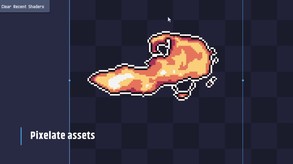
PixelOver is a pixel art animation tool that transforms your artwork into pixel-perfect renders. Animate in real time with keyframes, bones, inverse kinematics, and pixel-accurate transforms for pixel perfect sprites, GIFs, and spritesheets.
Modeled estimate, not a reported figure. How we estimate →
Discounts
Every price cut of more than 20% we have observed, in each market that quoted one, with this game's chart position on either side of it. These are episodes, not a model: a sale is one event, and one event cannot tell you what the next one will do.
Reviews, worldwide (the counter carries no country): 0/day in the week to Sep 13 → 0.2/day in the week after.
For scale, across Steam · Top Sellers · Brazil over the last 30 days: the 26 chart moves that followed a price cut of more than 20% went a median of 7 places towards #1, and the 2,400 moves with no price cut behind them went 2 away. One store, one chart, one country — it is the only place we have enough observations to say even that.
Prices outside the United States have been collected since 6 August 2026 and chart positions since 19 July 2026, so a cut older than that has no market to compare and a market that joined later has no history yet. Nothing here is converted between currencies.
About
Stats
All-time low is the lowest price we've recorded for this game since we started tracking it.
Engagement
Reviews
Themes across 47 recent reviews and how positive each mention is. A keyword signal, not full sentiment analysis.
Reviews
Nunca súper usarlo, si quiero animar o hacer pixel art, tengo aseprite que va directo al grano.
뭔 ㅈ버그가 한둘이아님
it stopped tracking my playtime because ive been using the executable but ive been using it forever and its such a good tool it basically replaces everything else i used before
Media

Related
Related
Price dynamics, follower growth, revenue and sales trajectories with interactive tooltips
This and every other Pro feature is free until October 20, 2026. A free account is all it takes.
Languages: English, French, Spanish - Spain, Simplified Chinese, Korean, Japanese, Portuguese - Portugal, Russian
Hours played at review time, across 47 reviews with recorded playtime.
positive critical· bar length = how often the theme comes up
The following review was translated into English with the help of AI. After using it for a while, I think the features are quite good overall. (Don’t pay attention to my Steam playtime—I often use it with Steam closed.) However, there is one major issue with the localization, especially the Chinese translation. It seems like some of the translations may have come from older machine translation, before modern AI translation became as capable as it is today. Quite a few terms are translated in strange or misleading ways. For example, “frame” is translated as “框架”. I was confused for quite a while because I thought it referred to some concept or feature I wasn’t familiar with. This seems like a typical literal translation issue—in this context, the correct translation should be “帧”, which has a completely different meaning. Another example is “亮度” being translated as “亮”. Since the surrounding options are all two-character terms, having a single-character “亮” there also feels quite unnatural in Chinese. I’d suggest using modern AI to redo or review the localization with proper context. Current AI models should be able to avoid most of these kinds of mistakes. And this probably isn’t limited to Chinese—other languages may have similar localization issues as well. Aside from that, I’m using PixelOver mainly for game development, so I’d really like to see direct Aseprite and PSD import supported sooner. It would make the workflow between different tools and game assets much more convenient.
ive been trying to animate on this program for a while, following tutorials and the documentation. the main problem i got with it is that there's little to no current documentation on how to animate stuff, rigging sometimes glitches out and just makes the image go horizontal for no reazon as the image's idle state, ive used it for relativly little and it has crashed on me 2 times just for adding an image, and for deleting bones (will add, small images, arround 200x200) also there seems to not be a way to modify already made keyframes, trying creates a new one behind it, tried all the combinations on the keyframe tab and it doesnt seem to be a way to do it, youll have to delete the old one. I would really like if they adresed these issues or created documentation for the current version, because outside of that this program has allowed me to do some stuff i cant seem to create in other programs. Also, i would really like if there was a way to export to aseprite but respecting the layers created on pixelover. the current way to export to aseprite just creates a .ase with the animation with a tag, but opening the gif on its original resolution gives the same efect, rendering it pointless (also there's 2 buttons on the export tab that seemingly do the same, export to aseprite and export .ase both create a .ase, maybe im not educated on the diference but both buttons seem to do the same wich is weird) overall, its an unestable rig based animation program, i would love to use a more stable version of this program, the way it renders sprites onto 60fps animations is really impresive to see and other rig based animation programs dont seem to be able to make this same efect so in that regard pixelover is pretty unique
I love this tool.
Muy útil, me facilita mucho mi dibujo.
好用爱用多用
Fena değil
Too many awful bugs This is badly incompatible with blender. As a beginner, i tried to make a pixel animation out of 3D model, put a lot of time into making animation tracks by using armature. Unluckily, after things were down, i open my project again to find all of the parts don't follow the skeletons any more for some reasons. You can't promise the files will stay the same as last time you close it .
Players by region
Where this game's players are, estimated from review languages.
Related
| Game | Estimated lifetime revenue | Reviews | Review score | Price |
|---|---|---|---|---|
| $27.4K | 96 | 83% | $6.99 | |
| $0 | 1 | 100% | Free | |
| $32.2M | 1M | 98% | $4.99 | |
| $9.3M | 26.9K | 99% | $19.99 | |
| $830.2K | 2.1K | 72% | $19.99 | |
| $359.5K | 519 | 81% | $34.99 |
Related
| Game | Estimated lifetime revenue | Reviews | Review score | Price |
|---|---|---|---|---|
| $64.5K | 363 | 96% | $9.99 | |
| $64.5K | 128 | 94% | $19.99 | |
| $64.5K | 272 | 74% | $9.99 | |
| $64.5K | 246 | 91% | $6.99 | |
| $64.5K | 162 | 72% | $12.49 | |
| $64.5K | 273 | 99% | $9.59 |