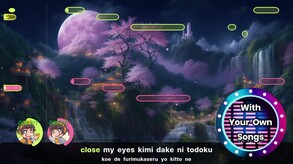
Let your talent shine when you sing along your favorite songs in this fun party game! A variety of modes let you play with friends or compete against them. An open song format and AI powered editor tools provide boundless possibilites.
Modeled estimate, not a reported figure. How we estimate →
Media

About
Genres
Stats
All-time low is the lowest price we've recorded for this game since we started tracking it.
Languages: English, French, Italian, German, Spanish - Spain, Simplified Chinese, Japanese, Korean, Polish, Portuguese - Portugal, Russian
Engagement
Hours played at review time, across 41 reviews with recorded playtime.
Reviews
Themes across 41 recent reviews and how positive each mention is. A keyword signal, not full sentiment analysis.
positive critical· bar length = how often the theme comes up
Reviews
Two things you need to know before buying this: 1. I've had my eye on this for many months and the release date has come and gone with little to no community media, streams or really anything showing what exactly makes this different from UltraStar and the like. There came a point where I thought this was, for sure, a scam and/or a cash grab trying to just push software that does what UltraStar already does. So I'm gonna tell you what should have been made clear SOMEWHERE here without having to deep dive to find out, like I did. So you have UltraStar Deluxe (Old architecture & Free), UltraStar Play (New architecture & Free) and Melody Mania (New architecture & paid). Melody Mania is UltraStar Play just under a different name and a way to support the devs so they can continue working on UltraStar Play and give it more features and make it better. So think of Melody Mania as a way of donating to the continued support and development of the free version that is UltraStar Play. Only Melody Mania has Ai support, steam workshop and a few other features to help creating songs or getting them from UltraStar DB. I'm gonna go ahead and give it a shot right now and I'll try to update this on whether it turns out well or not. 2. You MUST supply your own music for this, either by creating them or from the websites that host UltraStar songs made by other people. There is no setlist, there is no licensing; this isn't Rock Band/Guitar Hero or Singstar/Disney Sing It. You want to sing a certain song? Then you have to learn to create it or hope someone else did. That's how UltraStar is and has always been, and that's how Melody Mania is and will always be. This is because the devs absolutely do not have the funds to acquire the rights to put official songs in the game. It's more like you're buying software than buying a game. In that, you can put any song/artist you want in the game; you just have to have the ambition to make it happen instead of hoping the devs are able to get the rights to some obscure artist or infamous one that NEVER lets anyone license their songs. Edit: After messing with the song creation suite for a while now, I can say that everything is there to easily add your favorite songs to the game, but it does require patience and the enabling of certain settings ("show virtual piano", "show wave form", "play midi sounds", and "adjust following notes" were the most helpful to me. Edit2: Just got to doing a lengthy play for New Years Eve and this was definitely worth it. Felt nice to finally play songs that would never be on the Rock Band Network or Singstar; and despite my doubts, the songs I got from the ultrastar DB didn't have any noticeable errors or inaccuracies that hindered the fun. Solidly recommend this if you want to support a good karaoke game for PC.
I've has this game for a couple of weeks now. Short version - it's superb with some caveats. Longer version - it takes some time and effort to get working and is fantastic when that's done. Two main things to consider, 1st is songs. It does not come with any although there's an option to download some licence free ones. The built in AI song converter needs a lot of work. Might be the style of music I like (electronic) but the pitch and lyrics were miles off. Saying that, the in game song editor is great when you get the hang of it for changing dud lyrics etc. If you really don't want a technical challenge, I'd suggest you search for "USDB Espania" where there are 1000s of songs already formatted. There are other guides to make your own songs. I have managed to make my own from scratch. You will need a load of free software to do this. I use Ultrastar Creator to tap out the lyrics, Ultimate Lyric Remover to strip the vocal track from the MP3, Audicity to then clear up any non-vocal artifacts, Ultrastar Pitch to us that vocal track to generate the pitch, then back to the Melody Mania in-game editor to fine tune the lyrics, timing and pitch. I can do a song that I know well in about 90 mins from MP3 to fully working karaoke file. The second issue is getting the mics and audio set up. I've not used the phone app, and I've read lots about using USB mics but that leads to a small audio delay. I've used an ASIO capable two input USB sound card with two studio mics. These give almost zero latency which is great but it's not obvious how to set them up. In the settings for "recording" you need to scroll right down and choose "Multi-Channel and low latency support" but also you need to go into the "develop" settings and choose under "Input and Pitch Detection" then "PortAudio API" and choose "Direct Sound". Back in the recording settings, you should then be able to allocate both mics to a player. I understand that there are Windows limitations about how many mics can be recognised at once, the method I'm using assumes it's one mic with a left and right input, which the games splits into mics 1 and 2. The last hurdle for me was the audio quality of the singing. I'm using an M-Audio Duo soundcard which is runs on ASIO and there's a setting in the M-Audio software where you can choose the bitrate and frequency of the mics. I don't really know what that means, but I had loads of crackling audio until I set those to 512 and 48,000 in the M-Audio app. Sooooo, once you have your music and mic lined up, how is the game? It's amazing. We used to play Lips on the 360 which I loved but always wished I could have any song rather than what was provided. Melody Mania lets you do that, attach videos to match the song, scores your signing, do duets, have tournaments. The UI design, song transitions, lyric timer, pitch indicator, scoring feed back as you sing are all superb. We hammered this New Years Eve, had such a good time and I'd managed to get hold of songs to suit everyone's tastes. The Steam discussion for this game is full of helpful folk, the developer is also active in there and I am really pleased that this game exists. If you loved Lips or Singstar, and can work through the technical issues, I would highly recommend this game and hope that it proceeds to full release.
Yeeaahhhh... if this gane HAD a starting songlist, I would hop right in. But the use of too much AI just makes me wanna gouge my eyes out. And they didn't even try to admit it in the Steam store page! Yes, the gameplay is fine, but if there ever is a full release, take out the AI images, get music licenses, and just improve on everything. This is fine for now, but $19? Why?
As I am aiming to mostly use Melody Mania for practising my singing, It was important to me that the karaoke software I was looking for had two features: - A big song library to choose from that is EASY to operate - relatively realistic feedback on my pitch I only tested Melody Mania for 90 minutes, but I can say so far: Song library: You retreive songs in conjuction with the program USDB Syncer, as Melody Mania doesn't provide any songs itself. USDB Syncer is a program that manages downloads from a library onto your PC and is completely free. As far as I understand, the song library provided on USDB is entirely community created. So, naturally, the quality of songs should vary. But tbh, the ~20 songs I downloaded so far have been all completely fine. Without instructions, the installation of USDB seems a bit complicated at first. But the official guide for USDB makes this an easy task that I completed from start to finish in under 10 minutes. So all in all, the installation was fast and easy. So what about the size of the library? As I mentioned, my 90 minutes of playtime dont allow for a deep analysis. But as a person who s listening to a high range of music genres, I was easily able to find and download Disney songs, Disturbed, Linkin Park, Red Hot Chili Peppers, Digimon, Johnny Cash and pretty many more. You get the idea. I found satisfying results for literally every song I looked up. What makes this really a breeze is that after setting up the account in USDB, you can download songs with one click. It automatically installs all the needed files (.txt, .mp3, .mp4 etc) in the folder you chose. So, to sum this point up: Never has it been that easy to download songs. I sound like an ad, but this is how I genuinely feel. Getting files that you can use has been the biggest obstacle for the prior softwares I tested. It was either super difficult to obtain files, or you had to create some of them yourself, or whatnot. Today, I just looked the song up, found it, and clicked download. Satisfying. 5/5 points, hands down. So, what about the feedback on my pitch? This was another important feature, as I want to practise hitting the notes. It also will be fun when friends are over sometimes and you can have a kind of retro-Singstar-evening. When I first tried the game out, I was pretty disappointed by how easy it felt to "hit the bars". It seemed like the program wanted to encourage casual singers by being more forgiving on mistakes. After I switched difficulty to hard, this completely changed. I got owned in "Numb" by Linkin Park, as I failed to hit most notes. So, with the higher difficulty, I had the challenge I wanted to have, while I can still tune difficulty down when friends are over. All in all, this is what I wanted in the program. But there is a cherry on top: There are several extra features. You can read them up in the description, as I ll only mention the one I used: After enabling the option in the settings, you can automatically save the voice recording of your song right after finishing it. This helps me to listen to the song with my voice, so I can mine this file for info on my singing. Great! Conclusion: So far, this program has fulfilled all my needs that all the other programs couldnt. Also, the fact that it's in early access makes me hopeful for future improvements to come. With a price of 18,49€, it is fairly cheap, but isnt a no-brainer-purchase. If it continues to uphold all my expectations as it has so far, this will easily be worth it for me.
Not intuitive, very little instruction on how to add songs or troubleshoot errors. No one is providing detailed guides or step by step videos of how to set up and play the game yet. The only gameplay video I have found was on youtube and was someone also struggling to figure out how to play it.
Absolutely loving this. I have had so many karaoke games its nice to try to solidify my collection onto one. The guide (https://steamcommunity.com/sharedfiles/filedetails/?id=3239867298) really helped and isn't as bad as it looks. Really easy to set up and get going.
This is hands down the best open source karaoke software at the moment. If you were a fan of singstar or ultrastar, this is the next level. Even if there are still some bugs, we had so much fun and I have played this game for more hours than any RPG. As for the bugs: it is recommended to join the Melody Mania Discord and you get first hand developer help - very friendly community. Now this is a custom karaoke software, you will have to provide the song files for yourself - but you can get literally 30.000+ songs with a helpful scraper from the biggest ultrastar-file database in no time (not included in the software, but you will find it very fast if searching the web for it). You also need to read into how to get a proper karaoke hardware setup since this isnt plug and play. But if you were into ultrastar, you should get things going pretty quick.
I was so sad to see the Kickstarter fail, but it's great to see that you nevertheless continued your journey. Just bought this and looking forward to my next karaoke party :)
As far as I can tell this is the best Karaoke game available right now.
Works better with wired microphones, there was too much interference with wireless mics. I used old PS2 microphones they worked perfectly after some tweaking with the settings. I also found that installing Ultrastar Deluxe on my PC helped improve the microphone quality too, couldn't get the wireless mics to work without doing this, not sure why but it made a big difference.
Related
Related
Trends
Modeled estimate over time, reconstructed from Steam's monthly review histogram.
Momentum
Pace estimated from the game's recent review growth (our daily snapshots) at its own sales-per-review ratio — a momentum signal, not booked sales.
Audience
Estimated from the language of this game's reviews — a proxy for where players are, not official Steam demographics.
Related
| Prehistorik 2 | $22.9K | 68 | 90% | $14.99 |
| Magnifico | $22.9K | 173 | 62% | $4.99 |
| Summer Fling | $22.9K | 121 | 65% | $9.99 |
| Scalak | $22.9K | 1K | 97% | $1.49 |
| A Hole New World | $22.9K | 102 | 75% | $9.99 |
| 琉隐 | $22.9K | 136 | 58% | $8.99 |
Related
| Slime Rancher | $73.8M | 155.4K | 98% | $19.99 |
| Dyson Sphere Program | $56M | 83K | 97% | $15.99 |
| The Scroll of Taiwu : Beyond The Dome | $51M | 56K | 66% | $29.99 |
| Supermarket Simulator | $47.7M | 83.2K | 92% | $19.99 |
| Wallpaper Engine | $42.3M | 1M | 98% | $4.99 |
| Beat Saber | $38.1M | 76.2K | 96% | $29.99 |