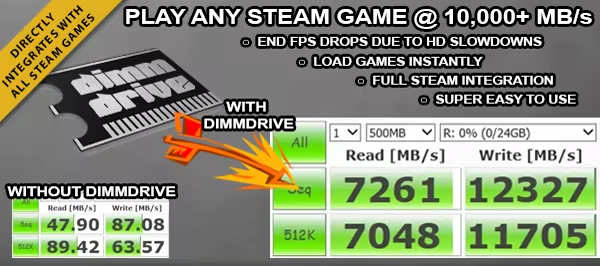
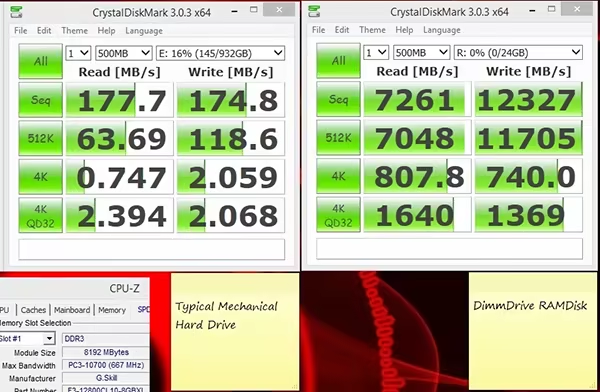
Play Steam Games @ 10,000+ MB/s :: Load games instantly with the Dimmdrive software. Dimmdrive fully integrates with all Steam games.
Modeled estimate, not a reported figure. How we estimate →
Media
About


Genres
Stats
All-time low is the lowest price we've recorded for this game since we started tracking it.
Languages: English, French, Italian, German, Spanish - Spain, Arabic, Bulgarian, Czech, Danish, Dutch, Finnish, Greek +15 more
Engagement
Hours played at review time, across 50 reviews with recorded playtime.
Reviews
Themes across 50 recent reviews and how positive each mention is. A keyword signal, not full sentiment analysis.
positive critical· bar length = how often the theme comes up
Reviews
I think I'd feel okay with having purchased this if it were $10 instead of $30. To be fair, the developer fixed my two main gripes with an update a week and a half after release. Hopefully the pattern will continue. With time I'm sure the price will come down and the quality will go up. I've got 32G of DDR3-2400 RAM and an Evo 840 SSD. I'm well beyond the recommended requirements for this thing, looking to shave a few seconds off load times. Expecting very little, it sill leaves me disappointed. Problems that I did expect before buying: - It takes a lot of RAM for this tool to be useful. I think 16G is the minimum for this to really pay off. - It can take a few minutes to load a game from disk into the ramdrive. It takes longer than all the time it will save you combined. But you can walk away for the time it takes up front, and the time it saves later is while you're immersed. Problems I didn't expect: - The main window isn't resizable. I can only see 9 games at a time and it takes 23 full scrolls of the mouse wheel to get to the bottom. I should be able to make this window as tall as my screen. - "Please disable Dimmdrive before adding programs or changing configurations." That's a nuisance. - Starts with its own empty list of favorites instead of using your Steam favorites. - Reads game names from some wonky variable that's not consistent with the Steam Library name. It shows me games like "mark_of_the_ninja" and "dont_starve" with underscores and puts "Back to the Future Ep 1" after "Back to the Future 105"
I attempted to use this software for various programs. In Civ5, if I invite someone to a game, it pulls them to the store page to purchase Dimmdrive instead, or "Invites" them to Dimmdrive. Not Civ5. Skyrim crashes after a couple minutes, Fallout Crashes after a couple minutes. Older games see no difference because they are already small. Pretty much everything I've tried this on has problems that prevent me from making this program useful at all, so I've just chose NOT to use it. I feel majorly ripped off, and now I'm broke just because of some exciting marketing on Reddit. Next time I'll just give a big "♥♥♥♥ off" and tell them to take their marketing elsewhere. Save yourself the 30 dollars and do NOT buy this program unless it's for say, Photoshop. It isn't useful otherwise.
This is a RAMdisk utility. There are plenty of other free alternatives that do essentially the same thing. So why should someone pay for this? 1. Performance (this goes for a RAMdisk setup in general) Let me start this section by saying that NO it will NOT improve your framerates or anything like that. No this improves something that everyone hates... Load times. Sure 5 seconds of loading with your current setup isn't too bad right? Well what if you now only had to wait less than a second? Now you are completely immersed without any break in the action. How annoying are those pauses and hitches in open world games? Most of the time those hitches are due to the game reading from slow HDDs and SSDs. Did I just call SSD's slow? Compared to a RAMdisk, they are. Typically an SSD won't read files faster than 550MB/s. Most RAM setups can be read from at around 8000MB/s! Thats like 15x the speed. 15 second load screen? 1 second now. Texture streaming is a real issue in some open world games and while more VRAM on a better GPU is your best bet, this type of software is easily the second best option. My hitches in Batman Arkham City are all but gone now and Shadow of Mordor doesn't hate my 2GB VRAM graphics cards as much now. 2. Simplicity Most other RAMdisk utilities require a lot of work from the end user (that's you!). Manually moving files, sometimes requiring restarts, making sure you update the physical files after you 'save' your game etc. This utility saves you a lot of time and hassle over most of the competition. I personally haven't used a lot of the options but I have dabbled in 3 or so. All felt like a major pain in the butt to setup, especially if you wanted to switch titles/programs fairly frequently. This program has a very simple user interface that automatically detects which steam games you have installed. So long as you have enough RAM, it can be as easy as flipping the games toggle and then the main programs 'on' switch. It will transfer all the files over to the RAM. "What about your save files?", you ask. Well this utility doesn't move your files over to ram... it copies them. It also copies in real time BACK to the hard drive or solid state drive the files originate from. This means no worries about a power outage or strange crash ruining the original files or your saves. Should you lack the amount of RAM required to completely copy over your games/applications, you can use the 'less RAM' option. Simply click the little configuration icon next to the games/applications and select the option. Now you have complete control over what does and what doesn't get put into the RAMdisk. Often programs and games will have extra language files, cutscenes, audio and such that don't benefit from being on a RAMdisk. So you are free to select the meat of a game and have only those items transferred over. This does have limits though and I'd still recommend at the very least, 8GB of RAM in your system. The more you have the more options you have. Older games don't require as much space but also don't benefit as much. Newer games are huge and can definitely benefit from 32GB or even more if possible. That said its not useless with less RAM, just less useful. Want to add a non-steam application or game? It's really as easy as dragging over the shortcut from that program/game into the 'apps' tab of the program. Dimmdrive will automatically figure out where the program files are and add it to the list. You can still use all the normal features like 'less RAM' with these additions. 3. It's not done yet - No this isn't a negative. Tim the developer has been awesome and constantly updating the program with new features, better user interface options and other tweaks both minor and major. Its fully functional and as far as I have experienced, bug free as of this writing. Tim is a pretty awesome guy that provides pretty fast support and is very active with the community. Have an idea that might improve this utility? Mention it and it may very well end up in a future build. This software isn't for everyone but anyone with 8GB of RAM or more can likely see some decent performance gains in programs and games should they take the time to set it up. The more RAM you have the simpler things get. If you have enough RAM to plop an entire game on the RAMdisk, do it. One minor note though is that not all games will benefit. This sort of thing benefits open world and games with long loading times the most. Anything that accesses the HDD/SSD a lot will benefit. This also includes software like video editors! Imagine working on a video in RAW format (HUGE files!) and being able to scrub the timeline and having near instant feedback. Well with a RAMdisk you can so long as you have enough RAM. Really at the end of the day this is basically a super fast SSD that you can move files to temporarily. Wherever you think an SSD might help, this should as well. Very functional and simple software designed with us gamers in mind. Time is money and this software saves me a lot of time setting up a RAMdisk solution. Highly Recommend
Most games are more Gb than you can spare on your RAM space (I have 16Gb RAM, have set 10Gb for RAMdrvie. Any more and Windows thinks you are running out of memory). So then you have to nominate which files are loaded into the RAMdrive. Then at the start of the session all the nominated files are loaded into the RAMdrive, this takes a minute or so. It depends if the initial wait is worth the ingame load saves. And that depends on if you've correctly nominated the files to be in the RAMdrive that affect the ingame loading times.
[h1]Over all impression, save your cash not worth it.[/h1] If you're system has the extra RAM it makes sense to cache an entire program into memory - in theory it should be faster. However target-audence systems are already so over built that gains brought by this software are negligible. If you're system is sub-optimal in RAM then chances are trying to fit a AAA game, or partially, into RAM will only cost you performance in missing ram for system (other reviews have touched this thought). [h1]I would recomend saving the cash you would have spent on this for either: more RAM, an SSD, or both.[/h1] Bought this in response to Developer's give-away on Reddit, the video made for a decent sell, so I broke down and bought it -- I wish I had held onto my money. My first experience was Dimmdrive crashing on me trying to run Diablo 3; the sync system fowled up and had to manually rename three steam games (which I marked for ram drive) back to orginal names, remove hidden attribute, and propogate attribute allowing me to run the games normally and remove a persistant error trying to enable Dimmdrive. On positive note I haven't had any errors since. As for system performance enhancement, enpirically I've seen little to no performance enhancement running with Dimmdrive. As for real data best I could do was run Valley Benchmark for numbers; producing one more FPS for minium, and two for max FPS. Ran using Direct3D11 render, 1920x1080 fullscreen, extreme HD preset. Was also Bit torrent on same drive as my games, giving Dimmdrive an edge (more theorycrafting), little change to benching or empirically System highlights (for what it's worth): [list] [*]CPU: Intel i7-3930K @3.20GHz [*]GPU: NVIDIA GeForce GTX 670 9.18.13.3182 (2GB) SLI [*]64GB Ram [*]Windows 7 [/list] *** EDITED: 4/22 Begins below *** In response to developers message, I'm unable to re-run the application due to changing platforms from Windows to Linux. There by I'm unable to re-evaluate on the same platform. While the user experience may be less susceptible to errors and bugs, I won't change my review. As the past review provides context for the comments made. Main comment being, my performance gains are negligible. Come to think of it, I wonder if the bandges work now? I remember making a 60gb dimm drive just for laughs and badges... only gave me giggles, no badges. ...."Badgers! We don't need no stinking badgers!" [h1]Over all impression, IS STILL, save your cash not worth it. Save for the RAM or SSD upgrade, or just save your cash for a rainy day. This is a niche-target audience program with questionable (at best inconsistant) gains in perform.[/h1] Update: may 4th, 2016: still garbage, don't waste your money on this program.
Not worth the $30 to see a minor improvement in game loading times. Read/write speed may be ridiculous but there is a very small benefit to running this. Recorded demos and config changes are not brought back into the Steam folder and are lost when the program is closed. Lost a really nice CSGO ace demo because it wasn't synced back to my Steam folder after closing. Will not be using this program again.
[table][tr][td][b]NOTE:[/b]This has been provided to me free of charge for review purposes.[/td][/tr] [/table] [h1]Overview[/h1] [i]Dimmdrive[/i] is a gaming oriented RAMDisk software with Steam integration. Basically what it does is that it loads your game files onto the RAMDisk using symbolic links. It has some very convenient features over other, free RAMDisk software, so if you have an excess of RAM and are used to these sort of programs, Dimmdrive will not disappoint. The negative review is not in any way reflective on the quality of the program. It is a very functional RAMDisk software, with some good and unique features. The reason I am giving it a negative review is that the decrease in loading times as well as the prerequisites to use this are not that convenient, and I will explain why in a moment. As I do on all my reviews, I will give you a TL;DR Pro/Con list, and if you are interested in the details, consider continuing the read afterwards. [h1]The Pros:[/h1] [list] [*][b]Steam Integration[/b] - The strongest selling point is that with a flick of an onscreen button you can turn it on and off and jump straight in your steam game, and then when you're done do the same thing and revert everything back to normal. User input is minimal and you can set it up pretty fast. [*][b]Power Loss Proof[/b] - One key feature over other similar software is that it keeps what's on your RAM with what's on your HDD in sync, so that in the event of a crash of blackout, where what you had on your RAMDisk would've been lost forever, here the data is being constantly written back to the disk, so you can rest easy it's not as dangerously volatile as other RAMDisks and offers some degree of redundancy. [*][b]Automatic Setup[/b] - If you want, you can make it so that the program runs automatically on startup and loads your preferred list of files onto the drive automatically. If you use it only for some specific games and don't really turn it off that often or change the files on it, it's a little time saver. [*][b]Anything-Compatible[/b] - Since it uses symbolic links to redirect your computer to the RAM, you can use this with any piece of software, and even has a dedicated tab for sorting and remembering those. You can even load another Virtual Hard Drive for your VM and test out the insane boot times of a make-belief SSD scenario. [/list] [h1]The Cons:[/h1] [list] [*][b]Not that impressive performance gains[/b] - Dimmdrive never claimed to improve your FPS, so don't blame the "sameness" of your gaming on that. It does, however, improve load times by a certain degree, although not that drastic of a difference when compared to an SSD. At least not to the naked eye. [*][b]Requires a large amount of RAM to be worth it[/b] - If you ever want to take advantage of AAA titles or heavily modded games you will need very enthusiast grade machine, that begs the question - Why not just buy an SSD instead? [/list] [h1]The Testing Environment[/h1] The computer hardware you have is very important here. All of the components in my personal PC are listed [url=http://pcpartpicker.com/p/zQ8yNG]on this PCPartPicker List[/url]. To mention the two HDDs are in RAID0, for better speed. To test, I've used Unigine Heaven Benchmark as well as some often-loading screen games, such as Skyrim, Oblivion and The Witcher 2. [h1]Things to Bear in Mind[/h1] The [b]MINIMUM[/b] amount of RAM I would recommend is 16GB, if you wish to load entire games. Anything lower than that is insufficient in my opinion. Dimmdrive takes away some of you RAM and creates a virtual Hard Drive with it. The space you use remains out of reach by any other program. That being said, with 16GB, you take away 2GB for Windows, System Services and other applications you might run in the background, such as Chrome. Then, consider 4GB as reserved by the game you are playing, since most games are 32bit and will never use more. So that leaves us with approximately 12GB of actual storage, which is enough for some games, but not enough for big games that would benefit from faster loading times. For instance, vanilla Skyrim with all the DLC is 9.6GB. If using mods, you would need a lot more space than that. So 16GB is just fine for some games, but to really get noticeable results from high-end games, you will need loads of RAM. [h1]My Findings[/h1] I first tested it with Unigine Heaven benchmark, just for fun, as I knew it wouldn't increase the FPS. And it's half true. While the results were marginally the same, and the max FPS was unchanged, the minimum FPS that is typically recorded at the beginning, when the textures are loaded onto the GPUs memory were doubled from 8fps to 15fps. This shows that games with scenes that are loading the map as you go, such as the majority of open-world games could benefit in frame rate, meaning some micro-stuttering might go away. However, that is theory. Next I tested loading times in various games, and I will keep using Skyrim as my reference since it's most popular and relevant. I used vanilla Skyrim with all the add-ons. The main menu load time was reduced from 22 seconds on the HDD to 8 seconds on the SSD to 6 seconds on the RDD. Not to shabby. However, once in the game, it provided little to no difference upon entering and exiting new areas and interiors, as most scenes are stored in memory anyways. So gaming wise, it helps, but only a little. There are a number of useful applications for a RDD in non-gaming, but those can be achieved with other software, even for free. Which brings up my last point: We've discussed that a lot of spare RAM is required for this. Folks with old, rusty HDDs will greatly benefit, but I find it hard to believe someone would have a ♥♥♥♥♥♥ HDD, but loads of RAM to play with, not to mention newer sATA3 dives can offer up to 150MBps, which is more than decent for games. People who can afford rigs with 32GB or RAM can certainly afford a SSD for their Steam Library, so that would be a much wiser purchase, as even if you do get only 1/10th of the speed of Dimmdrive, you get anywhere from 10 to 50 times the storage space, with more reliability, at only thrice the price. [h1]The Conclusion[/h1] As I've said, this is a perfectly working piece of software, and for those needing a good RAMDrive solution, even for non-gaming purposes, that are interested in the backup feature and great ease of use, I recommend it. For people with lower end gaming machines that look for better performance, I would suggest saving a bit more for an SSD and perhaps even better GPU, extra RAM and the such. You won't find too much help from here. By the way, Tim. I heard of your new project, CPUCores. If you liked the manner I reviewed this, I will gladly check that out as well.
Dmmdrive is not worth a cent. This app is basically like RAMDISK program which is free ! In the selected game makes the sea of shortcuts and on each restart STEAM start twice! :( .USB-3 Turbo is free (does not work) and benchmark also which essentially not exists. If you could return the product i wood immediately , as it is all it offers is free in support for your hardware ! This is hoax 28 € robbery that is not working properly! And my tests. Ill will edit check yourself.
EDIT: THIS REVIEW IS FOR A PREVIOUS VERSION. READ THE MORE RECENT REVIEWS. THANKS. Ok, so after a few weeks of using this thing I've come back with a more insightful look of what this program did for me. First of all, I'll elaborate what kind of setup I have: 8 GB of RAM to work with 4 GB of RAM dedicated to DD whenever I run the program. A majority of my games are installed onto my 2TB Seagate Barracuda ST2000DM001 7200 RPM I also have Windows installed on my Intel 335 Series 240GB SSD i5-3570k Why didn't I post my GPU? GPU doesn't do anything in regards to the performance of this program at all. We're looking at faster load times. So like I said, the majority of my games are loaded onto my HDD, while I only have one or two games installed on my SSD (and a majority of my intensive programs such as video and video editing sits there too). Now that being said, I do have limited RAM. And a bit of INITIAL TWEAKING is needed properly configure DimmDrive to what I need. Thus, I have to use the LESS RAM FEATURE in order to get what I want with this. I do realize this isn't the pancaea for my performance problems; my hardware is old by a few generations and probably needs an upgrade in two years or so. So after tweaking DimmDrive for games like Killing Floor and Team Fortress 2, both on my HDD. My map loading times for these games have been so much faster. HOWEVER, when I tried to tweak this for Final Fantasy XIV: A Realm Reborn, I see little to no difference. This is because this game was on my SSD. Do I expect a huge difference for my games on my SSD? Not so much, an SSD is already fast enough as is. On my Hard Drive? Oh gods yes. I was able to get into the game faster, and in the case of Skyrim, experience a more seamless adventure because of the little to no loading times this has provided me. Now onto crashes. I experienced crashes while using this. I'm not going to lie, the Less RAM feature is a feature not for those who have no idea what they're doing with their computer. I messed up several times and had my games crash on me randomly or not even start at all when using this. It was not until I started monitoring which processes/files that were used/accessed the majority of the time when running the program is when I was able to configure DimmDrive with the correct files. This program isn't perfect; Tim said he's going to implement an "auto-learning" that will make the program allow to "learn" which files are accessed multiple times and save that as info for its use. That's a feature I am looking forward to. That being said, why did I buy this program when it's not perfect or doesn't work as "advertised"? I could've gone with a free alternative. Yes, I could've gone with a free alternative, but I did not want to bother spending much more time figuring out which files I need to designate for the RAMDrive. Plus, it provides a soft link to most of my installed Steam library. That's a plus in my book. And while I can't say that I'm currently happy with the lack of Steam saying I'm actually playing the proper game while using this, I still think this program has a lot of potential and right now it has made me happy for what it is capable of doing considering my hardware. In conclusion, I should point out that the program isn't perfect. DimmDrive isn't a one click solution to your performance troubles. You are required to do some tweaking on your own which may result in a few failures but once you get it to work properly, it does its job. Right now I can't exactly recommend DimmDrive in its current state; I want something more out of it or perhaps a way to make it "dummy proof" for your more average user who simply looked at this and say "HEY THIS IS PERFECT FOR ME!" and avoid disappointment.
Though I was hoping this utility would be something useful for me, in my experience with it I can not recommend it. *Update: See the *Edit note towards bottom. At one point I was supportive of the Developer of this software, but now I certainly won't want to support a Developer who blames the Users for their defective / buggy software. So, WARNING, stay well clear of this software and don't support Devs who blame the Users for bugs and issues with their software. * It doesn’t list all of my installed games - as I write this review, I have 449 games / programs installed via Steam, but DimmDrive is only listing 394 of them. That’s a big chunk of games (55 of them) that I’m unable to access with DimmDrive. * Many of my games I've tried simply do not work (won't load or crash-on-loading) with DimmDrive, or some games may seem to work at first but then crash. Without using DimmDrive, those same games will work fine. * DimmDrive does not properly name / list several of my games. For example; Installed via Steam and in my Steam library I have a game named “Next Car Game: Wreckfest”. However, it doesn’t show anywhere on the games list in DimmDrive, either alphabetically or by trying to type in a word search in the filter. However, scrolling through the list of games on DimmDrive, by chance I happened to notice the tiny game’s avatar-image of a car. But the game is listed as “Bugbear Entertainment”. WTF? How would I know that DimmDrive would so horribly misname that game? It was only by pure luck I noticed the tiny graphic that I realized it’s for the “Next Car Game: Wreckfest” game. I have the same problem with several other games too, which makes it rather difficult to find them. * The DimmDrive window is soooo small and there doesn't appear to be a way to re-size or enlarge it or to enlarge the games-avatars or the size of the text. Be prepared to lean in close to your monitor to see things in the DimmDrive window and to do a lot of scrolling. :p * I had to jump through hoops, doing several restarts of my computer, then finally manually going into the Windows Services to fiddle around with DimmDrive’s settings there to get the utility to launch (as it was often giving me error upon starting Windows, or I had to manually go into Windows Services to start, or restart, the DimmDrive Helper to be able to launch DimmDrive). * DimmDrive outright broke some games I tried with it (which makes me rather nervous to continue to try it with more games). Basically what seems to happen was in those cases was most of the game files did not properly sync back to their standard folders when either DimmDrive crashed (or caused the game to crash) or when simply closing the game and closing DimmDrive. Luckily I’m fairly computer savvy and was able to manually fix those games on my own, but it was quite a hassle and shouldn't have happened to begin with. * DimmDrive's "real-time sync" simply didn't seem to work properly with some games I tried it with, resulting in game-progress not being saved, this meaning the next time I went to run that game, I needed to re-do / re-play a big portion of the game I had already played to get back to the same point. When running the same games without DimmDrive, I could save my progress for those games fine. * Of the several games I did happen to get working with DimmDrive, in most cases there was no (or very little / miniscule) noticeable increase in loading speed. * In some cases where I’ve tried using DimmDrive with a game, and it seemed things worked ok, and I wanted to do some recording of my game-play, my recording software would tend to crash (or not even load in). However, if I ran the game without using DimmDrive, I was able to use my recording software fine. * After un-installing DimmDrive, one day when looking at running services via Windows Task Manager, I noticed that a DimmDrive Helper service was forcing itself to run with Windows and running in the background. The only way I could find to stop this was to go into Windows Services and set the DimmDrive Helper service to Disabled. There doesn't seem to be a simple way to fully remove this service and it should NOT be there after uninstalling DimmDrive, so this is yet another bug and problem with the DimmDrive utility. ~~~~~~~~~~~ Overall, for the rather high price, the various issues I’ve had with DimmDrive and that the games I was able to manage to get DimmDrive to work with in most cases there wasn’t any noticeable difference in loading speeds, for me it’s not really worth it. So, unfortunately I can’t recommend DimmDrive. Sorry DimmDrive Dev. I’m just being honest with my experience of DimmDrive. I know that you have made some fixes & improvements since you originally release it on Steam, but I still have several issues with it. *Edit: Quote from StartupTim [developer]"... everything you mentioned is more an issue of user intervention than an issue with the program..." I really don't appreciate the Developer trying to blame the Users for the problems the software causes or its bugs. And no, it's not MY fault that DimmDrive is buggy or causes the problems it does. And I've already wasted too much of my time to bother any more with this defective software.
Related
Related
Trends
Concurrent players on Steam, sampled daily since tracking started.
Momentum
Pace estimated from the game's recent review growth (our daily snapshots) at its own sales-per-review ratio — a momentum signal, not booked sales.
Audience
Estimated from the language of this game's reviews — a proxy for where players are, not official Steam demographics.
Related
| Dungeon Rats | $135.3K | 713 | 78% | $7.99 |
| Children of Silentown | $135.3K | 1.5K | 87% | $5.99 |
| Golden Chambers | $135.3K | 267 | 79% | $19.99 |
| Tales Of Glory 2 - Retaliation | $135.3K | 241 | 66% | $19.99 |
| Flat Heroes | $135.3K | 570 | 90% | $9.99 |
| Forgotten but Unbroken | $135.4K | 268 | 78% | $19.99 |