Maximize your FPS :: Use CPUCores to isolate and constrain OS + non-game processes and dedicate CPU resources to be used exclusively for your games! CPUCores fully integrates with all Steam games!
Modeled estimate, not a reported figure. How we estimate →
Prices
Each in the currency that store quoted — not converted: the gap between two rows is the publisher's pricing, not an exchange rate.
Every market we collect.
About
CPUCores ADVANCED is a cutting-edge Windows-based software built--by gamers, for gamers--with one thing in mind: MAXIMIZE YOUR FPS! CPUCores ADVANCED does this better than ever before by micromanaging your Windows OS and non-essential applications to deliver maximum CPU to your game!

1) DIRECT STEAM INTEGRATION
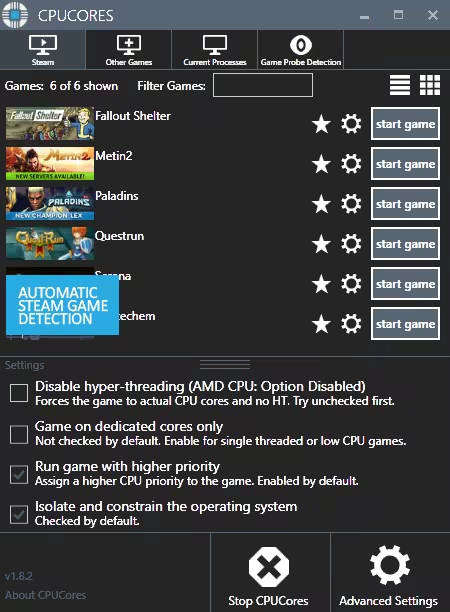
CPUCores automatically detect all of your Steam games.
2) OS OPTIMIZATION
To start, CPUCores will isolate your entire OS to your first core.
Secondly, CPUCores examines and constrains key Windows services that are not essential and known to hog CPU resources.
Third, CPUCores examines and isolate key Windows processes to ensure a perfect balance of CPU savings without starving key Windows processes.
3) GAME OPTIMIZATION
CPUCores will isolate and dedicate processing cores to be exclusively used by your game.
CPUCores will allow game-specific hyper-thread disabling/enabling.
4) BACKGROUND / NON-GAME OPTIMIZATIONS
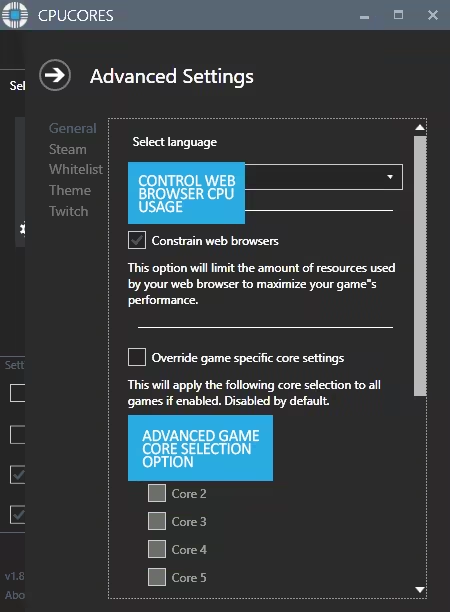
CPUCores examines what non-OS and non-game operations your PC is running. It will do things such as constrain non-game programs to your first processing core.
5) EXTRAS
Ability to "START RANDOM GAME" with 1 button click!
Fully supporting VR games!
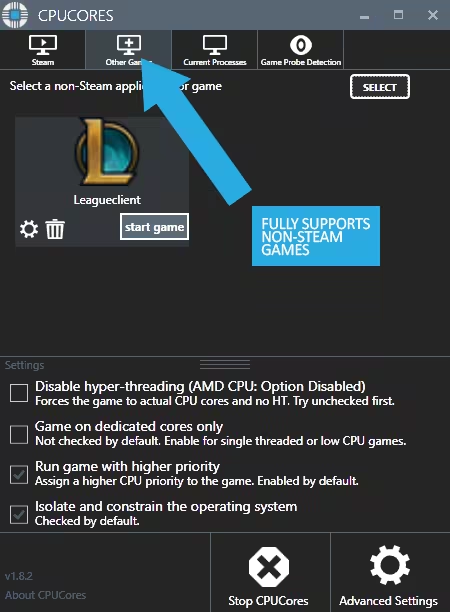
Support for non-Steam games
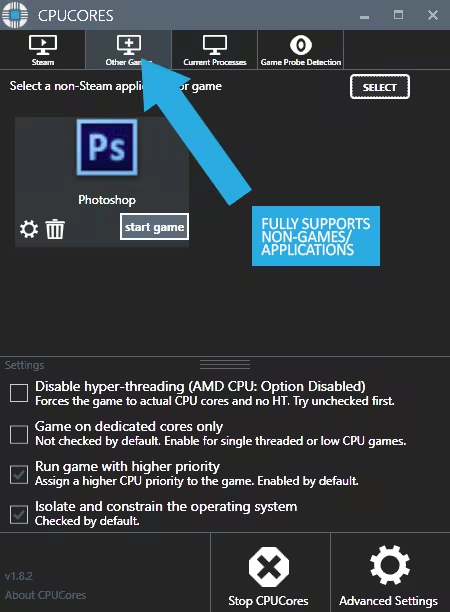
Support for general, non-game applications like video editing, graphic design and more!
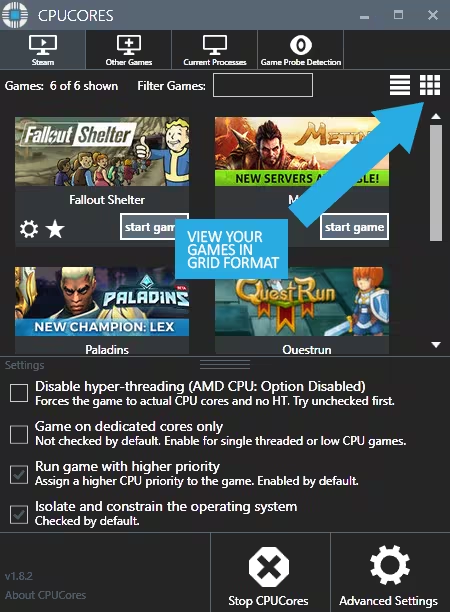
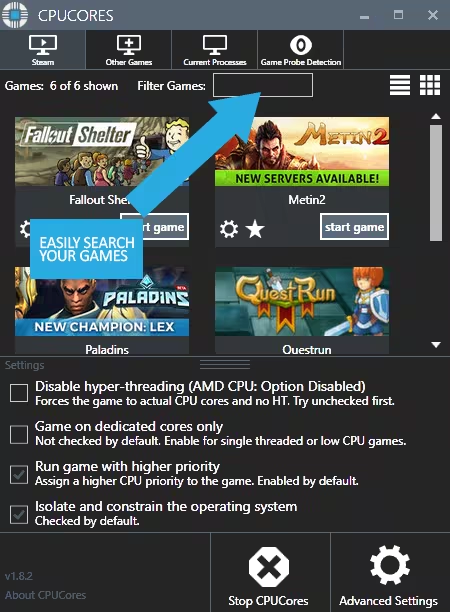
Convenient game sorting options makes large Steam libraries manageable
Incredible community surrounding the software!
Direct contact with the developer for suggestions on feature updates!

The impact of how CPUCores will help with FPS depends on essentially 2 things:
#1 Your PC Hardware
#2 The game itself
Here are some benchmarks we've recently seen from our test system:
ARMA III - 17.5% FPS Increase!
Team Fortress 2 - 58% FPS Increase!
TombRaider - 6.3% FPS Increase
Left4Dead2 - 14% FPS Increase

The CPUCores application identifies dozens of Windows programs, background processes, and non-gaming applications, and immediately controls and isolates them to a subsection of your total CPU resources.
CPUCores will then free up a block of CPU resources and dedicated it specifically for a game. You can then launch a Steam game, or any game/program, directly via the CPUCores application. This enables CPUCores to control the processor usage for that game/program and ensure it has dedicated usage to processing cores. Your game no longer has to share resources with the OS / other applications.
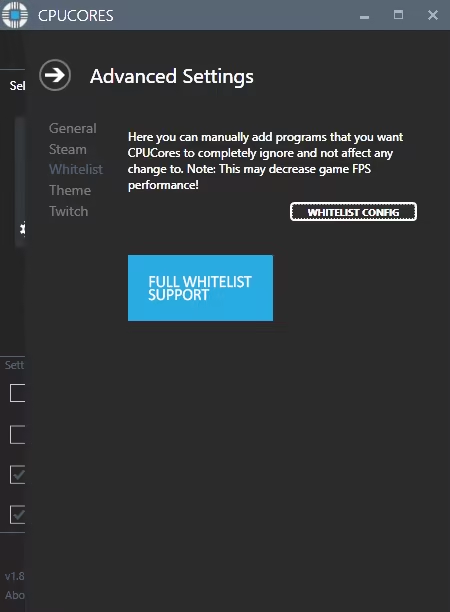
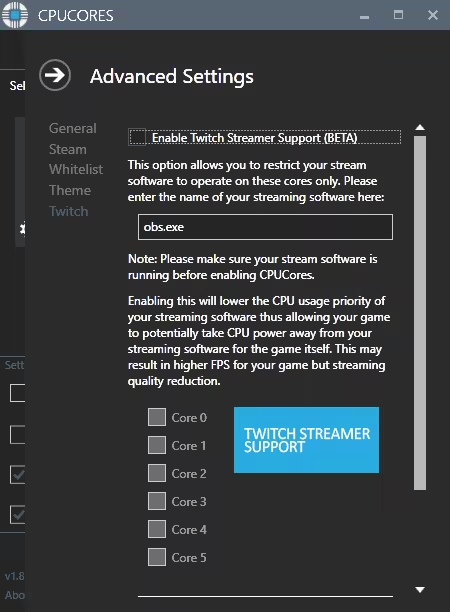
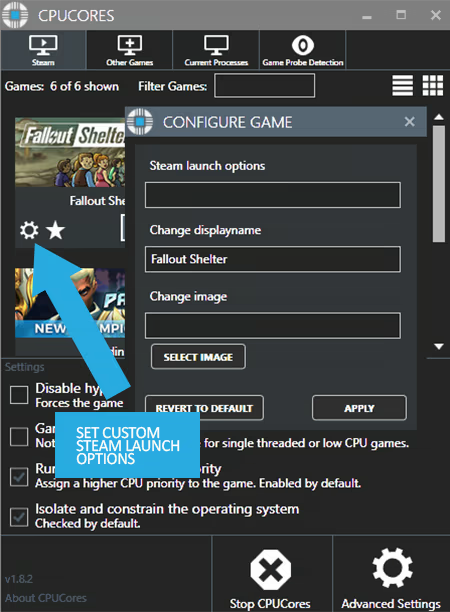
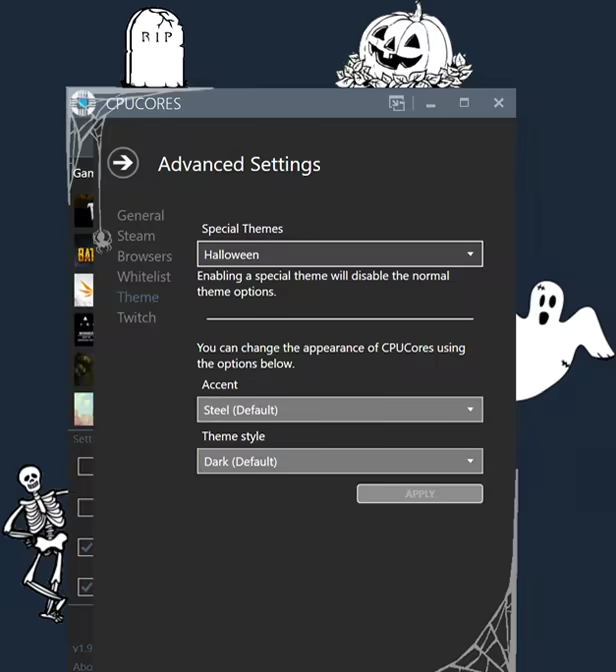
SCREENSHOTS

Updates
Build ids and update times come straight from Steam's PICS — the same source SteamDB reads. Patch history grows as we record new builds.
Engagement
Reviews
Themes across 806 recent reviews and how positive each mention is. A keyword signal, not full sentiment analysis.
Reviews
난 진짜 돈받고 팔면서 이런 놀라운 쓰레기는 처음 이다 UI가 안좋은건 어쩔수 없다지만 전용 코어에 게임 만 선택란에 있는 설명... 설명에 있는 글자가 다나오지 않는 것을 몇년이 지나도 고치지 않았다는거에 경의를 표한다. 이런 간단한 것도 수정 못하면 회사 닫아야지 제대로 되지 도 않은 제품을 판매하고 발전가능성은 0.1%도 안보여주면서 새로운 제품을 업그레이드해서 판다고 하다니 또 새로운 쓰레기를 팔겠네 많이 팔아라 :)
作用不大,感觉完全就是心理作用,可能是我用不来吧...打折可以考虑考虑,原价就算了,很多时候都是图个心理暗示。这款FPS优化器据说是对电脑配置不好且玩吃cpu优化的游戏才有一定有限的帮助,但毕竟是工具类,多一类总没坏处,可能就是花点个人觉得的“冤枉钱”。优点是随库携带,下载迅速,如果你习惯在网吧打游戏且网吧配置不是很高,便捷地下载他可能可以稍微改善游戏效果。 另外,作为成就党,顺带一提这款工具中有一项成就是:解锁万圣节主题。目前对于这个成就的解锁信息也是十分的少。解锁方法很简单:高级设置里找到主题切换成万圣节就行了。是一个不错的免费皮肤。
Media

Related
Related
Price dynamics, follower growth, revenue and sales trajectories with interactive tooltips
This and every other Pro feature is free until October 20, 2026. A free account is all it takes.
Genres
Stats
All-time low is the lowest price we've recorded for this game since we started tracking it.
Languages: English, French, German, Polish, Russian, Simplified Chinese, Traditional Chinese, Korean, Italian, Spanish - Spain, Arabic, Bulgarian +15 more
Hours played at review time, across 808 reviews with recorded playtime.
positive critical· bar length = how often the theme comes up
I dont really notice any FPS improvements and it doesnt recognise half my Steam library. Manual add option for steam libraries does nothing at all. I suspect the program will have more effect on system with integrated GPUs. But if you have half a decent gaming rig this thing doesnt do much if anything at all. The Game Probe feature does look very promising though! (automatically detects the EXE running and then kicks in the CPU Cores Profile) EDIT (Advanced Released): 1. Bugs - The feedback form for bug and suggestions doesnt work - The disable hints button doesnt work - *Right clicking system tray icon crashes the program - List/Grid view resets every time it starts - 'show windowed only' option resets every time it starts - Start with windows option doesnt work - *Add game manually doesnt work * = Appears fixed 2. requisted feature - Please let us select which tab is the default open tab when starting program - Please add option to set games to HIGH priority instead of REALTIME. As Realtime can cause regular programs to stack and crash.
[h1]Great for Low-End/Retail PC's[/h1] This is a great piece of software for lower-end computers, often times many retail computers might have locks that prevent the user from accessing the full range of capabilities through the BIOS (overclocking). If you aren't a very technical person, or lack the knowledge/capability to adjust BIOS settings this gives you a very safe alternative to do the same things without the clutter or risking a "blue screen of death". If you are gaming on a low-end PC this can help you a lot in terms of allocating your processing power for games that you are playing. [u]Of course, your graphics and visual display are NOT going to improve[/u], that's not the purpose of this software. This is a CPU-based software, so games that rely more on CPU will have a significant [b]PERFORMANCE[/b] improvement compared to others especially on lower-end PCs. You will be receiving [u]consistent frames[/u] while playing, and sometimes that does result in a higher FPS but this also means it draws more power from the PC itself since you are basically overclocking. Be mindful of your PC, keep vents open on a laptop, clear your memory, close background applications, ect.... There are also limitations and people who shouldn't use this software, but this can get very technical. Generally speaking unless you are on a low-end/retail PC and need to boost to play games without much of the screen tearing or performance drops you may be experiencing. This is the software for you, I have used it a lot and would say it works great.
Snowrunner: from 40-60fps to 70-100fps, limiting stuff to 1 core does make chrome a bit sluggish but while gaming that's perfectly fine for me Warframe: i only got a 10 fps increase in open world, from 123 fps to around 133 but it no longer dips under 90, while without the program i used to get even 70ish fps (anything else than open world is irrelevant cuz i get vsync 144fps) i even threw it at cinebench and it got my cpu score from 6229 to 6335 This program will work best on any game that uses more than 1 cpu core which makes it amazing for AMD cpus (sadly i currently have an intel i7-6700k but i can't wait to abuse this program once i get a new amd processor) However! if your GPU is the bottleneck in your pc then you might not see any improvements. Process Lasso is more customization but i prefer CPUCores since it's a 1 click and play Edit: tested the new update for a while now and it's amazing, even has all sensors detection
如果不是有需要將遊戲鎖在其中一個CPU,例如12代CPU和WIN11在遊戲時出現的多核心衝突問題或遊戲可能鎖在PCORE或ECORE,需要手動調試的話,這程式基本用處不大,但對於只是需要提升FPS的用戶,我就不建議了.
very nice software
Depois que eu troquei de computador eu não usei mais esse programa. Já me zoaram muito por causa dele me perguntando se "eu queria um site bom para baixar memoria RAM", ironizando a funcionalidade um programa para melhorar o desempenho. De qualquer forma, eu posso afirmar com todas as letras: Eu só consegui zerar Red Dead Redemption 2 na época por causa dele. Meu antigo PC era muito bom pra época dele, mas eu demorei tempo demais para trocar e com o passar dos anos eu senti isso pesando nas performance dos lançamentos. Eu sou alguém que nunca pude me dar o luxo de me importar com gráficos e sempre peguei meus consoles no final da geração, quando o preço costumava baixar. Por conta disso, quando peguei o RDR2 meu PC realmente chegou no limite. O gráfico parecia argila e ainda sim eu não conseguia um desempenho consistente em trechos simples de gameplay, e por mais placebo que possa ter sido esse programa realmente me ajudou MUITO. Eu não sei explicar de forma técnica o que ele faz, mas eu sinto que meu processador conseguia administrar melhor os processos dele depois de utilizar o programa, e com isso eu conseguia jogar com um desempenho ruim, mas não diferente do que o que eu ja estava acostumado ao longo de todos esses anos. Em resumo, o programa não vai fazer milagre. Mas provavelmente, vai te garantir uma melhora de desempenho que as vezes pode ser o suficiente para que você consiga uma experiencia desesperada de um titulo que você realmente quer muito jogar. Pelo que pesquisei nas analises aqui da Steam, isso vareia muito de processador pra processador e de jogo para jogo mas sendo um programa tão barato eu acredito que vale o teste caso você queira melhorar um pouquinho seu desempenho e comprar um novo PC ou fazer os upgrades necessários estejam temporariamente fora do seu orçamento. O programa também tem uma função de limpar o uso de memória RAM, que funciona, mas a longo prazo o próprio computador vai criando novos processos e vira mais uma solução momentânea que não dura muitas horas, senti bastante isso quando migrei pro Windows 11 inclusive. Reforçando que eu realmente não sei explicar de forma técnica o funcionamento do programa e eu só usei essas duas funções que descrevi, liberar memoria RAM e otimizar um jogo da minha biblioteca Steam. Na minha experiencia isso funcionou e me ajudou bastante, talvez não seja o seu caso mas você tem as 2 horas de reembolso da STEAM para ver se o programa consegue te dar uma força, além do mais ele é bem barato e talvez com um pouco mais de conhecimento você consiga fazer testes mais elaborados explorando melhor os menus. O único ponto negativo ao meu ver é que o programa tem conquistas baseadas no desempenho do seu computador, o que faz com que caso você queira pegar todas elas de forma legitima você vai precisar de uma máquina monstruosa, e caso você tenha uma, eu não vejo por que você precisaria desse software. É um detalhe que a grande maioria não se importa, mas achei válido mencionar pois achei uma escolha estranha e de mal gosto. Com tudo isso em consideração eu recomendo o programa pois para mim ele funcionou perfeitamente e cumpriu o que prometeu. Espero que ele consiga ajudar alguém que possa estar precisando.
ok
居然更新了终于有中文了点赞,加油
Selling now
See how fast this game is selling right now — estimated copies and revenue per day from recent review growth.
Active players
Estimated daily and monthly active players (DAU/MAU) modeled from peak concurrency.
Players by region
Where this game's players are, estimated from review languages.
Players also reviewed
The games this title's players most often review too — audience affinity.
Related
| Game | Estimated lifetime revenue | Reviews | Review score | Price |
|---|---|---|---|---|
| $45.9K | 261 | 78% | $9.99 | |
| $32.2M | 1M | 98% | $4.99 | |
| $830.6K | 2.1K | 72% | $19.99 | |
| $303.6K | 2.3K | 93% | $5.59 | |
| $255.6K | 3K | 93% | $4.99 | |
| $27.8K | 905 | 91% | $1.99 |
Related
| Game | Estimated lifetime revenue | Reviews | Review score | Price |
|---|---|---|---|---|
| $3.8M | 8.8K | 56% | $14.99 | |
| $3.8M | 7.7K | 92% | $19.59 | |
| $3.8M | 15.5K | 97% | $11.99 | |
| $3.8M | 9.1K | 81% | $19.99 | |
| $3.8M | 3.8K | 82% | $29.99 | |
| $3.8M | 4.7K | 70% | $29.99 |