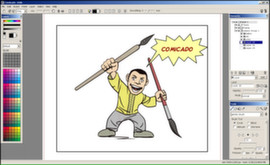
Comicado is an easy and lightweight graphic application for creating comics and other illustration works. It combines many standard elements of digital illustration (layers, editable brushes...) with some new concepts like panels based artwork composition, which allows creation of editable comic layouts.
Modeled estimate, not a reported figure. How we estimate →
Media

About
Genres
Stats
All-time low is the lowest price we've recorded for this game since we started tracking it.
Languages: English
Engagement
Hours played at review time, across 42 reviews with recorded playtime.
Reviews
Themes across 42 recent reviews and how positive each mention is. A keyword signal, not full sentiment analysis.
positive critical· bar length = how often the theme comes up
Reviews
One of my new favorite tools! Yes, it has plenty of issues; it lags intensly when using spline layers and etc... even on my High end pc.... and yes it is super simple and seemingly basic... but it is incredibly intuitive... the spline tool, the line blocking and the perspective tool as well as others really revolutionize comicbook designing software. This program is truely developed for comic book artists... in all of the best ways... as far as those artists who are looking for something extremely tool heavy and photoshop-esk this might be waaaay to limited for you... but if you aregoing into professional comicbook creation... you will feel right at home as well as transitioned properly into the future with the layers and line toools provided. I love this program! ~Mike.M
Please do not buy this product. I only had this thing for 2.9 hours, and that was it. After that, any time I tried to open it, my border would turn green, then blue again. I hav uninstalled and reinstalled Steam three times already, all with no avail. I don't know if this is Steam or a file, or whatever, but it's not at all worth it. As an alternative, I recommend Paint Tool SAI, even though it is a little pricey at nearly $60, but it never shuts down, and it seems to be the best image painting tool so far. Better than Fire Alpacam, better than this, and possibly better than Photoshop. So go get that instead. If anyone can be able to help me get Comicado to work again so I can give this product another chance (and therefore a fair review), it would be greatly appreciated.
yes this software is for creating comic books, so any one who has dreamed of creating a comic book, here is your chance. i recomend this software to anyone
I have 'a lot' of profesional graphics software and this is amazingly powerful for the money. Some features are make it best for comic creation of all of them in terms of SPEED and EASE. Read the manual ! Some aspects of it require some different thinking - panels and boards etc. I put the keyboard shortcuts on a Excel file, which I can share if I find way to post it. Check out Deivanart for can be produced with it.
I didn't like, maybe if it has more english tutorials online . I wish I had my money back. Totally waste of money.
It takes some getting used to, and I'll be honest, the splines don't work very well for me, but otherwise it's a good little program. There are much better out there, but for $9.99, I'd say it's a good place to start. It does work pretty well with my Wacom tablet at least.
So... You want to draw pictures, or more specifically, a comic. Well, this software is built around this particular use case. It can also do illistrations, but it's not built around that use case quite as much as it is comics. You have the vitual 'paper' of the page to be drawn. You don't draw directly on this, like in MS paint. You have panels. For an illistration, a panel can be the entire page. When you're making a comic, you'll have more then one, and you can easily resize and move them around a bit after drawing them. It also allows you to distort the whole panel if you want. There's lots of options there. Inside these panels, you have your standard layers, like in everything that's not MS paint. It will take mouse input, so you don't need to buy a $100 tablet (or $250 tablet-equipped laptop) but if you have one, that also works. It has drawing guides, like French Curves for us Drafting people, that let you draw smoothly with either method. Pros: It's cheap, Buy it once and you're done Has some tools very useful for it's inteded application. has figures you can pose to get a sense of scale, this is REALLY nice if you're like me and utterly stink at drawing characters. Has nice export functions, and some limited vector graphics capibility (it's a raster program, so no exporting) Doesn't chew up too much memory, while you're running. A fair decent selection of brushes and the like. Has guides, even mouse drawn stuff can look good. Perspective grid <3 so much less involved for basic outlining of that sort of scene. Cons: The pressure sensitivity for tablets isn't there (at least on the t730 it's not) it also doens't change the cursor to tell you it's getting it's cues from the pen, it's nice for me to have that visual feedback so I know when I can let my palm rest. Editing spines is TEDIOUS. Avoid using them when you can. The toolbars on the sides don't stay inside the window, so it can cover the start bar or end up half offscreen when I rotate the tablet.. It lacks a classical 'ruler' with mm/pixels/inch measurement, it IS nice to have that now and again. Not so much a con as a feature I miss dearly. Could use more figures. A hand is one example I'd love to see added. I tied to add one myself (You can do that!) but it failed miserably. It could use some tutorials, but I know those are slowly coming. Lacks a plugin API that I know about (if it has one, I can think of at least one handy plugin to add, I'd make it myself if need be) All in all, it's not a bad program. I've doodled with it quite a bit, using both the tablet on the laptop, and the desktop, and have yet to have gotten really annoyed at anything. I've gotten faster with it as time goes on. Would (and have) reccommeded it to other artists I know
Light program for your comic/manga projects.
This is great! I have been searching for something like this for a while. Easy to use and works with my intuos perfectly, I havn't dove deep into this but so far so good. If I do find any problems I will post them.
不好用
Related
Related
Trends
Modeled estimate over time, reconstructed from Steam's monthly review histogram.
Momentum
Pace estimated from the game's recent review growth (our daily snapshots) at its own sales-per-review ratio — a momentum signal, not booked sales.
Audience
Estimated from the language of this game's reviews — a proxy for where players are, not official Steam demographics.
Related
| Spy Fox In: Hold the Mustard | $4.2K | 52 | 40% | $4.99 |
| Gear Puzzle: the inheritance of grandpa | $4.2K | 60 | 75% | $4.99 |
| GORE | $4.2K | 130 | 75% | $1.99 |
| aMAZE Valentine | $4.2K | 69 | 81% | $1.99 |
| Mighty Dungeons | $4.2K | 92 | 62% | $1.99 |
| Tobla - Divine Path | $4.2K | 225 | 92% | $1.19 |