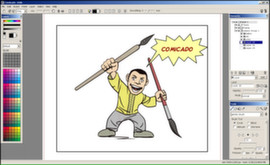
Comicado is an easy and lightweight graphic application for creating comics and other illustration works. It combines many standard elements of digital illustration (layers, editable brushes...) with some new concepts like panels based artwork composition, which allows creation of editable comic layouts.
Modeled estimate, not a reported figure. How we estimate →
Media

About
Genres
Stats
All-time low is the lowest price we've recorded for this game since we started tracking it.
Languages: English
Engagement
Hours played at review time, across 42 reviews with recorded playtime.
Reviews
Themes across 42 recent reviews and how positive each mention is. A keyword signal, not full sentiment analysis.
positive critical· bar length = how often the theme comes up
Reviews
Light program for your comic/manga projects.
So... You want to draw pictures, or more specifically, a comic. Well, this software is built around this particular use case. It can also do illistrations, but it's not built around that use case quite as much as it is comics. You have the vitual 'paper' of the page to be drawn. You don't draw directly on this, like in MS paint. You have panels. For an illistration, a panel can be the entire page. When you're making a comic, you'll have more then one, and you can easily resize and move them around a bit after drawing them. It also allows you to distort the whole panel if you want. There's lots of options there. Inside these panels, you have your standard layers, like in everything that's not MS paint. It will take mouse input, so you don't need to buy a $100 tablet (or $250 tablet-equipped laptop) but if you have one, that also works. It has drawing guides, like French Curves for us Drafting people, that let you draw smoothly with either method. Pros: It's cheap, Buy it once and you're done Has some tools very useful for it's inteded application. has figures you can pose to get a sense of scale, this is REALLY nice if you're like me and utterly stink at drawing characters. Has nice export functions, and some limited vector graphics capibility (it's a raster program, so no exporting) Doesn't chew up too much memory, while you're running. A fair decent selection of brushes and the like. Has guides, even mouse drawn stuff can look good. Perspective grid <3 so much less involved for basic outlining of that sort of scene. Cons: The pressure sensitivity for tablets isn't there (at least on the t730 it's not) it also doens't change the cursor to tell you it's getting it's cues from the pen, it's nice for me to have that visual feedback so I know when I can let my palm rest. Editing spines is TEDIOUS. Avoid using them when you can. The toolbars on the sides don't stay inside the window, so it can cover the start bar or end up half offscreen when I rotate the tablet.. It lacks a classical 'ruler' with mm/pixels/inch measurement, it IS nice to have that now and again. Not so much a con as a feature I miss dearly. Could use more figures. A hand is one example I'd love to see added. I tied to add one myself (You can do that!) but it failed miserably. It could use some tutorials, but I know those are slowly coming. Lacks a plugin API that I know about (if it has one, I can think of at least one handy plugin to add, I'd make it myself if need be) All in all, it's not a bad program. I've doodled with it quite a bit, using both the tablet on the laptop, and the desktop, and have yet to have gotten really annoyed at anything. I've gotten faster with it as time goes on. Would (and have) reccommeded it to other artists I know
First Impression: Lack of tutorials which many have mentioned. I am not sure why the developer did not promote his tutorial on the front page which gets you started with most of the stuff. http://steamcommunity.com/sharedfiles/filedetails/?id=215951642 Why you would not buy this software? 1- If you are not good at drawing this will not improve on any of that. Develop your drawing skills first. Even with the pose options you will not be able to draw good if you are not familiar with the anatomy of the drawing. So if you are buying this software thinking your comics are going to look any better most likely they wont. 2-If you don't like to explore the software yourself stay away from it most of the help you will be scavenging through the discussions. If you are the type of person who posts a thread the minute you get stuck with something - this software is not for you. 3- Everything has its own layer - text , poses, everything - its not photoshop - once you get past the whole everything in its own layer you should be able to move through the whole drawing process relatively faster. Though this software seems complete I hope the developer listens to the users and fixes several misplaced menu options. Pose creation does not have pose delete or rename - you have to go through the preset manager. Also the smoothing option is wonky you will have to play around till you find the sweet spot - which might not exactly be what you need. All said and done - for the discounted price I can recommend it. Its not Manga studio but than for the discounted price its worth it - which I recommend the developer to reduce to that permanently. I highly recommend checking out the guides posted by the developer - they will answer most of your questions. The lack of proper pictorial manual is simply unacceptable - seems like the dev is highly dependent on having the user already used and being familiar with other photo / illustrative tools. Also if you plan to draw with a mouse - please don't buy this software. Link to tutorial: http://steamcommunity.com/sharedfiles/filedetails/?id=215951642
Iv'e used this software for a while, and honestly, it's great! For the price you get alot, and you can do alot with it. Just a reliable Software to make cool artwork. Buy.
Not worth the money at all. I would use paint over this. Wanna hear why? Paint has more brushes, it's more simple and doesn't have a bunch of useless features. Drawing with a mouse is impossible already so I at least can't get anything out of this. I'm not interested in comics that much and that's what the software is about. The trailer showed how you can also draw fancy stuff with it but no. It's not possible with a software like this and a mouse. Buy samsung galaxy note 3 and use the base drawing software and you can show how artistic you are.
this software is so bad!!!!! The developer of this app must learn something from Clip Studio or SAI.
this application is ♥♥♥♥♥♥♥♥. in it you make your comics, scene art and what have you yet there's one key issue... you absolutely CANNOT save anything as any kind of image file. the only thing you can save your creations as is a data file that only this very application can open properly. quite the big ♥♥♥♥ up to make for this sort of application.
where are the text tools,......not in the drop down menus, nothing says "TEXT" wtf....
Love the program for the Pose thing but there is a limited amont of brushes for something for $30 you just need to add a Few more Brushes mayby and My Tablet short cuts don't work on the Program :(.
al principio me confundía con su modo de mostrar las capas y las imagenes en si, pero luego de unos dias me acostumbre y empece a usarlo mas seguido, ahora es mi herramienta de dibujo principal, solo tienes que darle una oportunidad y el tiempo suficiente para comprenderlo
Related
Related
Trends
Modeled estimate over time, reconstructed from Steam's monthly review histogram.
Momentum
Pace estimated from the game's recent review growth (our daily snapshots) at its own sales-per-review ratio — a momentum signal, not booked sales.
Audience
Estimated from the language of this game's reviews — a proxy for where players are, not official Steam demographics.
Related
| Gear Puzzle: the inheritance of grandpa | $4.2K | 60 | 75% | $4.99 |
| Spy Fox In: Hold the Mustard | $4.2K | 52 | 40% | $4.99 |
| GORE | $4.2K | 130 | 75% | $1.99 |
| aMAZE Valentine | $4.2K | 69 | 81% | $1.99 |
| Mighty Dungeons | $4.2K | 92 | 62% | $1.99 |
| Tobla - Divine Path | $4.2K | 225 | 92% | $1.19 |