Card Creator, developed and published by Pixelatto, is a dedicated design and prototyping tool for creating custom playing and trading cards. Unlike traditional graphic software, which demands significant manual layout work, Card Creator streamlines the process of generating entire card decks through templates, automation, and data integration. It’s designed for game developers, tabletop designers, and hobbyists who want to bring their ideas to life without the steep learning curve of professional design suites. By focusing on usability and repeatable structure rather than pure artistry, the software positions itself as a practical bridge between creative vision and production-ready output. It’s less about painting every pixel and more about organizing visual systems that make hundreds of cards consistent, printable, and shareable.
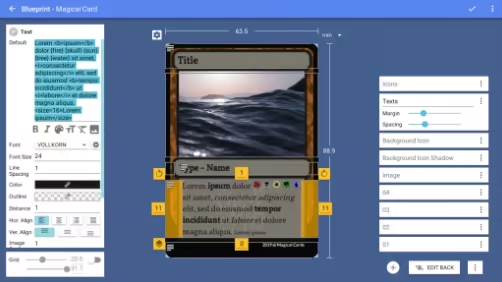
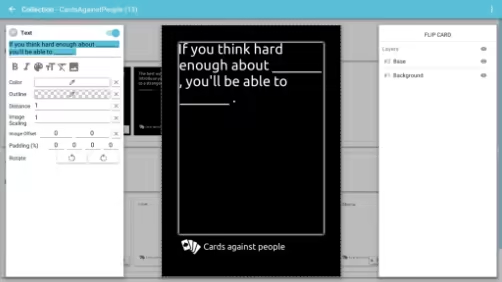
At its foundation, Card Creator uses a blueprint system that defines the visual and structural layout of cards. This system allows users to create templates where each design element—images, icons, titles, stats, or flavor text—has a designated space. Once a blueprint is built, you can populate it with data using either a built-in editor or external files like spreadsheets or CSV documents. This makes it possible to design once and then automatically generate dozens or even hundreds of unique cards with varying information. For developers or designers who have struggled with repetitive layout work in Photoshop or Illustrator, this is a game-changer. The process of linking data fields to text boxes or icons is intuitive once you understand the basics, and the software provides real-time feedback as you edit. The user can immediately preview what each card will look like as values change, making iteration fast and precise.
The user interface emphasizes accessibility, though it still requires a bit of acclimation. The workspace is divided into sections for design, data management, and exporting, allowing users to focus on one stage of creation at a time. Tools for aligning elements, adjusting spacing, and scaling images work efficiently, and most actions use familiar drag-and-drop conventions. However, Card Creator’s reliance on an aspect-ratio-based sizing system can feel unintuitive to those accustomed to traditional width and height measurements. Adjusting card proportions sometimes requires more trial and error than it should, and users who prefer pixel-perfect control may find themselves wishing for more flexibility in defining dimensions. Still, the balance between simplicity and customization is handled well enough that beginners can produce professional results without becoming overwhelmed by options.
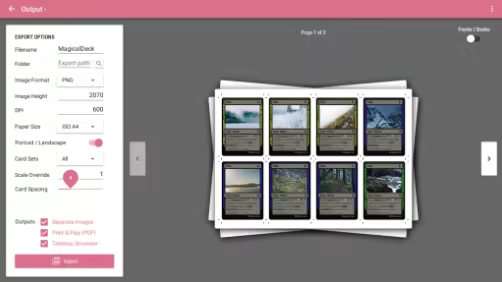
Card Creator’s greatest strength lies in its automation and export capabilities. Once a set of cards is complete, the software can output high-resolution image files or print-ready PDFs with bleed and trim marks, allowing creators to send their work directly to professional printers or digital platforms. The output quality supports resolutions up to 700 dpi, which is sufficient even for large-format printing. More importantly, because the software ties visual templates to data sheets, updating cards is as simple as editing a spreadsheet. If a stat, value, or ability name changes, you can regenerate the entire deck with one click. This workflow efficiency makes the program invaluable for iterative game design, where mechanics often change mid-development. Additionally, the ability to export in multiple formats makes it suitable for both physical prototypes and digital assets for online card games or mobile projects.
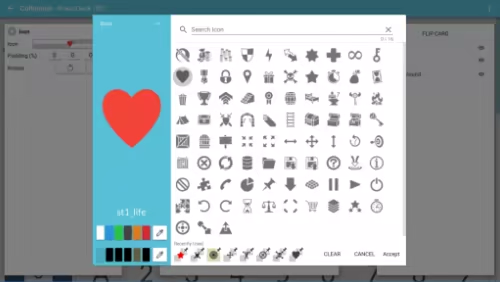
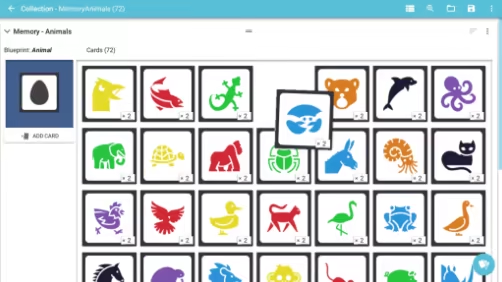
In terms of versatility, Card Creator is surprisingly flexible. It isn’t restricted to trading cards or collectible decks—you can design flashcards, educational tools, character cards, or even board game components. The library system allows users to organize projects into collections, manage art assets, and switch between multiple blueprint types for different game elements. This modular structure gives the software longevity beyond a single use case. While it lacks some of the deep compositing and vector manipulation found in advanced design programs, it integrates well into a broader creative pipeline. Many designers use it to automate layout generation, then polish exported cards in Photoshop or Affinity Designer. This hybrid workflow maximizes efficiency while maintaining artistic control.
The overall experience, however, is not without frustrations. Some users have reported occasional stability issues, particularly when working with large numbers of high-resolution assets. The software can stutter during real-time previews or data imports if the project size becomes too large. The interface, while intuitive in its layout, can also feel dated in design and occasionally clunky in navigation. Certain interactions—like resizing objects or adjusting fine alignment—lack the precision found in professional design tools. Documentation and tutorials exist but are somewhat limited, leaving beginners to learn many features through experimentation. Despite these drawbacks, the program’s core functionality remains reliable, and most bugs are minor inconveniences rather than deal-breaking flaws.
Where Card Creator truly excels is in its practicality. It understands the needs of small teams and independent creators who want to focus on design logic rather than production tedium. The blueprint system turns the card-making process into a creative data exercise rather than an artistic grind, which is ideal for rapid prototyping. The ability to instantly apply aesthetic changes—like altering font styles, repositioning icons, or adjusting frames—across hundreds of cards demonstrates how well it scales for large projects. This data-driven approach makes it particularly useful for collectible card games, where balance adjustments or new expansions demand quick updates to existing templates.
Visually, the results produced by Card Creator are clean, professional, and adaptable. Users can incorporate their own artwork, add transparency effects, and use conditional visibility rules to display certain elements only under specific conditions, allowing for advanced designs that feel handcrafted even when mass-produced. The software doesn’t impose stylistic limits; instead, it serves as a blank canvas for whatever aesthetic you choose to bring. For users who value structure and organization over painterly detail, this approach is liberating. It encourages creativity through logic, rewarding careful planning rather than manual repetition.
Card Creator’s reception reflects its niche but valuable place in the market. While it may not have the widespread recognition of graphic design giants, it fills a gap few others do: a tool that understands the workflow of tabletop and card game creators. Its reviews are largely positive, with users praising its efficiency and functionality, even if they acknowledge the occasional rough edge. It’s not a flashy program, but it doesn’t need to be—it succeeds because it does what it promises and does it well.
Ultimately, Card Creator is a practical and focused tool that prioritizes workflow efficiency over artistic complexity. It’s ideal for independent developers, small studios, educators, and hobbyists who want to generate high-quality card designs quickly without diving into complex design software. Its blend of automation, flexibility, and accessibility makes it one of the most efficient tools available for anyone working in the realm of card-based design. While it won’t replace full-featured art suites for those seeking absolute precision or advanced graphical effects, it offers an elegant, purpose-built solution for the unique demands of card game creation—a rare example of software that understands its audience and delivers exactly what they need.
Rating: 7/10