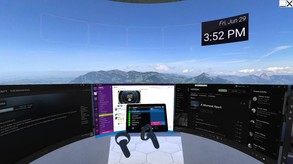
Welcome to your new virtual workspace. Commute to your office by simply putting on a VR headset. vSpatial brings productivity, collaboration, and a little bit of fun to your immersive virtual office. Meet with up to 3 additional people with voice calling and content sharing.
Modeled estimate, not a reported figure. How we estimate →
Media

About
Genres
Stats
Languages: English
Engagement
Reviews
Themes across 45 recent reviews and how positive each mention is. A keyword signal, not full sentiment analysis.
Reviews
Can't use it without an account, and it refuses to let me create an account. It also makes my computer un-useable every time I start it up because it steals all inputs system-wide.
A good idea, terrible execution. It's really slow and confusing.
tl;dr It's free, it's the best so far, at least try it and experiment. The idea of using VR for productivity is extremely appealing. The amount of information that can be displayed within VR is incredible. Combined with the level of personalization that can be accomplished, and it can easily beat out real work spaces. Compartmentilization is something that is really helps me get my work done. I like to be in a different area for the different things I do. If I'm at school, then I feel like working at school. If I'm at work, then I feel like working. Depending on my location, the ease of which I can be productive changes. Due to recent circumstances, all of my productivity has been thrown into my gaming room, making it difficult to actually be productive. The potential of this app to fix that problem is enticing. So far, there are a few things that I believe hold this back from being the perfect productivity application. However, that's only with an hour of experimenting. There is more I wish to try with this program. The main roadblock I've had is related to the controls. Firstly, I would love to have a single controller option. What I do involves lots of typing, and VR typing is not sufficient for my needs. Therefore, I need to use a keyboard. This app actually has good support for a keyboard and a mouse. So, using the hardware is not a problem. The issue occurs whenever I want to change windows, or scroll across the 360 degree view. In order to scroll horizontally, you have to hold the shift key while using the scroll wheel. This, for me, was incredibly slow and frustrating. It was much easier to swivel my chair to view the screen I wanted to view. The problem? I have a wired mouse and keyboard. To remedy this, I decided to use one of my Valve Index controllers instead of a mouse. However, there is no way to change the mapping on controls so that I can use just 1 controller. To cycle the windows I have to use the left controller thumbstick. So, I end up with the left controller in my lap with my keyboard, and my right controller within arms reach so I can grab and manipulate windows. I would either like A. Improve native mouse functionality B. Program single controller support. I actually really like using the index controller as a replacement mouse, it feels very natural. However, I don't like having to use both of them to get the full functionality. My only other gripe at the moment is the 360 band can't be adjusted in height. I prefer to look straight ahead for my monitors, but I'm often looking down on the band. It can become quite uncomfortable. I'm not sure how big of a fan I am of the band. It works well, but feels sluggish. I'm going to experiment with placing monitors freehand in space. That may work better. I also think the menu might work better as a pop-up. It feels like wasted space having the area at the top that contains my opened applications, the time, and some default apps like the weather and settings. I would rather have that space for monitors. On that note, options for where the "mini-monitors" can be placed would be nice. By default they're up above the 360 bar, but I would prefer to have them under it so the bar is more eye-level. These nit pics do not break the application. This is the best VR desktop productivity software out there. That being said, it's not finished yet. It has the potential to be much more productive then a regular desktop environment, but the options aren't there yet to allow you to build your own workflow. This is a fantastic start and I plan to continue to learn this application and discover new ways of trying to be productive. The fact this is free is insane, and I hope the full product will be behind a pay-wall. If you are even considering using VR as a workspace, use this program.
Related
Related
Trends
Modeled estimate over time.
Hours played at review time, across 45 reviews with recorded playtime.
positive critical· bar length = how often the theme comes up
起動すると何故か「ファイル名を指定して起動」のウィンドウが出て、消してもまた出てきてしまいます。 無視してやってたのですが、VRゲーム以外のゲームをデスクトップ画面に表示しプレイすると 先程のウィンドウにキーが引っ張られているのか全く操作できない。 終いにはマウスカーソルまでウィンドウの真ん中に戻されるとゆう…自分だけかもしれませんけど
Without a doubt my favourite immersive workspace, it works well for me, is customisable enough, and it helps my productivity.
Amazing productivity app.
I love it so far but wish that the desktop version was more usable
love it
Overall, this is exactly what I was looking for to help me study for school work in VR. Although having the ability to have other screens on top of each other would be a nice touch, I would easily recommend this application for anyone looking for a way to work in VR.
You can't press anything from the start. Can't use, Developer advice would be appreciated. For now. 0/10.
Momentum
Pace estimated from the game's recent review growth (our daily snapshots) at its own sales-per-review ratio — a momentum signal, not booked sales.
Audience
Estimated from the language of this game's reviews — a proxy for where players are, not official Steam demographics.
Related
| Wallpaper Engine | $42.3M | 1M | 98% | $4.99 |
| Dungeon Alchemist | $3.5M | 3.9K | 95% | $44.99 |
| GameGuru Classic | $1.5M | 2.1K | 72% | $19.99 |
| Homebrew - Patent Unknown | $518.7K | 971 | 72% | $14.99 |
| Paradiddle | $494.6K | 678 | 91% | $24.99 |
| Aimbeast | $472.2K | 2.2K | 93% | $7.99 |