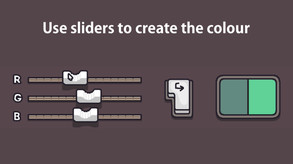
How accurately can you recreate a random colour? Forget using a colour picker, learn to form hex codes in your mind. Impress your crush. Prove your abilities under the clock, blindfolded. Practice today.
Modeled estimate, not a reported figure. How we estimate →
Discounts
Every price cut of more than 20% we have observed, in each market that quoted one, with this game's chart position on either side of it. These are episodes, not a model: a sale is one event, and one event cannot tell you what the next one will do.
Reviews, worldwide (the counter carries no country): 0/day in the week to Sep 8 → 0.14/day in the week after.
Reviews, worldwide (the counter carries no country): 0/day in the week to Jul 30 → 0/day in the week after.
For scale, across Steam · Top Sellers · Brazil over the last 30 days: the 26 chart moves that followed a price cut of more than 20% went a median of 7 places towards #1, and the 2,400 moves with no price cut behind them went 2 away. One store, one chart, one country — it is the only place we have enough observations to say even that.
Prices outside the United States have been collected since 6 August 2026 and chart positions since 19 July 2026, so a cut older than that has no market to compare and a market that joined later has no history yet. Nothing here is converted between currencies.
About


Engagement
Reviews
Themes across 41 recent reviews and how positive each mention is. A keyword signal, not full sentiment analysis.
Reviews
何かしらの能力を鍛えられる気がする
10/10. My eyes hurt and are sore at staring at pixels, at least my expensive calibrated art monitor isn't. My optometrist is gonna hate me.
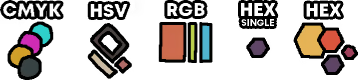
"RGB Rush" is you could say a education game in which you try to recreate a random color as accurate that you can. In this game you get a random colour, then you will get tested how accurate you recreate it with sliders or type it in? There are diffrent modi in this game like CMYK (Sort by cyan, magenta, yellow and key); HSV (Sort by colour, intensity and brightness), RGB (Sort by red, green and blue) and HEX (which is the same as RGB, except letters can be numbers too) The gamemechanics are realitive easy to understand and simple. I really liked the Artstyle and the music. The whole game took me around 2.1 hours to finish with all achievements, you get one for specific actions like typing in the right colour code. I bought the game on sale for 1,99€, which is nice. The game is nice, so try it out!
Media

Related
Related
Price dynamics, follower growth, revenue and sales trajectories with interactive tooltips
This and every other Pro feature is free until October 20, 2026. A free account is all it takes.
Genres
Stats
All-time low is the lowest price we've recorded for this game since we started tracking it.
Languages: English, Simplified Chinese
Hours played at review time, across 41 reviews with recorded playtime.
positive critical· bar length = how often the theme comes up
锻炼脑力
задумка интересная, но это можно накодить самому за 5 секунд, и разраб просит 6$. это шутка?
This game is simple and fun, but kinda NSFW—I was trying to prove myself until I played the Timed mode, then I quickly realized I was just rushing it like how I bullsh!t my job... I DO NOT recommend you playing this on a lunch break in your office(play on work-time instead so people would think you're just practicing your eyes).
好玩,不过要关闭夜览模式并且选择hsv模式,相比rgb模式更加直观且容易上手
Сойдет. Просто как напоминание об основных цветовых кодировках.
UIのスライダーの見た目が不便 特にHSVモードではこれのせいで難易度が爆上がりしてる 手で数字を打つなら関係ないけど... ゲームのテーマとデザインは楽しい
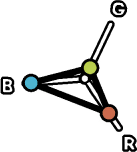
【概要】 お手本の色と同じになるよう、スライダーを調整して色を作り出すゲーム。 RGBはもちろんCMYKやHSVなど、自分のやりやすいor慣れ親しんだ方式で挑める。 *** 【感想(良かったところ)】 色の感覚が鍛えられてる気がしてなかなか面白い。 いわゆる”チルい”音楽にどこか小気味よい効果音も相まって、つい集中して黙々とやってしまう。 RGB(ディスプレイ)にCMYK(印刷)、HSV(CG系)、HEX(カラーコード)と、色の様々な表現方式の勉強にもなって良い。 デジタル環境で色を弄る機会がある人の暇つぶしにぴったりだと思う。 あとHEXを扱う関係上、少しだけだが16進数も学べる。 オプションとして、現在自分が作り出しているのが何色か見えず手探りになる「Blind」と、色調整に30秒の時間制限がかかる「Timed」がある。 それぞれONにして遊ぶと、これまたゲーム性が生まれて少しばかり熱中してしまう。 また、ゲーム中にポーズすることで見られる「Reports」では、現在の成績(お手本と作成した色との差異?)から分析したと思われる三角形レーダーチャートが表示される。 自分はRGBそれぞれどの色感覚が優れているのか、逆にどの色を見極めるのが困難だったかが可視化されており、これも面白い。 *** 【誤字?】 HSVモードでのポーズ画面の「Reports」では、三角形レーダーチャートの各項目がそれぞれHSVとなっているのだが、そのうちの「V」が「B」になってしまっている。 他2つはHとSのままだし、そもそも、1つも問題を解いていない初期状態でのポーズ画面だとしっかりHS「V」となっているので、おそらく誤字ではないかと思う。 【気になったこと】 ・スライダーのつまみで色のバーや目盛りが隠れてしまう。 ・つまみの真ん中にある色を選択しているのかと思いきや、そうでなさそう? (例:バーの両端付近だとつまみが端っこへぶつかりつっかえてしまい、つまみの真ん中を目盛りへ合わせることが出来ない) など、ちょっとUI面でモヤモヤする部分があった。(自分の遊び方やUIの見方使い方が間違ってるだけだったらマジでごめんなさい) 【要望】 設定でつまみのデザインを変えられるようになったりしたら、かなり嬉しい。 あと、音量もON/OFFだけじゃなく調整出来るようになるとありがたい。 This text was written using machine translation. Thank you for your understanding. [Overview] A game where you adjust sliders to create colors that match a given sample. You can take on the challenge using whichever system you are most comfortable with or accustomed to, such as RGB, CMYK, or HSV. *** [Impressions (What I liked)] It’s quite interesting as it feels like it's training my sense of color. The combination of so-called "chill" music and somewhat pleasant sound effects makes me lose myself in the game and play in silence. It’s also great for learning various ways to represent color, including RGB (displays), CMYK (printing), HSV (CG/graphics), and HEX (color codes). I think it's a perfect pastime for anyone who has opportunities to work with color in a digital environment. Additionally, since the game involves HEX codes, you can even learn a little bit about hexadecimal numbers. As optional modes, there are "Blind," where you cannot see the color you are currently creating and must work by feel, and "Timed," which imposes a 30-second time limit on color adjustment. Turning these on adds a layer of gameplay that makes it quite engrossing. Furthermore, the "Reports" accessible by pausing the game display a triangular radar chart, which seems to be analyzed based on your current performance (the difference between the sample and the color you created). It visualizes which colors you have a good sense for within RGB and which ones you find difficult to distinguish, which is also very interesting. *** [Typo?] In the "Reports" section of the pause screen while in HSV mode, the labels on the triangular radar chart are listed as HSV, but the "V" has become a "B." The other two remain H and S, and in the pause screen at the very beginning (before solving any problems), it is correctly labeled as HS"V," so I suspect this might be a typo. [Points of Concern] - The slider handles hide the color bars and scales. - It doesn't seem like the color is being selected based on the center of the handle? (Example: Near both ends of the bar, the handle hits the edge and gets stuck, making it impossible to align the center of the handle with the scale.) There were a few parts of the UI that felt a bit frustrating. (I sincerely apologize if I'm just playing it wrong or misunderstanding how to use the UI.) [Requests] I would be very happy if there were an option to change the design of the slider handles. Also, it would be appreciated if the volume could be adjusted rather than just toggled ON/OFF.
Players by region
Where this game's players are, estimated from review languages.
Related
| Game | Estimated lifetime revenue | Reviews | Review score | Price |
|---|---|---|---|---|
| $1.4K | 5 | 100% | $8.99 | |
| $1.3K | 10 | 80% | $9.99 | |
| $314 | 6 | 100% | $1.79 | |
| $152 | 2 | 50% | $4.99 | |
| — | 0 | — | — | |
| $73.9K | 467 | 95% | $9.99 |
Related
| Game | Estimated lifetime revenue | Reviews | Review score | Price |
|---|---|---|---|---|
| $15.4K | 155 | 75% | $3.99 | |
| $15.4K | 107 | 73% | $9.99 | |
| $15.4K | 78 | 49% | $9.99 | |
| $15.4K | 97 | 97% | $7.99 | |
| $15.4K | 86 | 79% | $9.99 | |
| $15.4K | 219 | 94% | $1.99 |