
RaySupreme 3D
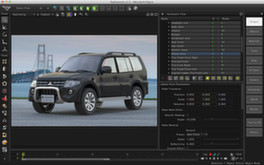
RaySupreme is a full-featured, powerful and easy to use 3D modeling, texturing and rendering software that features many of the tools you would expect from any professional 3D software. You can model, render, select and import objects in the same manner as most high-end 3D programs.
Estimated lifetime revenue
Free-to-play
Revenue comes from in-game items and microtransactions, which our price-based model doesn't estimate. Copies below reflect the player base, not paid sales.
Est. copies sold
1.9K
mid estimate
Reviews
54
Review score
43%
4.3/10
Playing now
0
live
Media
Screenshots & trailer
About
About the game
RaySupreme is a full-featured, powerful and easy to use 3D modeling, texturing and rendering software that features many of the tools you would expect from any professional 3D software.
You can model, render, select and import objects in the same manner as most high-end 3D programs.
RaySupreme is designed for all users ranging from beginners to professionals at an unparalleled value.
RaySupreme is also the development platform for Text-to-3D, a new technology that enables users to create 3D works by simply typing text descriptions.
3D Artist Magazine gives RaySupreme an 8/10 review saying "RaySupreme is not your average I want to be like everyone else package"
Key Features:
Please visit this link to see the full feature list of RaySupreme
RaySupreme combines 3D modeling and rendering tools with Text-to-3D Technology.
What's new in v1.5
RaySupreme is available for Mac OS X, Windows 7 / 8 and Linux platforms
Download the trial version of RaySupreme here
Resources
Help guides are in the RaySupreme software and can be accessed by selecting the Help Tab.
Tutorials can be accessed via our website as well as our community forum.
You can model, render, select and import objects in the same manner as most high-end 3D programs.
RaySupreme is designed for all users ranging from beginners to professionals at an unparalleled value.
RaySupreme is also the development platform for Text-to-3D, a new technology that enables users to create 3D works by simply typing text descriptions.
3D Artist Magazine gives RaySupreme an 8/10 review saying "RaySupreme is not your average I want to be like everyone else package"
Key Features:
- 3D Modeling
- UV Unwrapping
- Full-featured Texture Painting
- Global illumination Renderer
- Compositing Features
Please visit this link to see the full feature list of RaySupreme
RaySupreme combines 3D modeling and rendering tools with Text-to-3D Technology.
- 3D modeling, mapping and rendering tools you would expect from any professional 3D program.
- Flexible, adjustable Primitive objects that can be configured to best suit the user’s needs.
- Polygon-based modeling with a full range of tools and features.
- Revolutionary Text-to-3D Engine, which processes English statements into 3D images.
- Subdivision can be applied to base forms and can be toggled on/off for flexible workflow.
- Snap and Alignment system to aid in precision and fast editing.
- Time-saving productivity tools like Boolean operations, Bend, Lathe, Extrude and Shell.
- Optimization and Correction tools like Global Remesh, Mesh Triangulation, Fill Holes and Update Normals.
- Powerful Node-based features, which support and integrate Text-to-3D Technology into your models.
- Detailed documentation that supports the beginner, intermediate or expert 3D artist.
- Ever expanding database of objects, materials with free unlimited downloads.
- OBJ Export functionality.
- Rendering
- Multithreading processor support.
- Final Gathering support for Global illumination.
- Caustics, Photon Mapping, time-based lighting, Procedural Sky.
- HDR light probe and texture light emission.
- Effects including sun and stars, fog and haze.
What's new in v1.5
- Up to 10 times faster rendering.
- Compositing features.
- New viewport and area rendering modes.
- Object display properties.
- New modeling and instancing tools.
RaySupreme is available for Mac OS X, Windows 7 / 8 and Linux platforms
Download the trial version of RaySupreme here
Resources
Help guides are in the RaySupreme software and can be accessed by selecting the Help Tab.
Tutorials can be accessed via our website as well as our community forum.