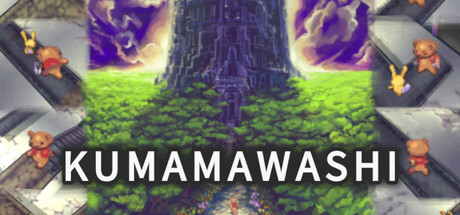
"The witch… took her." Bear's puzzle adventure, rotate panels in tower.
Modeled estimate, not a reported figure. How we estimate →
Media

About
(´ ・( ェ)・`) (´・(ェ )・ ` )
"The witch... took her."
To rescue the kidnapped girl, the bear embarks on a solo journey, delving into the depths of the witch's tower.
Rotate the panels to forge a path and lead the bear to the girl.
Move the cursor forward, backward, left, right, and up or down to select and rotate panels, creating paths for the bear.
The bear's stamina decreases over time, and when it reaches zero, it's game over.
Stamina can be restored by touching orbs scattered throughout the tower, allowing the bear to explore further.
The tower to be explored is wide, tall, and consists of stages with a sense of volume.
With adjustable difficulty settings, you can enjoy puzzle action suited to your skill level.
[Open Menu]
Keyboard … Tab key
Gamepad … Menu button, View button, Y button
[Move Cursor Horizontally]
Keyboard … WASD keys
Gamepad … D-pad, Left stick
[Move Cursor Vertically (Change Floor Level)]
Keyboard … Up/Down arrow keys, Numpad keys 5 and 2
Gamepad … RB, LB buttons, Right stick (up/down)
[Rotate Panel]
Keyboard … Space key, Enter key
Gamepad … A button
[Rotate Camera]
Keyboard … Left/Right arrow keys, Numpad keys 1 and 3
Gamepad … LT, RT buttons, Right stick (left/right)
[Dash]
Keyboard … Ctrl key, Numpad key 0
Gamepad … X button
[Charge Attack During Combat]
Keyboard … Space key, Enter key
Gamepad … A button
[Progress Story]
Keyboard … Space key, Enter key
Gamepad … A button
[Skip Story]
Keyboard … ESC key, Ctrl key, Tab key, Numpad key 0
Gamepad … B button, Menu button, View button, X button, Y button
[Menu-Related Cursor Navigation]
Keyboard … WASD keys, Arrow keys
Gamepad … D-pad, Left stick
[Menu-Related Confirm]
Keyboard … Space key, Enter key
Gamepad … A button
[Menu-Related Cancel]
Keyboard … ESC key
Gamepad … B button
Cursor Movement: Use the WASD keys or D-pad to move the yellow cursor up, down, left, and right.
To rotate the panel under the cursor, press the Space key, Enter key, or A button, which will turn it 90 degrees counterclockwise.
Rotate the panels to create a path and guide the bear deeper into the tower.
However, some panels cannot be rotated, so please judge by their appearance.
Also, if you hold down the rotation key after rotating a panel, you can continue to rotate it as long as the key is held down.
Vertical Cursor Movement: The room has level differences equivalent to the height of one floor.
The panel to be rotated is directly beneath the cursor, so to select a panel positioned above the cursor, you need to raise the cursor's position.
You can raise the cursor with the up arrow key, numeric keypad 5, or the RB button, and lower it with the down arrow key, numeric keypad 2, or the LB button.
Raising the cursor's position not only changes the selected floor, but also allows you to have a broader view inside the room.
By the way, even when walking on a sloped panel, the time it takes to traverse is the same as walking on a flat panel.
Camera Control: In some places, it may be difficult to see the bear's position.
In such cases, it's good to rotate the camera.
You can rotate the camera using the left and right arrow keys, numeric keypad 1 and 3 keys, or the LT and RT buttons.
You can check which direction the camera is facing using the compass display in the bottom right of the screen.
Stamina and Orbs: In the center of the upper part of the screen, there is a red bar that represents the bear's stamina.
The bear's stamina constantly decreases over time while moving.
If the stamina runs out, it's game over.
If you stop at the edge of a panel with no path ahead, stamina decreases at twice the normal rate.
Always keep an eye on your stamina and try to advance the bear on the shortest route without stopping.
Whether the stamina is currently decreasing is shown in real-time on the icon at the top left of the screen.
The rate of decrease is also displayed on this icon.
This icon allows you to check whether the bear is stopping even when it's off-screen and not visible.
Touching a Orb before the stamina runs out will fully restore it.
Therefore, you will progress the bear through the tower by passing through Orbs scattered throughout.
You can also save at Orbs, so it's good to save first when you reach a Orb.
Leave the Orb: When leaving the Orb, you can choose the direction to proceed.
Use the WASD keys or the D-pad to select a direction, and confirm with the Space key, Enter key, or A button.
Surrender: If you lead the bear to a dead end, choose to surrender from the menu.
If you have touched a Orb before, you can restart from the last Orb you touched.
You can access the menu by pressing the Tab key or the menu button.
Combat: When you come into contact with an enemy, you will enter combat.
Each time you are hit by an enemy attack, your stamina decreases significantly, so you need to defeat the enemy as quickly as possible.
To attack with the bear, hold down the Space key, Enter key, or A button to charge power, and release it at the desired moment.
The more power you charge, the more damage you deal in a single hit.
However, if you miss the timing, you will inflict less damage than expected.
During combat, the enemy's stamina bar is displayed below your own.
At the same time, a gauge showing the damage you can deal with the charged power is displayed above the bar.
Use this to time your attacks.
Also, power can be charged up to 8 levels. Charging beyond this level will not increase the power beyond the 8th level.
Dashing: Press the Ctrl key, numeric keypad 0, or the X button to make the bear dash, doubling its movement speed.
It's good to dash when you have mostly created the path.
Pressing the key again returns the bear to normal speed.
When dashing, the bear's stamina also depletes at twice the normal rate.
This means the distance you can travel with the same stamina is the same as when moving at normal speed.
However, if you stop at the edge of a panel while dashing, stamina depletes at four times the normal rate.
It's better not to dash recklessly when the path is not yet made.
Note that dashing only affects movement.
Entering combat while dashing will not change anything compared to entering combat at normal speed.
Menu and Tower Map: You can view the tower's map from the menu.
You can access the menu by pressing the Tab key or the menu button.
By carefully examining the tower's map, you can figure out the route to the next Orb or destination.
If you're unsure of which direction to go, it's a good idea to check the tower's map.
Also, when touching a Orb, you can move the bear to any previously touched Orb using the tower's map.
If you realize you've missed something, it's convenient to move to the Orb closest to your destination from the tower's map screen.
Bear's Abilities: You can adjust the bear's power when touching the Orb.
If you find yourself unable to proceed, it's best to unlock the latent abilities first.
Unlocking latent abilities will increase both attack power and movement speed.
Increased attack power means more damage to enemies during combat, and increased speed allows you to travel farther with the same amount of stamina.
You can check where to unlock latent abilities on the tower map.
Retry from Entrances: You can go to adjacent rooms from the entrance.
When you switch rooms, the panels in the previous room return to their initial rotation state, and enemies respawn.
Furthermore, after leaving the Orb, the first time you reach an entrance, you will be able to restart from the room's entrance in case of a game over or surrender.
If you find it difficult to navigate the bear in a room and lose more stamina than expected, it may be better to surrender before moving to the next room and restart from that room's entrance.
However, please note that the number of restarts from the room's entrance is limited, unlike restarting from the Orb.
The number of restarts can be reset by touching a Orb.
Difficulty Settings: If you find the game very difficult or get stuck and can't progress after multiple attempts, try changing the bear's stamina to 'High' from the menu settings.
Increasing the stamina can help cover for some operational errors.
Normally, you can progress through the game with the usual amount of stamina, so it's recommended to temporarily change the setting only when you absolutely can't move forward.
Also, if you're confident in your skills, choosing 'Limited' will make the difficulty more challenging.
Stats
All-time low is the lowest price we've recorded for this game since we started tracking it.
Languages: English, Japanese
Reviews
This was a strange, horrific experience. Kumamawashi looks like an innocuous children's game but is full of sinister level designs and elements that are just downright broken and got me soft locked several times, taking me probably 15 hours to finally complete. Yet something compelled me to keep playing it, perhaps a combination of the nostalgic graphics and music and addictively simple puzzle element designed to lure you in and then enrage you not unlike the bear you play as in the story. A girl offers a bear an apple in the woods before being kidnapped by a witch and he must go through fifty floors of twisting, rotating platforms to save her. If you decide to play this game, note two things: 1. Set the stamina in the options to max, the game considers this "easy" but it's actually the only way some areas can be completed. 2. Make sure you collect every power up on each level of the tower before you proceed to the next floor. If you do this then the game will still be extremely frustrating but playable. You basically just rotate the floor pieces as the bear moves and try to guide him to the exit, but as you progress the game starts having branching paths and giving powerups that you MUST collect to fully complete the game. At times you must adjust your speed but you can only do this at the save orb you reach that restores your stamina. If you have the wrong speed set you might not know until you are near the exit and have to restart because you ran out of stamina. If you set the speed fast at all times you will still need to restart because the bear will move too quickly for you to be able to rotate some of the platforms. Later on the max speed is insane as the bear will fly across the map before you even have a chance to react to it. There are also "enemies" which must be killed in "fights" which are essentially just button timing minigames where you try to kill them while losing as little stamina as possible. This adds an interesting puzzle element because you sometimes want to take a path where you avoid fights or fight just the weaker enemies to survive. Even though it was insanely frustrating having to restart because I missed a necessary powerup, I still really enjoyed this game and the challenge it posed. The music sounds like something from a 90s JRPG but in childlike music box mode, and the graphics are just beautiful. Unfortunately there's only one tileset the entire game uses and no environmental decorations so it starts to get repetitive later on. That and sometimes you will get lost because the game reuses some puzzles. Some puzzles are clever and others are just filler for you to pass through. This isn't a VERY good game, but it's good enough to recommend. The ending came as a total surprise and felt absolutely bizarre compared to everything that came before it. The devs could easily make this game more playable with just a few lines of code by letting the player teleport between orbs. This would reduce unnecessary backtracking and let the player go back to the floors where the powerups needed to complete the game are located.
Related
Related
Trends
Concurrent players on Steam, sampled daily since tracking started.
Momentum
Pace estimated from the game's recent review growth (our daily snapshots) at its own sales-per-review ratio — a momentum signal, not booked sales.
Related
| Bongo Quest | $315.6 | 51 | 45% | $0.49 |
| Glasses and Girls | $315.6 | 51 | 82% | $0.99 |
| Food and Girls | $315.6 | 51 | 86% | $0.99 |
| Dances and Girls | $322 | 52 | 83% | $0.99 |
| Anime Sunset Ride | $334.4 | 54 | 67% | $0.49 |
| Cosmic Journey PC Live Wallpaper | $336.3 | 52 | 71% | $0.49 |