Languages: English, French, German, Korean, Portuguese - Brazil, Russian, Simplified Chinese, Spanish - Latin America, Traditional Chinese
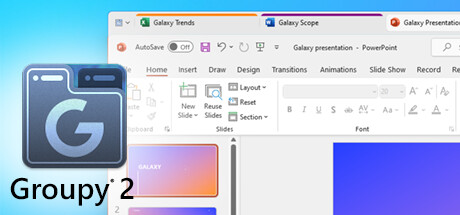
Groupy 2 is a productivity utility designed to make a busy Windows desktop easier to control by bringing browser-style tabs to regular applications. Developed and published by Stardock, it allows separate program windows to be combined into organized tabbed groups, reducing the need to repeatedly search through a crowded taskbar. The concept is simple, but it becomes increasingly useful for people who routinely keep numerous applications, folders, documents, communication programs, and utilities open at the same time.
The basic workflow is one of the software's strongest qualities. Compatible windows can be brought together into a single group, with each application represented by its own tab. Moving between programs then feels similar to switching between pages in a web browser. Tabs can also be separated when an application needs its own window again. Because these interactions rely on familiar desktop conventions, Groupy 2 does not demand an extensive learning period. Once accustomed to the system, it can significantly reduce the visual mess created by overlapping windows and numerous taskbar entries.
Groupings make the utility more useful for recurring workflows. Collections of applications can be saved and later launched together, allowing users to prepare different environments for work, study, entertainment, or particular projects. A writing setup, for example, could contain a document editor, browser, file manager, and communication application. Instead of opening and arranging each program individually every time, the collection can function as a reusable workspace. This is particularly convenient for anyone whose daily routine involves predictable combinations of software.
Automatic grouping provides another useful layer of organization. Multiple windows belonging to the same application can be kept together rather than scattered across the desktop. This is beneficial for programs that tend to produce several separate windows during normal use. Taskbar integration further helps by reducing the number of independent entries competing for space. The result is not necessarily fewer applications running, but a desktop that feels considerably more manageable because related programs occupy logical collections.
Visual customization also has a functional purpose. Accents can distinguish tabs using different colors, making it easier to recognize categories or projects at a glance. Users handling several groups can assign visual identities to different types of work rather than relying entirely on application names. Various appearance and tab-layout options provide additional flexibility, helping the utility blend naturally into Windows 10 or Windows 11. Its presentation generally feels like an extension of the operating system rather than a completely separate desktop environment.
Although productivity is the obvious focus, Groupy 2 can also be convenient for gaming-related multitasking. A PC gaming session may involve Steam, Discord, browsers, recording utilities, streaming applications, hardware monitoring tools, and other supporting software. Grouping some of these programs can keep the taskbar cleaner without forcing the user to close useful background applications. Streamers and content creators may gain even more value by organizing communication, broadcasting, and supporting tools into dedicated groups.
There are nevertheless reasons why the software will not appeal equally to everyone. Someone who normally uses only a few applications simultaneously may gain little from another layer of window management. Windows already provides snapping, virtual desktops, and built-in taskbar organization, so Groupy 2 is most worthwhile when those tools no longer feel sufficient. Compatibility can also vary depending on how individual applications implement their windows and title bars. Programs using unusual interfaces may not always behave as naturally within a tabbed system as conventional desktop applications.
System requirements are exceptionally light by modern standards. The utility is intended for Windows 10 and Windows 11 and asks for little memory, storage, or processing power. That makes hardware performance largely irrelevant for most supported computers. Its value is instead determined by workflow. The more frequently a user switches between numerous windows, the more noticeable its organizational advantages become.
Steam Deck compatibility is effectively not applicable as a normal handheld use case. Groupy 2 is a Windows desktop-management utility and depends on the Windows application environment rather than being a conventional SteamOS game or portable application. There is no meaningful native Steam Deck experience under the Deck's standard SteamOS setup. A Steam Deck running Windows could potentially provide the required operating environment, but the software is primarily designed around desktop-style Windows multitasking, making it far better suited to a traditional PC with multiple application windows.
Overall, Groupy 2 takes a familiar idea and applies it effectively to desktop multitasking. Its tabbed window groups, reusable application collections, automatic organization, taskbar integration, and visual customization can turn an overcrowded Windows workspace into something considerably easier to navigate. It is unnecessary for minimal users, and its usefulness depends heavily on how many applications a person normally manages, but heavy multitaskers can find genuine everyday value in its streamlined approach. It does not reinvent Windows productivity so much as make one of its most cumbersome aspects easier to manage.
Rating: 7/10