GameCreator
Game Creator is a visual game design tool which allows people to create 2D games without any coding background. We provide an intuitive interaction experience that enables you to build your game by simply dragging and dropping.
Estimated lifetime revenueMedium confidence
$44.8Kgross
$20.1Klow → high range$98.5K
Net to developer$29.8K
Modeled estimate, not a reported figure. How we estimate →
Est. copies sold
2K
mid estimate
About
About the game
Intro
GameCreator is an all-in-one game development engine that focuses on providing a fully visualized approach to create 2D games without programming. It supports publishing to PC, mobile, and website. In the meantime, we also provide a platform that serves as a hub for the distribution of both commercial and free games, as well as the sale of assets, plugins, and templates by the development community. Starter packs include a RPG Game Template “Feather of Cyan” (without combat system) and five free DLCs (AVG template "Eyes of Star", TBRPG template "Sword of Dream", ACT template "Jump of Sky", ACT template "Shoot of Sky", PUZ template "Magic Tower Editor"), All 1st party Game Templates will be released as DLC in future.
UGC Community
GameCreator has a built-in community for the creation and sharing of game designs. Developers can easily create games from templates, assets and plug-ins or trade those templates, assets and plug-ins. The platform has been designed to allow users to publish their works directly, and for players to provide feedback on those works. We work hard to support the growth of the community and provide more 1st party assets to add more and more possibilities to your game dev projects.
Game Templates
GameCreator provides high-quality 1st party game templates with complete documentation and professional support which will ensure a smooth flow of the creative process and allow developers to focus entirely on game development instead of spending time on technical difficulties. With a variety of templates in place, it’s easy for developers to get started on their ideas right away.
Generic Module Editor
GameCreator comes with built-in modular editors so developers can quickly prototype ideas and turn them into fully playable games.
Scene Editor
Scene Editor is used to create and modify the contents of scenes in a game. For instance, in RPG games the developers can create many scenes, each with its own scenery, NPCs, object placement/positioning, etc.
●Unlimited Layers. Without having to worry about adding more layers or deleting any, users can freely create layers to match them with different scenes.
●Adjustable Layer Parameter. Users can make exciting effects by adjusting the layer parameters at will, such as making a background that scrolls and layers that are see-through, or using image offset to scale or move an image.
●Dynamic Tile Layer Config. Users can place multiple tilesets on the same layer. GameCreator also includes standard tilesets so you may add several with one click.
●User-friendly Image Layer. GameCreator allows you to select any background scene from your pictures and add it to your game. You can also change the image properties directly, such as distance ratio to achieve a layered effect.
●Real-time Render in Editor. GameCreator allows you to monitor dynamic effects in real time from the editor and make adjustments as needed without having to run your game.
Visualized UI Editor
Visualization UI editor is used to create all kinds of interfaces. You can make interfaces as needed and recall it at any time during your game development.
●GameCreator has a drag-and-drop interface that allows you to modify or custom a configuration. It also supports visualized scripting/flow to control the logic for game events and create quick interactive feedback.
●For advanced developers, GameCreator can bind the UI editor with TypeScript codes, which allow developers to config/debug the UI editor in the TypeScript codes.runtime scripts.
Character Sprite Editor & Standing Avatar Editor
Character & Standing Avatar Editor allow you to manage the sequence frame of your character's actions, expressions, and equips all in one place.
●The Sprite Editor supports 1, 2, 3, 4, 5, and 8 directional movements mode. Horizontal flip options are supported in 1, 3 and 5 direction mode.
●Keyframe editing supported. You can adjust the position, size and other properties of an action in each frame.
●Sprites can be link/bound to objects/plug-ins for calculating collisions, strikes, and other things.
●Presetted quick dressing-up component.
●Multiple image trimming options. Both individual frames and entire sequences can be trimmed to precise parameters in the editor. There is a built-in merge tool for merging similar items together for simple file management.
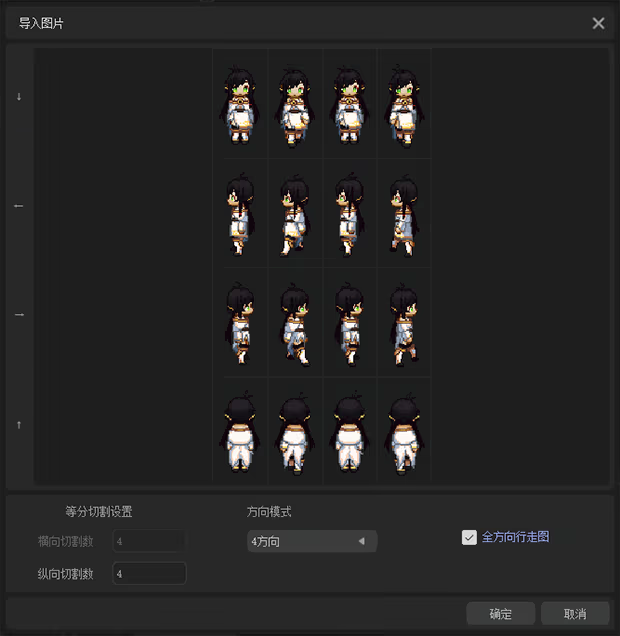 ●Standing Avatar management and frame sequence playback.
Animation Editor
Animation editor includes a full suite of tools to create animation effects. These animation effects can be recalled in multiple places in your game.
●Frame Sequence Animation. The animation editor can help you quickly set keyframes in image and audio assets to create animations. It also supports auto filling function, making your animation smooth and fluent.
●Particle Animation Mode. You can replace texture with preferred particle textures and adjust their properties to achieve the animation effect you want.
●Create animation with nested interactive is supported (including particle animation).
●Multiple trim / merge options are supported.
Data Editor
Data Editor is optimized with our 1st party game templates. For example we have built-in icon systems in AVG template, Skills and Equipment system in RPG game template.
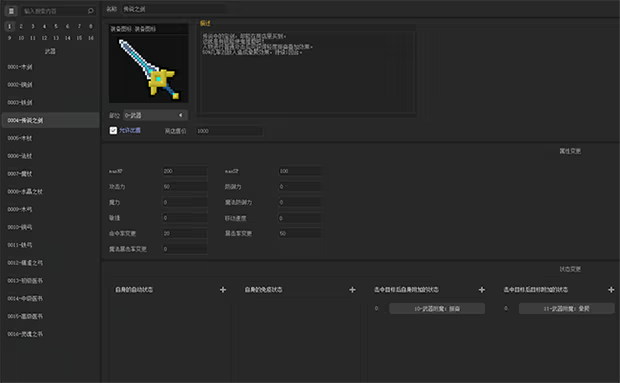 ●For advanced developers, you could also DIY your own data modules such as adding a task module, etc.
●More Data modules could be imported from 1st party / 3rd party plug-ins.
Event Editor
Event Editor allows you to create your game event logic and flow without any coding. Everything is visualized in the Event Editor.
●The editor allows you to control how objects behave in your game with one-click insertion of commands and see how they look in real-time.
●In AVG game templates, you can drag-and-drop in clips or insert visual commands. All effects supported real-time preview in the editor.
●Camera control commands give the image a sense of movement and depth, making it look like the graphics are moving towards you as you play the game.
●Advanced developers can write commands and build corresponding visual editors. You can also share your creations as plug-ins in our marketplace.
●All 1st party game templates come with built-in event triggers, such as NPC's click event, touch event, etc. Alternatively, users can also customize these events to create more personalized game experiences.
Code Editor
In addition to using GameCreator’s visual editors to create your game, you can also write code in GameCreator to modify the gameplay whatever you like. Advanced developers can just build on top of pre-built visual editors (e.g., UI, sprites, animations, scenes, events) and combine them with code logic to generate richer game content.
●GameCreator supports TypeScript / JavaScript with its built-in IDE.
●All of the 1st party game templates are written in TypeScript, which will be compiled into JavaScript and then run automatically during testing. Inheritance and other relationships are taken into account during compilation to ensure that JavaScript does not throw reference order errors.
●Code completion, jump to definition, code hinting and highlighting, and other standard editing features are supported.
●Support 3rd-party Web libraries, which then can be called after load; for instance, some games may require physics libraries.
●Some editors will generate codes and/or APIs for quick direct calls.
Texture Editor
Texture editor facilitates the creation of textures and shaders (GLSL) that can be used to generate sophisticated visual effects.
●When creating new textures, the system generates the corresponding uniform API that you can call directly in Shader and preview the effect in real-time.
Plug-in System
Users can publish their customized plug-ins into our platform with just one-click, making them available for other developers.
●Following game assets support sharing/sell: sprite, standing avatar, animation, UI, tile, autotile, map, texture, etc.
●Following game materials support sharing/sell: scene and object module, custom module, custom object behaviors, custom event commands, scripts, etc.
Custom Editor
Custom editor allow you to customize the editor mentioned above, so that you can modify its features —for example, making new modules, event commands and object behaviors. These customized editors can be packaged as plug-ins for sharing/sell.
Games made with GameCreator
「日日夜夜」「记得我」「罪狱:soul」「浮世万千三天地情殇」「觅光:第一章」
「不和我推谈恋爱就会死?!」「梅洛可奇遇」「令和罕见物语」「小夜怪奇物语」
「异常情绪回收组」「我的魅魔库库拉」「筮灵」「夜弦酒吧员工守则」「小小勇士团」
「皎月坠落之时」「鼓手余命十日谭」「风之歌」「致命终局 Deadly Endgame」
「魔女黏糊笔记」「叛军组织的我爱上了贵族大小姐」「无限骰子」「MIRAGE Episode:1」
Demo made with 1st party game templates
●Action RPG game template
●AVG game template
Our Commitment
GameCreator's goal is to provide the best-in-class user experience for all game developers by enhancing its engine’s capabilities and expanding its library of game templates, plugins, and assets. We hope to establish a thriving community which boosts our developers’ creativity and productivity by input &output knowledge, skill, idea, information, assets, plug-ins … etc.
About GameCreator Team
We are a startup company mainly based in China and focus on making game development more accessible to everyone. Our mission is to empower game developers by providing a simple visualization game-making tool and allowing them to focus more on their imagination and creativity.