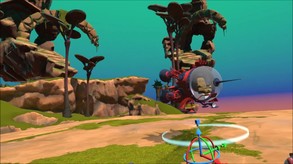
VR Model Viewer allows you to import a variety of model formats for viewing and curation in VR.
Modeled estimate, not a reported figure. How we estimate →
Media
About
Genres
Stats
All-time low is the lowest price we've recorded for this game since we started tracking it.
Languages: English**languages with full audio support
Engagement
Reviews
Themes across 40 recent reviews and how positive each mention is. A keyword signal, not full sentiment analysis.
Reviews
This needs a great deal of polish on the interface, but for this money I'm blown away at the amount of features. I've previously tried to develop something like this for my company and never finished it due to time constraints. I'm a mechanical engineer, and I use professional grade CAD. It's unfortunate this only supports basic free formats, but I also understand why. My CAD tools can export some of these formats so it's no big deal. If you just want a basic VR model viewer, with all the scale and manipulation options you could need, you can't go far wrong here. I've seen far worst software costing thousands of pounds.
The concept is good, but the execution is lacking. I'm attempting to use this to view a room model I've built in Fusion 360. You'd think that between the 2 tools, I could get a model across that has textures, but there doesn't seem to be a combination of formats which will do that. Additionally, I'm working in imperial (not ideal, but not exactly unexpected) and the units don't port. So, everything that's 1 foot in Fusion 360 is 1 meter in VR. I can scale to a specific factor, which helps, but if I try to use one of the pre-existing scale factors (1/10th, 1/100th, whatever) poof! The model disappears. Finally, the only light source I can find is a flashlight. Documentation in game does say that additional lighting is coming, but it isn't there yet. There's still a lot of work to be done. I wouldn't spend any money on this until it's in a better state.
Related
Related
Trends
Modeled estimate over time, reconstructed from Steam's monthly review histogram.
Hours played at review time, across 40 reviews with recorded playtime.
positive critical· bar length = how often the theme comes up
TLDR: Great software if you're a maker who wants to be able to visualize projects before going to print. Probably lacks the fine-grained measuring capabilities that a real engineer would need. But it's going to be fantastic for demoing prototypes. I have a decent Steam library, but this is probably the only title that will make my life easier. Several hours of my life that I'll never get back. But in a good way. For me, this started as an exercise in procrastination. I was tasked with adding an extension to a greenhouse and wanted to sketch it out in CAD. Since my HOA enjoys picking every nit they can find, I wanted to make sure that it was aesthetically pleasing. So, hey, $10. Impulse buy. I'm quarantined and figured the software would, at a minimum, net a few hours of fun. Caveat: I'm using this on an OG Rift. I want now, more than ever to get an Index, but the global pandemic seems to be making that increasingly unlikely. First off, "Model Viewer" is a bit of a misnomer. I would almost call it a model curator. It allows you to create vast, museum-like virtual halls filled with whatever you've downloaded from Thingiverse or have built on your own. I've been trying to 3D print a D&D figurine for a friend but the model just hasn't been holding together. So I imported it in as an STL and *I think* I've figured out where I'm lacking in supports just by accidentally clicking the Y rotation button the wrong way and flipping the model on its side. It's a very immersive experience. But there are some idiosyncrasies in the controls. * While in free flying mode, the thumb controls still teleport. So the slightest extra pressure when trying to navigate can easily zap you to a completely different part of the scene. * Bringing up the virtual keyboard with a model between you and it is a problem. The line-of-sight acts as though the model were still there and an invisible chunk of the keyboard is confusingly unusable. The solution is just to turn your head and bring up the keyboard. Hopefully somebody reads this and it saves them some confusion. * Some sound effects don't seem to respect the user settings. The bird screech when shifting to free fly mode gets old pretty fast. Some little things that I would find useful (and that the devs have zero obligation to implement): * A better way to scale. The current method is hard-coded at 100, 10, 1, 0.1, etc. with an option for a user input value. In my mind, a slider of some sort is a bit more intuitive. I find myself having to go a few menus deep every time I want to see a slight change in scale. * A way of translating, rotating, and scaling objects without having to bring up the menu. I actually *think* this is already possible, I just haven't found how to do it. I can move objects around in 2 dimensions on the floor using the right hand control. It'd be cool to see a Maya/Blender-esque multi-handle control at the base of the models. I haven't had any of the issues that some of the other reviewers have had. 8th gen i7, 2080GTX, 64GB RAM. Your mileage may vary. The models load just fine. No blank screens. No trouble with the various OBJ and STL file that I've thrown at it. I do most of my prototyping in Rhino with Fusion 360 for anything CAM related. I don't foresee any issues with integrating this into my workflow. Note to the devs: Hi! A pleading from a hobbyist maker. Please don't try to make this into a complete CAD package. I get the temptation. I'm personally responsible for more scope creep than I'll ever actually admit. But I think you have a seriously game changing product here. Little things like being able to paint textures and things like that would be fun. But my advice would be to continue to perfect on what you already have and work on tighter integration into existing workflows.
Пробовал открыть несколько своих моделей. Не работает. Пробовал экспортировать их в половину поддерживаемых форматов и открыть. Не работает. Управление размером неудобное. Встроенный контент мне совершенно неинтересен. Стоимости своей соответствует, но и функционал так себе. Нужен более профессиональный продукт.
I had a horrible time with this. It is said to be compatible with the Rift, and that is what I have. This had a lot of options, but it does not work as described for me. It is very glitchy. I have used a few VR modeling programs, such as Medium. To me Medium is not 100% working, but it is far easier to use than this. All one is suppose to be able to do in this is open a model so you can place it to view it in VR. It should be a very simple concept to setup. But it is over complicated. The Oculus home lets you open scale rotate and place a model very simply. This should be just as simple. But it's not. Far from it. I have opened some models from it's own library, and they are extremely hard to place. It should be mad simple to do in VR. I tried out one model from it's own library, and it was stuck to my hand. I could not get it to stay put. Having to hold down two buttons to rotate a model is a joke. That was made over complicated, and didn't give me the full range of rotation I should have had. And it didn't work part of the time. It didn't work at all on the model that was stuck to my hand. The option would not activate for that model. Positioning a model is over complicated also. I have to pres the thumb stick button and cycle through various move type options, and only one of them lets me move the object off the ground. I have not been able to grab any object to move it with my hand, other than the one that was stuck to my hand and could not let go of it. Also, there is no light to place. All objects are uniformly lit, with a global light. Or it just was not working for me. Objects looked plane, as though there was no type of light in the environment. Not fun to look at, at all. For now, until this glitchy mess is fixed, I would give this two thumbs down. It's too bad, seeing this would be a great program, if it was not so darn buggy, and there was some good lighting. Blender 2.8 now has a built in VR viewer. And it works. I can place objects, add any missing textuers. And edit any loaded models. Put on my VR headset, and see what I got. I would say to the developers to see how the Oculus home works. And try to make this work a little like that. Far less complicated. Or even have a look at how a person can move and place objects in Medium. It don't need to be more complicated than that. And get rid of the need to hold down two buttons to rotate, scale, and move an object. Holding down just one of the two should work just fine.
This blew my mind! Was looking for a way to show my 3D models, well this is it!
I am in the process of laying out my machine shop in CAD and I was really having trouble getting a feel for how it "felt". These machines are 3000-8000 lbs, so I can't just shove them around in realty, without a lot of costs. Then I stumbled upon this gem here in steam. Export from CAD as an STL, load it in, scale it, and there it is! I have made several major layout changes and I have a pretty dang good feel for where things will be in space. My only complaint is that everything is the same shade of grey, but that is to be expected with an stl file.
I've only given it a quick try so far, all said. I'm using this as a way to visualise products I'm designing (leather bags) and this has been really effective so far. Giving me a good sense of the proportions of what I'm making against a mannequin model I imported. I've needed something like this for a long time! I'd like to see proper support for index controls coming up, a physics toggle to stop objects from colliding, and then perhaps an effort to bring things into AR as well as VR. Perhaps with more control over lighting and provision to colour your objects within the app. Great job so far, and I'm excited to see what the devs do next.
A great way to display your collection of 3d models. A bit rough round the edges at the moment, and models can need a lot of pre processing (in your favourite 3D editor) before importing. Great concept, responsive developer,looking forward to seeing where this one goes.
its cheap and simple, allows me to view my .obj scenes in VR! i'd give it a 7/10, it would be 10/10 but sadly it doesn't have a feature to disable backface culling, so a lot of my .obj scenes have errors in them. but the scenes without backfacing textures render great!
Momentum
Pace estimated from the game's recent review growth (our daily snapshots) at its own sales-per-review ratio — a momentum signal, not booked sales.
Audience
Estimated from the language of this game's reviews — a proxy for where players are, not official Steam demographics.
Related
| Game Royale 2 - The Secret of Jannis Island | $2K | 127 | 78% | $0.99 |
| Eschaton | $2K | 166 | 88% | $1.99 |
| Grimoire Chronicles | $2K | 108 | 76% | $0.79 |
| Simple Story - Alex | $2K | 134 | 71% | $0.99 |
| Dark Fantasy Warriors | $2K | 60 | 57% | $1.99 |
| Love in Belarus | $2K | 60 | 82% | $1.99 |