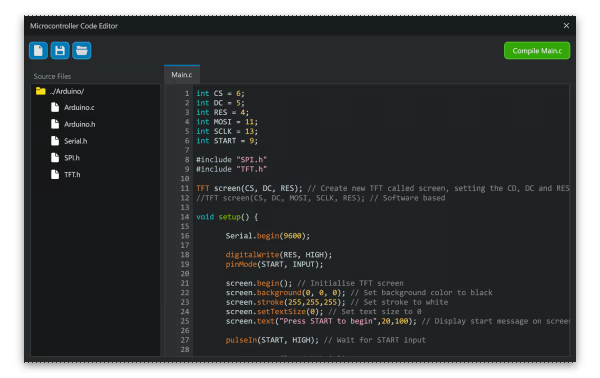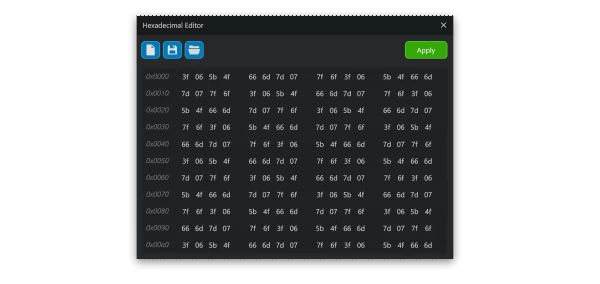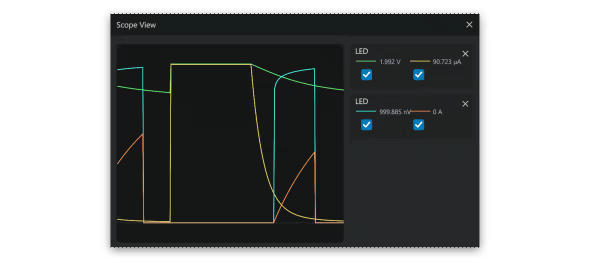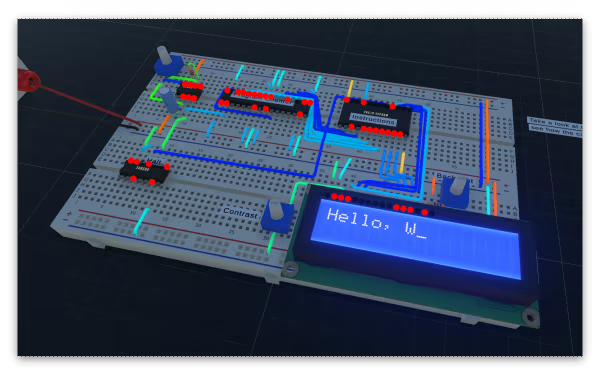
Powerful Realtime 3D Electronic Circuit Simulator
Modeled estimate, not a reported figure. How we estimate →
Discounts
Every price cut of more than 20% we have observed, in each market that quoted one, with this game's chart position on either side of it. These are episodes, not a model: a sale is one event, and one event cannot tell you what the next one will do.
Reviews, worldwide (the counter carries no country): 0.71/day in the week to Sep 11 → 4.14/day in the week after.
For scale, across Steam · Top Sellers · Brazil over the last 30 days: the 26 chart moves that followed a price cut of more than 20% went a median of 7 places towards #1, and the 2,402 moves with no price cut behind them went 2 away. One store, one chart, one country — it is the only place we have enough observations to say even that.
Prices outside the United States have been collected since 6 August 2026 and chart positions since 19 July 2026, so a cut older than that has no market to compare and a market that joined later has no history yet. Nothing here is converted between currencies.
About


Engagement
Reviews
Themes across 98 recent reviews and how positive each mention is. A keyword signal, not full sentiment analysis.
Reviews
For nearly 9 € game i dont need to buy power supply, Arduino and components and i can learn circuitry and electronics for cheap. Love it, saved a lot of money. Gonna sink much more time into it.
Amazing software but a bit confusing, steep learning curve
Kiepsko to wygląda. Wszystkie powyższe biblioteki nie są adekwatne do oryginanych bibliotek. np. arduino.h. Brak podstawowych bibliotek avr. W sumie to nie można symulować niczego.
Media

Related
Related
Price dynamics, follower growth, revenue and sales trajectories with interactive tooltips
This and every other Pro feature is free until October 20, 2026. A free account is all it takes.
Stats
All-time low is the lowest price we've recorded for this game since we started tracking it.
Languages: English
Hours played at review time, across 98 reviews with recorded playtime.
positive critical· bar length = how often the theme comes up
So far I've only just tested out CRUMB since I've installed it, and haven't gotten a chance to test it out thoroughly. I would like to create a Tri-color led, to simulate the three colored led. I hope this is possible. But so far I like it as it is still under development, could someone look in to it to see if that would be a great asset for development?
Can you add feature stop wave in scope view pls?
Would be even greater if we could adjust the voltage of the power supply without having to turn the know as well as it going up to 20 V for class experiments
中国·浙江的技术选考生必玩 玩玩通用电控就掌握了【好评】
Had to return it after I still hadn't finished figuring out how to wire a single OR IC to an LED (literally the first thing I learned as an electrical engineer). Once the UI and keybindings have been polished I may come back to it but there are much, MUCH, better alternatives, whether you're benching or learning, online for free. If you need a digital environment, Multisim has this in spades, just (obv) not the 3D aspect. I think if the dev(s) focus on the core mechanics, make legit keybindings, offer more than a small handful of tools, offer the ABILITY TO SPLICE (seriously, i get a breadboard in this space is infinitely expandable, and you -can- just use a different input slot, but I got this to imitate real life, in real life you can shove many wires into a single space (or a slot if on a breadboard), and is sometimes necessary to simplify something in order to achieve the "aha!" moment. I was psyched when I bought this too, like "about damn time" and was going to use it alongside Turing Complete so I could build out the tables on a bench, which sometimes simplifies boolean logic faster than I can get through DeMorgan law and all the other fun boolean algebra stuff, but with a physical representation in front of you (and a 3D breadboard is perfect, no copper, no jacketing, no tools taking up space), but this is not quite at the $10 price mark imo. Not when Multisim is free. This is no discouragement to the creator(s), this is an amazing framework to jump off of, but this is alpha at best (unless a UI overhaul and more components and a expansion on the mechanics are in the near horizon), and like many people have said "it seems like it's made for people that -already- know what they are doing-" and I couldn't agree more. If this were sat in front of me in my Intro to Electronics course without guidance, I wouldn't be an electrical engineer today. Even with over a decade in the field and more years studying (whilst being promoted in my career that's evolved from mechanical to software-centric), where something like this could be pretty damn useful if it just had more. Integrations with other software would be great, but honestly the mechanics need to be left alone before the User Interface is given a commercial release, as it basically doesn't exist. No copy/paste that I could find (by find, I mean hitting random key combinations until something happens). You can't rotate using the keyboard, so everything is done via mouse movements besides a few rare exceptions, and there is angle snapping. So you have to click the breadboard, this doesn't even place it on a blank canvas, you have to select it then read what should be a tooltip and click an "+Add" button embedded in said tooltip. Wiring isn't as simple as "click in the slot here and drag to the other slot or right click to maintain an angle and click another slot to land", no, you have to click a part "Jumper" which, okay while every jumper may be a wire, a wire is not ALWAYS a jumper. So select the "jumper" and it's going to default to a color every single time, and not a neutral one, it's going to choose black (generally the polar to red when wiring), then you click the holes and get them landed. Then you slam your head against the keyboard as you eventually find out there is no splicing, and I just wasted 15 minutes just so I could open a pre-built schematic to figure out how to lay them before we even started. When when you start placing multiple items together it is impossible with the 3D display to get each part lined up in a aesthetically pleasing way (outside of the things that snap, like the breadboard and power lane). No angle snapping, And as far as I could tell, there's no way to select more than one item at a time, like the breadboard itself after you've added things to it (like the power bars will not stay attached). I had to stop after an hour because i just knew if I couldn't make a simple XOR/AND circuit to an LED with a few rocker switches I was afraid I already passed the 2 hour mark and couldn't return it. I never got the circuit finished and I design Automation logic and circuits for a living. Seriously, how is there no area selecting?! I really want this game to succeed! I was excited when I bought it, even admitted to myself how much of a nerd I was for said excitement! I want this in my life, but it needs some more time in the oven before I could recommend it over a free schematic editor/simulator.
9,900원에 사두면 나중에 그 이상 값을 할 것 같은 프로그램이라 미리 사둡니다. 현재는 간단한 작업 정도.
if your looking to get into computer whatever but dont have money to spare on parts this game is one purchase and you can learn various things
Selling now
See how fast this game is selling right now — estimated copies and revenue per day from recent review growth.
Active players
Estimated daily and monthly active players (DAU/MAU) modeled from peak concurrency.
Players by region
Where this game's players are, estimated from review languages.
Players also reviewed
The games this title's players most often review too — audience affinity.
Related
| Game | Estimated lifetime revenue | Reviews | Review score | Price |
|---|---|---|---|---|
| $62 | 1 | 0% | $1.99 | |
| — | 0 | — | — | |
| $128.5K | 1.4K | 83% | $3.99 | |
| $9.6K | 39 | 77% | $8.30 | |
| $6.9K | 23 | 87% | $7.99 | |
| $140 | 1 | 0% | $4.99 |
Related
| Game | Estimated lifetime revenue | Reviews | Review score | Price |
|---|---|---|---|---|
| $251.3K | 817 | 77% | $9.99 | |
| $251.5K | 300 | 38% | $24.99 | |
| $251.5K | 543 | 76% | $12.99 | |
| $251.6K | 843 | 88% | $7.99 | |
| $250.9K | 410 | 54% | $19.99 | |
| $251.6K | 1.4K | 74% | $19.99 |