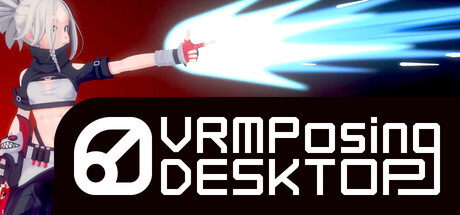
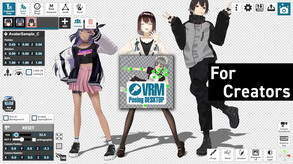
Accelerate the creation of 3D models! This is a highly functional posing tool for Vtubers, 3D modelers, and illustrators to use.Make your VRM character take various poses using poses you created or others' poses.Various useful functions are available.
Modeled estimate, not a reported figure. How we estimate →
About
VRM Posing Desktop was developed to help you do your best to create with your VRM models.
I'm constantly updating it with feedback from Vtubers, 3D modelers, illustrators, and many others. The deliverables are available for personal, corporate, and commercial use.
Creating mp4 videos with characters moving a bit
Tracing materials and reference materials for illustration.
Thumbnail creation for Youtube, etc.
Linking of pose data to other apps.
Let 3D models take various poses to be healed.
vrm1.0 support
.vrma (VRM Animation) support
Video export (.mp4)
High-quality image export (transparent images are also possible)
Various Pose, Accessory, and Background Image Presets
Pose sharing among users via SteamWorkshop
VMC protocol for external apps (VSeeFace, Unity, Unreal Engine, etc.)
Pose switching with shortcut keys
Importing props (FBX and GLB are supported)
Various post-effects
Vroid Hub integration
Exporting animation clips for Unity
I'm adding other useful functions for posing as needed.
I have a history of dropping out of college because I didn't find meaning in my studies at university. When I dropped out of college, I wanted to become a manga artist.
From there, I studied programming, discovered Unity, and decided to develop software that would be useful for people who like creative activities, so I developed this app.
I believe that everyone who uses this application likes to create.
I would be happy if this application could contribute to your creative activities.
Stats
All-time low is the lowest price we've recorded for this game since we started tracking it.
Languages: English, Japanese, Spanish - Spain, Simplified Chinese
Engagement
Reviews
Themes across 43 recent reviews and how positive each mention is. A keyword signal, not full sentiment analysis.
Reviews
Absolutely lovely, I love using it to make thumbnails for stream!
this software low key got me a girlfriend. ...long story.
This is a very good app and is like a better version of the vanilla vroid pose editor. However, I will say some things could be improved upon - especially the animation feature. The animation feature is really clunky and doesn't support face movements it seems. The only way around that I can imagine is if you learn blender and map out the face tissues to bones. I can imagine this being a feasible alternative to MMD once they fix the animation features.
Media

Related
Related
Price dynamics, follower growth, revenue and sales trajectories with interactive tooltips
This and every other Pro feature is free until October 20, 2026. A free account is all it takes.
Hours played at review time, across 43 reviews with recorded playtime.
positive critical· bar length = how often the theme comes up
This is a great program. I use it on a regular basis. But I have a few suggestions. 1. The animation module. It's a good start. You should greatly expand the animation module. It's just not convenient. There's no way to switch to the created frames. I have to move the animation slider and guess where the frame I want is located. I also can't edit the created frame. I can't expand the animation mode window. It's just a small column. This is very inconvenient. 2. My fur can't move its ears! If I disable physics, I can control the ears, but then the wind mode doesn't work! And physics doesn't work in general. 3. Creating your own IK chain of effects. This should also be added. 4. Adjusting physics. Spring bone in Unity has several physics control sliders for each selected model element. It would be great if you could add these sliders to the program. 5. Support for animation formats. vpdloop and vrma? Is that all? I would really like to see bvh and UnityFBX formats for import and export. 6. Errors when working with blendshape. Animation with automatic blinking and manual blendshape edits doesn't work very well and has errors. The eyes twitch very often. Since I can't fix and re-save the animation frame, I can't fix this epileptic blinking. Manual setting of facial expressions is not recorded in the animation at all when automatic blinking is enabled! 7. For reference, look at the MotionMuse Muni Animation program. There are interesting solutions for working with animation, and it would be great to see them in VRM Posing. 8. Optional. Reference - the MMD Doll dance mobile app. This program can load MMD animations in vmd format and automatically retarget VRM bones if their names do not match. This is just a good idea, but it is not mandatory.
the most simple and intuitive app for making renders of VRM characters. whether you're a vtuber or just like goofing with models like dolls its a no brainer purchase. I myself use it for youtube thumbnails, comics, and more to the point its just part of my editing ecosystem.
I kept Encountering bugs and general errors in the tools/UI - twitchy IK often spasming into random and slightly different positions each time - no rotation IK, only position IK, causing constant issues of having to re-post the hands and or feet etc - there is a strange auto-"fixing" of the poses at random that triggers even more randomly after touching IK handles and or Hand controls, every single time it causes a different "fixed" pose to be applied **this is not with the appropiately named "fix pose" option turned on, it's still applied regardless of that option ** - "fix pose" option, accentuates the problems above to unusable levels to the the point where random completely different alterations of the poses are applied - no or at least bugged full screen - glitchy and very bad camera movement - excessive menu nesting causing constant switching of modes i curretly find myself using it just as an exporter being i am capable of animating in blender i was hoping this to be a quicker way to do simple poses or animations that in general would take longer in time to load the projects of rather than the time it making them but no it's just not possible if you are looking to: 1 animate in blender 2 export the model or a proxy of the model as VRM from blender to have the animations in the vrm file (using the VRM format addon) 3 import the model or animation proxy into VRMPD 4 export as uanim then it can still be usefull, otherwise it's neither easier or cheaper than just booting up blender and unity it's just a "convenience exporter" for me at the moment due to Warudo requiring unity animations
Use VRM Posing desktop for simple VROID posing. Use Blender For more controll and animation use
Отличное дополнение к VRoid. Как инструмент - штучка годная, но если решили её использовать - готовьте свои 3D-ассеты, так как базовый набор имеет очень небогатый выбор, а качество базовых ассетов оставляет желать лучшего.
Если вы хотите ПРОСТО анимировать своего vrm-перса, делая максимально простые движения в пару кадров, то +- программа подойдет. Есть несколько ассетов для преображения кадра (пыль, лучи солнца, глюки и т.д.). Имеется какой-никакой параметр ветерка, света, тени, и самого освещения. Еще один из плюсов можно выделить Auto IK, где кости уже имеют встроенные ограничения вращения, но он косой и ты изменить его не можешь, так что, 50/50. Но минусов у нее очень много: 1. Интерфейс. ● Интерфейс с самого начала непонятный и тебе приходится методом тыка все узнавать. Никаких временных дорожек с ключами, очень ограниченный выбор графов (их всего три: line-in, line-out, line-in-out). Ты можешь лишь перемещаться по "кадрам" и криво-косо да дополнять анимацию. У каждого кадра есть скорость, она также очень сильно ограничена (часто ты даже не уверен в том, что указанная длина для кадра соответствует в действительности). ● Нет никакого главного экрана, тебя просто при следующих запусков кидает на пустую сцену с твоим персом, который был загружен самым первым. 2. Сам процесс анимирования: ● Анимировать тебе можно только, собственно, модель. Захочешь передвинуть объект, а-ля, его кинули или это качеля/дверь? - не получится. Он может просто играть роль нефункционального декора, как стена. ● Если на сцене два и более персонажа и ты захочешь просмотреть, какая анимация получилась, то тебе придется все саморучно протыкивать, а не просто нажать на пробел, как в Blender. ● Как уже было сказано выше - ИК очень кривой, ты не сможешь по нормальному посадить модель или поставить в динамичную позу. ● Очень скудный инвентарь по имеющейся мебели. А если захочешь добавить свою (неважно, сам сделал или взял из открытых источников), то есть всего пара форматов, которые допустимы для этой программы (fbx, gltf, obj, png). Часто она решает, что тебе не нужны материалы вместе с объектом, поэтому, хочешь-не хочешь, а ты будешь открывать Blender и делать махинации для того, чтобы все хорошо экспортировалось. НО даже после этого, ты загружаешь объект, а тут бац, у этой программы встроенная ориджин (ну или точка вращения). И ты опять проходишь 9 кругов ада ради того, чтобы точка вращения была такой, как ты задумывал, ведь согласитесь, неприятно, когда ты экспортируешь кружку, в блендере ее точка стоит как ты задумывал, а VRM Posing Desktop не согласен, и эта точка стоит где-то в углу. И ты не можешь ее поменять в самой проге. ИТОГ: Если ты по несколько раз перебегаешь из VRM Posing Desktop в Blender и обратно, то задумайся: а зачем тебе тогда эта прога? Как по мне, VRM PD - это очень сырое, урезанное подобие блендеру. Так еще и стоит, как крыло от самолета, не оправдывая ожиданий. (Отдельная благодарность техподдержке Steam, лапочки, помогли вернуть деньги за эту прогу)
I love, love, LOVE this program, but I will say downloading poses in the app is annoying when it's constantly scrolling me back to the top after every pose I download.
Selling now
See how fast this game is selling right now — estimated copies and revenue per day from recent review growth.
Active players
Estimated daily and monthly active players (DAU/MAU) modeled from peak concurrency.
Players by region
Where this game's players are, estimated from review languages.
Related
| Game | Estimated lifetime revenue | Reviews | Review score | Price |
|---|---|---|---|---|
| $66K | 142 | 49% | $6.49 | |
| $65.9K | 114 | 79% | $14.99 | |
| $65.9K | 853 | 97% | $4.99 | |
| $66K | 278 | 77% | $9.99 | |
| $66K | 827 | 84% | $6.99 | |
| $65.9K | 323 | 96% | $12.00 |
Related
| Game | Estimated lifetime revenue | Reviews | Review score | Price |
|---|---|---|---|---|
| $36.9M | 944.3K | 98% | $4.99 | |
| $1.9M | 5.4K | 91% | $11.99 | |
| $856 | 17 | 76% | $3.99 | |
| $841 | 35 | 74% | $0.99 | |
| $516 | 27 | 81% | $0.99 | |
| — | 0 | — | — |