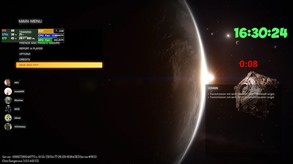
Use our cool in-game overlays to achieve the best gaming experience! Harnessing the power of your GPU, hardware accelerated H.264 codecs and the various overlays, you will have an advantage over your opponents and you can share your victories.
Modeled estimate, not a reported figure. How we estimate →
Media

About

Genres
Stats
All-time low is the lowest price we've recorded for this game since we started tracking it.
Languages: English, Hungarian, Russian, Simplified Chinese
Engagement
Hours played at review time, across 46 reviews with recorded playtime.
Reviews
Themes across 46 recent reviews and how positive each mention is. A keyword signal, not full sentiment analysis.
positive critical· bar length = how often the theme comes up
Reviews
ชอบ interface มากๆ ดูแล้วเข้าใจง่าย ดูสวยงามแบบเรียบๆ อัดแล้วไม่หน่วงเครื่อง
[table] [tr] [th][b][i]Byte-sized review[/i][/b][/th] [th][b][i]Simple but effective[/i][/b][/th] [/tr] [tr] [td][i]Review in under a minute[/i][/td] [td]I have been using [b][i]PlayClaw 5[/i][/b] for years now and have been very fond of it. I found it was the perfect replacement for [b][i]FRAPS[/i][/b] which I had used previously. With Let's Play's and streaming becoming more mainstream the market for recording software has certainly gotten more competitive, especially so since NVIDA waded in a few years back with its own free version - [b][i]Shadowplay[/i][/b]. What this has meant for paid applictions like [b][i]PlayClaw[/i][/b] is that they have had to up their game and offer features these free versions don't have. I was lucky enough to get a free copy of [b][i]Playclaw 6[/i][/b] (the latest version) from the developer and I am very thankful for this because even with [b][i]Shadowplay[/i][/b] on the market, [b][i]PlayClaw[/i][/b] has become my defacto recording software because it gives me visual up to date information such as the temperatures/memory usage of my CPU cores and GPU while gaming and recording without having to run other applications in the background. [b][i]Playclaw 6[/i][/b] goes even further adding a host of new features and is by far more the most complete version. New features in [b][i]Playclaw 6[/i][/b] now enable me to see if there are overheating issues, pagefile problems as well as bandwidth issues. The new versions GUI interface also looks much better than the previous version although it could still use a lot of work as it lags behind other applications such Action! visually. The application also comes with improved streaming integration for all types of streaming applications and lots of workable overlays. The developer, Eduard Kozadaev, is also an incredibly helpful chap and over the years has responded to many of my posts in the forums within minutes of posting them and has often implemented fixes and suggestions from myself. He also regularly updates the software with fixes and new features and this is the reason I keep coming back to his application. With [b][i]Playclaw 6[/i][/b] he has introduced the best version of the software yet that is well worth picking up.[/td] [/tr] [tr] [td][i]One word to sum up the experience[/i][/td] [td]Reliable[/td] [/tr] [tr] [td][i]Performance/Bug related incidents[/i][/td] [td]None that I have encounterd yet, the application just works as expected.[/td] [/tr] [tr] [td][i]Similar to other applications[/i][/td] [td][b][i]PlayClaw 5[/i][/b]; [b][i]FRAPS[/i][/b]; [b][i]Action! - Gameplay Recording and Streaming[/i][/b]; [b][i]Shadowplay[/i][/b][/td] [/tr] [tr] [td][i]Suitable for[/i][/td] [td]YouTube and streaming enthusiasts.[/td] [/tr] [tr] [td][i]Position in my games of 2017 cleared list[/i][/td] [td]Not applicable[/td] [/tr] [tr] [td][i]Rating[/i][/td] [td]http://steamcommunity.com/sharedfiles/filedetails/?id=869453510[/td] [/tr]
Решил поддержать разработчика. Вроде наученный уже, нет же поверил. Хотя отзывы что это не качественный продукт в стиме прочитал. Не стоит тратить денег. Программа абсолютно бесполезна. Рассчитывал на запись видео и стримы. Многочисленные попытки хоть как-то записать видео+звук не увенчались успехом. Звука нет, только если писать с микрофона, качество тут конечно отстой, никаких реалтеков, звуковых карт программа не поддерживает. До стримов естественно не дошел. Техническая поддержка отсутствует. За два с половиной месяца тикет в техподдержку так и не изменил своего статуса - "в обработке". Вконтакте тоже тишина, только посты разработчика как он "делает" что-то новое и лучше. На решение своих проблем не рассчитывайте. И на заявленное приобретение "полной" версии, тоже не стоит обращать внимание - шестая версия в стиме не обновляется до седьмой. Это проверено. Вконтакте заявлено что можно обновится, переустановил программу, но версия так и осталась шестой. Обладая тем же самым Bandicam и сравнивая эти программы в режиме записи видео - небо и земля. Если хотите получить качество, не испытывать разочарований, купите лучше ее или любую другую, только не PlayClaw. За стримы не скажу, до них не дошло и очевидно уже не дойдет. Но тут по отзывам эта та же OBS только за деньги. Не совершайте ошибок моей и тех кто потратил свои и ничего из заявленного не получил. Жаль нельзя вернуть покупку обратно. Берегите себя и свои деньги, читайте отзывы в стиме. не ведитесь на слащавость вконтакте. Всем удачи!
Looking for something like OBS Studio but with overlays. First impressions were good, until I actually tried recording. - Performance footprint is much, much higher, KF2 easily maintains 120 FPS with OBS Studio while recording at 120 fps, but Playclaw 6 introduces a noticeable performance hit, 99th percentile FPS dropped to 110-115, with severe frametime spikes (6 whole frames, as reported by Playclaw 6 itself, that's a 50 millisecond hang - very bad even if you're targeting 60 fps) - Audio is 44.1khz only, no 48khz option, not even a hidden one - Very limited NVENC settings; can't even set keyframe interval to anything less than 1 second. This means very poor performance in video editing software, unless you want to reencode the entire recording (which I don't) - Seems to crash itself and games randomly On the flip side, here are the good things you can have with Playclaw 6 that OBS doesn't provide (or provides, but with severe side effects): + Automatically switches between display capture and game capture for you + Arbitrary overlays with webpages, windows from other displays (or the same display if your game is borderless), performance counters, recording status, etc. Recording status is especially useful, no need to alt-tab and verify it's actually recording. + Selective recording: choose which of your overlays appear on your recording and which overlays appear just for you + "Lossless" PCM audio (if you can overlook the fact it's being resampled from 48 khz to 44.1) I have mixed feelings. With all the aforementioned issues, it's very hard to recommend this over OBS, unless you value convenience over quality and performance, and don't have a second display.
I got this for free as i am owner of previous version 5. update for previous version owners is FREE for a limited time. This version 6 changes the UI completely, its very easy to understand and the UI is clear and not cluttered with useless junk. UI has similarities with OBS, and while OBS is great, i find playclaw 6's ui even more better to use then OBS's. User can make a custom template for every game he plays/records/streams. makes life of a streamer much easier and convenient. And when it comes to recording performance, you can barely notice any fps drop while recording a game. My pc is mid-range and i see no notacible performance drop, so i can still PWN everyone and record evidence of it. overlays are the gem of this software, SysInfo overlay is one of the many reasons i use this software, when comparing to v5's sys info, On the Playclaw 6 its 300% more adjustable and shows all possible info of your pc. So. Incredibly. SWEET. I can't wait to see the revamped Twitch chat overlay and TS3 overlay when they come out as a FREE UPDATE for all Playclaw 6 Owners + other overlays the dev is developing currently. Overall i recommend this app 11/10. and the dev is very active to help out with problems and such. also helpdesk support via playclaw.com is available.
The developer is really active on the forums, and really seems happy to fix any issues. In game overlays work really well, like really well. Had a few games where the overlay for Xsplit gamecaster would not work, tested playclaw 6's overlays and they work. It has all the basics you need for streaming (with mroe stuff coming), with features the others dont have (working overlays).
Good day everyone. Before I begin my review let me tell you that I've used playclaw for a long time. In fact, I have 11274 hours logged in version 5... No, that's not a typo =) Okay onto version 6. The GUI has completely changed and is much quicker and easier to place things. You will also not that before previous versions were a pain in the you know what to get multiple of any source in your overlay which has also changed. Quick Note: THIS IS THE BEST OVERLAY SOFTWARE Everything in version 6 is better from the speed to quality, but more importantly the user experience. I've already put 250 hours into this program and there's nothing better on the market today. I tried literally everything else out there and even going to alternative.to to find more that I could try. With all this good stuff, I must be some sort of fanboy you might think, but I do have some things that I don't like about it. mainly with the streaming ability of the program. There is absolutely nothing wrong with the stream ability of playclaw for it's speed and quality, it's great. HOWEVER, the biggest problem with taking it seriously as a streaming app is the lack of scene transition and other integration that other apps are just better for. Now if you're a new streamer or a streamer that isn't going after a streaming career then this program for streaming is quite fine and does all of the basics without flaw. I recommend this program because it's the best at what it does, hands down. There is no other recorder out there that came challenge playclaw...
I have not tried streaming with this but for everything else the program works great when you know how to use it. You can even vTube with it. The only problem I hope one day gets fixed is recording over 20 minutes your gameplay "sound" goes out. If you are a commentator you can hear yourself just fine, it's the game audio that just cuts out and even the dev doesn't know why or how to fix it! (lol)
The support system is great. But, the software not compatible with my laptop. I get much help but unfortunately still didn't work. I enjoying just use MJPEG and can't use intel quick sync. Sorry but this is my objective review.
A profesionnal recording/streaming tool with great support. The new system info overlay is much more complete than the previous version, and help to pinpoint problems such as overheat, pagefile or bandwidth trouble. Helps me alot to pinpoint problems on betagames such as Escape From Tarkov. Much recommended for beginner and pro streamers/Youtubers
Related
Related
Trends
Modeled estimate over time, reconstructed from Steam's monthly review histogram.
Momentum
Pace estimated from the game's recent review growth (our daily snapshots) at its own sales-per-review ratio — a momentum signal, not booked sales.
Audience
Estimated from the language of this game's reviews — a proxy for where players are, not official Steam demographics.
Related
| Packmates | $17.6K | 57 | 86% | $11.99 |
| Ski Jumping World Cup | $17.6K | 137 | 77% | $3.99 |
| Strania - The Stella Machina - | $17.6K | 58 | 90% | $11.99 |
| Concealed | $17.6K | 87 | 84% | $12.99 |
| Hero Quest: Tower Conflict | $17.6K | 333 | 30% | $1.99 |
| Warden: Melody of the Undergrowth | $17.6K | 87 | 75% | $19.99 |