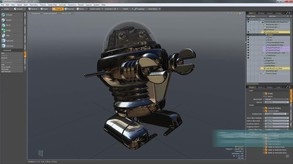
MODO indie packs powerful, industry-leading 3D modeling, sculpting, and animation tools into an affordable package that's perfect for indie game makers.
Modeled estimate, not a reported figure. How we estimate →
Media

About
Genres
Stats
All-time low is the lowest price we've recorded for this game since we started tracking it.
Languages: English
Engagement
Reviews
Themes across 48 recent reviews and how positive each mention is. A keyword signal, not full sentiment analysis.
Reviews
Awesome piece of software with tremendous amount of functionality for its price, but export is limited to 100k polygons. I have to export high-poly models piece by piece to Blender for assembly. Then another export from Blender to Substance Painter/Designer for baking. Unnecessary, counterproductive limitation.
Honestly speaking, I really like modeling in Modo. Emphasis on the really like. Yet, I cannot recommend this to others when a free alternative like Blender exists. Bevels have been broken for longer than I can remember. There's a known bug with snapping where the cursor doesn't show up which still hasn't been fixed. Viewport performance while moving highpoly meshes or if highpoly meshes are active while snapping just brings modo to a crawl. The worst offender, which is only related to the Indie version, is the 100k poly export limit; to get around it I export my high poly proxy mesh in obj to blender and apply the SubD modifer - an unnecessary step. In short. If you're used to Modo and like modeling with Modo with all it's downfalls, like I am, This is an excellent buy. If you're new to modeling, I highly recommend Blender - yes it does get used for AAA production, don't let anyone tell you otherwise.
Related
Related
Trends
Modeled estimate over time.
Hours played at review time, across 48 reviews with recorded playtime.
positive critical· bar length = how often the theme comes up
Modo is a great poly modelling too, maybe even the best out there. Other aspects, not so great. Sculpting, Animations and Deformation, very slow and clunky. Working with big scenes, it does quite well, but also very slow. The scene linking system: atrocious. Expect a character Auto Rigger: You're dreaming! The render is quite good (though CPU only), and the material system and presets makes it quite a breeze to get good looking materials up and running quickly. I first purchased Modo Indie when it first came out, and it was a true pioneer in the Indie space. Now most (not all) major DCCs have an indie version, and most with less restrictions. With Modo Indie, you are always at least 12 months behind. Still very workable, but it is not the same as the non indie version. The restrictions is the big killer here. Modo has a robust script/plugin market to really round out the limitations of the software, but none of this is available to you in Indie. Show stopper: No. Annoyance; Yes. I've been able to push Modo Indie quite hard, and other than being slow in loading large scenes, it was able to render them without any issues (200M+ poly count). Overall, I'm quite happy with Modo (slowness aside). It was the first DCC that really clicked with me, and Indie made it very affordable for a hobbyist. But in 2019/2020, you have so many affordable options. The Blender 2.8X release seems to have take a lot of its queues from how Modo works, and is an astronomical improvement in terms of usability over Blender 2.7X and earlier. If I were starting today, I would look at Blender 2.8X first before I entertain Modo for a hobbyist. For those looking to break into the industry, there are Indie and Academic versions for Maya, 3DS Max, and Houdini available these days too. I'd start with one of those over Modo as they are industry standard, while Modo is still a bit player. I really like Modo, but looking at today's market place, and the reasons I detailed above, I cannot recommend Modo Indie.
Hi from end of 2021! If you think that the export limit of 100k triangles for fbx format will be enough for you to work, you are wrong! If you think that you can work comfortably in Modo without scripts and addons - you are wrong too! I really wanted to work on licensed software and I like many features of Modo, but this version is simply not suitable for real tasks.
В общем из всех 3D программ - эта мне понравилась больше всего. Приятный интерфейс, классная ретопология, рендер, все инструменты под рукой,uv карты делаются норм, настройка под себя. Из минусов могу выделить - отсутствие расстояний в числовом выражении между моделей, т.е. создаем с заданными размерами болт и рядом гайку, так вот узнать расстояние между ними как и их самих без бубна не получится. Приходится пользоваться - Punch! ViaCAD 2D3D v9 + 3D для вычислений. В остальном все норм. Огромный минус отсутствие экспорта в stl, опять же пользуюсь Punch. P.S. Хороший русскоязычный туториал https://www.youtube.com/watch?v=my8n2QNrax0&list=PLrsq-o51mMFFQBoPpPX-BE-oP0-iOpYyb И да, я не сравниваю с Blender т.к. он бесплатен.
UPDATE: It's been almost 6 months since macOS Monterey was released and Foundry still hasn't released a fix for Modo crashing on launch. They don't deserve customers. ----------- Repeating many other reviews, I really like Modo's poly modelling and UI but the other parts of it are hardly passable for professional software. Sculpting even on low poly meshes, especially for corrective morphs, can get extremely slow. Same with texture painting. Animation tools appear fine at first but there are lots of bugs/quirks and you could end up with a somehow broken, unexportable rig but only notice it after you've done a lot of work on it. Exporting FBX files from Modo and importing into Unity almost always results in strange artifacts. Some workflows don't function on some days, but seem fine on other days. etc. etc... By the way these are not Indie-only issues. Pretty much all 3D software seems to have poor UX and lots of bugs, but having to do things *just* perfectly right and putting your work and time at risk like this just isn't good enough in 2021, especially for paid software. It just makes no sense to pay for a product that its company barely acknowledges. If you're going to learn to work around the bugs and quirks of a 3D package, you might as well go for Blender. As much as I like Modo, I regret having sunk so much time into learning it, which I will now have to do again with another package.
I have experience modeling as a hobbyist in both Blender and Houdini. I decided to try a month of Modo after hearing for ages that it was the best software around for modeling. Allow me to save you both time and money: the hype is unjustified. Modo wouldn’t be my tool of choice even if it were free. To its credit, Modo looks great and is nice and fast. Modo supports several kinds of modeling: direct modeling (if you’ve ever modeled before, this is what you were doing), procedural modeling (every modeling step is added to a list, and you can go back and change your mind about what you did at any point without losing all your work), schematics (an odd node-based way of modeling), and MeshFushion (boolean operations on steroids). I REALLY enjoyed Modo’s procedural modeling, and I might have actually continued my subscription if the rest of Modo held up. Viewport navigation is both strange and awful. To navigate with the mouse, you have to click and drag from one of three buttons at the top of the viewport (one for rotating, one panning, and one for zooming in and out). According to various tutorials, alt + left click, alt + middle mouse, and alt + right click should allow for these three operations, but when I tested Modo, these didn’t operate as advertised at all. I went through every beginner project and tutorial I could find, and I poked around in the tools myself to get a feel for what Modo can do. In terms of direct modeling, it has all the same tools you’d find in any other 3D software just with different locations, conventions, and keyboard shortcuts. Selection seems to be nicer and easier than in Blender or Houdini, but that hardly justifies paying a monthly fee for Modo, and that has to be balanced against the odd viewport and project structure in terms of modeling gains. Now we come to the real problem with Modo: its only really good for creating meshes. Creating and applying materials, sculpting, and animation are all possible in Modo, but these features are very basic. Materials in particular are horrible. If you buy and use Modo, you’re only doing it because you want to create models. Everything else will be done in some other piece of software. Blender is free, and it does modeling, rigging, animation, texture painting, full digital sculpting, compositing, basic visual effects, and basic video editing. The Unity game engine features support for .blend files, and people all over the world have used it to create amazing pieces of art. Max and Maya, the two big industry heavyweights, as of this writing now have indie subscriptions for less than $300 per year. Houdini, the industry standard for visual effects, can be had for a similar yearly fee, and has integration directly into Unreal and Unity, through which you can peform procedural modeling miracles. Modo Indie is the cheaper than the other paid alternatives, but all it does is modeling (and not noticably better than any other software). MeshFusion and schematics fee like gimmicks, and procedural modeling to create single-use assets isn’t something I can see most people doing much of. In Houdini you can use procedural modeling to creeate tools to do things like grow buildings and cities to your specifications inside of Unreal or Unity, but again, Modo just does modeling. Even if you decide you like Modo, the Indie version here on Steam has some limitations, the most notable of which is an export limit of 100,000 polys. This essentially means that, even you really like modeling in Modo, you’ll be stuck creating small scenes or single complex objects. The learning materials and support are very sparse. Modo is something of an underdog, so there don’t seem to be many people around online to ask questions of. The tutorials and help documenation are, in my opinion, severely lacking in quantity and quality. Modo crashes a lot too. If you want to use industry standard software, go buy that instead. If you to work freely as a hobbyist doing 3D art of creating assets for a game or animation, grab Blender on Steam or off the official site and go nuts. If you want to create beautiful visual effects, wizard-level abstract art, or work seriously with procedural modeling, grab the free Aprentice version of Houdini from the SideFX’s website and see if you have the patience to learn it. Only consider Modo if you are sure you like procedural modeling, and only if you want to create individual models that are under 100,000 polys. And if those things do apply to you, in the long run you’ll just wish you’d learned to model in Houdini instead.
Моделлинг в данной программе конечно шикарен, но в инди версии разработчики жестко все так ограничили. Во-первых, в модо можно экспортировать модели только до 100 тысяч трисов, а во-вторых, здесь полностью отсутствует поддержка плагинов, даже нельзя поставить GoZ, чем меня данная версия и расстроила. В целом, я и дальше продолжу пользоваться Modo чисто для моделирования, потому что это реально приносит удовольствие, в отличии от Blender'а и тд
Cool software
Modo is Great ! I love to use it
Momentum
Pace estimated from the game's recent review growth (our daily snapshots) at its own sales-per-review ratio — a momentum signal, not booked sales.
Audience
Estimated from the language of this game's reviews — a proxy for where players are, not official Steam demographics.