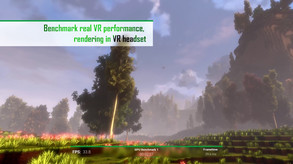
Benchmark your VR setup - OpenVR Benchmark is the first benchmark tool for reproducibly testing your real VR performance, rendering inside of your VR headset. See if your hardware performs correctly! VR headset required.
Revenue comes from in-game items and microtransactions, which our price-based model doesn't estimate. Copies below reflect the player base, not paid sales.
Media
About

Genres
Stats
Languages: English
Engagement
Reviews
Themes across 44 recent reviews and how positive each mention is. A keyword signal, not full sentiment analysis.
Reviews
Great little testing tool that proves that frame time is king in vr, all day, every day. I currently have the top result. In nvidia control panel, disable "vr pre rendered frames" and set it to "application controller". Set latency reduction to ultra. Prefer max performance. disable HPET if you're on AMD. Use a DPC latency checker and get that as low as you possibly can. Enable IOMMU. Then turn on hardware managed gpu memory on windows 2004~, optimize for "background applications". Disable "Game mode" in the xbox center. Disable overlays. Enjoy rapid frames and high scores. No cheating the system.
It's good to finally see decent benchmark software for VR headsets. The results are very useful and you can even compare them with others although you'll need the DLC for that. Highly recommended if you a VR headset.
Related
Related
Trends
Concurrent players on Steam, sampled daily since tracking started.
Hours played at review time, across 44 reviews with recorded playtime.
positive critical· bar length = how often the theme comes up
⠀
Didn't work. Adjusted suggested settings, and never fully loads, just spins endlessly.
I play Alyx at 100% res with ultra setting with my RTX 3080 and HP Reverb G2 and I get steady 90 fps on fpsVR tool! I play ultra photorealistic demo of Kayak VR with best graphic settings (no compromises) at 100% res: never less than 70 fps, the middle value is 80 fps, reaching also 90 fps. And so on! The benchmark 3D scenery used by OpenVR Benchmark is just junk in comparison to the demanding games above. It's an ugly minecraft-like scenery. I get something around 30 fps! And you know? While running, the minecraft-like scenery stutters a lot! My fps counter never goes beyond 35 fps! This is completely unreliable! No way! I know what you think: the benchmark tool is made for comparing hardware, not game performance. Okay, I agree! However the ugly scenery gives a wrong impression to people approaching VR! Getting 30 fps with that minecraft-like scenery is out of this world! Let's do a comparison with similar benchmark tool on flat monitor! When you play the free open benchmark tool on line, your PC has to render different kinds of scenery coming with different graphic quality; you have also to play a sort of 3D mini game. Even the ugliest scenery has so far better graphic quality than the minecraft-like scenery of OpenVR Benchmark! And you know? While my PC renders every scenery for my 4K OLED TV, fps go high to the stars! Something like 300 fps! I repeat, every scenery has so far better graphic quality than the minecraft-like scenery! There is no proportion! VR is two times more demanding, maybe even four times more demanding than flat gaming, but not 10 times more demanding than flat gaming! No Way! As you can see, there is something wrong with OpenVR Benchmark! I'm also perplexed about the rendered FoV values reported by OpenVR Benchmark . My values measured with TestHMD are: HFoV: 98°; VFoV: 90°. The OpenVR Benchmark reports a max rendered HFoV around 94°, less than my measured FoV ! That's not possible! Max rendered FoV are always bigger than perceived FoV. Ok, maybe my measurements are wrong, TestHMD is wrong. But it doesn't seem the case, they are consistent with the rendered FoV values calculated with the RisaTool. See here: https://risa2000.github.io/hmdgdb/ Even other reliable reviewers on the web confirm my meaurements and RisaTool calculation. My conclusion is: OpenVR Benchmark is not good, it's unreliable.
There are some fake reviews in the leaderboard (a 2080ti way over a 4900). If you filter by headset works. If you filter by GPU works. If you apply both filters doesn't work, even when you can find your match in the leaderboard.
Well, it works fine, just 1 test that lasts ~1 min. It also has Leaderboard where you can compare your results with other people. At the very least serves as kind of a baseline. i wish there where more tests available.
great for VR benchmanrking in the headset itself. Simple to use and works.
Not only has this not worked for the Quest 2 for two years (doesn't run inside the headset, only on the desktop), the project appears to be dead. Last post in the discussion forum (before mine) was in 2023.
[b][h1]OpenVR Benchmark - The Ultimate VR Showdown![/h1][/b] [h2]Introduction[/h2] Alright, furballs, let's get this icy paws-on with [i]OpenVR Benchmark[/i], a tool that's here to test if your VR rig can handle the heat or if it's gonna melt down like a snowflake under a dragon's breath! Developed and published by Stonebrick Studios UG, this benchmark is the real deal for those wanting to see if their hardware is up to snuff in the VR realm. Released on December 20, 2019, this bad boy is your go-to for assessing your VR performance where it counts—in the headset itself. Let’s dive deep and see what this frosty piece of software is all about! ❄️ [h2]Plot Summary? More Like Performance Summary![/h2] In this tale of silicon and pixels, there’s no plot, no epic narrative of heroes and villains—just pure, unadulterated performance testing. This isn’t about saving worlds, it’s about benchmarking your VR setup in a voxel-based world pulled straight from the game [i]cyubeVR[/i]. The whole point here is to see if your GPU and CPU can handle rendering VR without breaking a sweat. You won’t find any character arcs here, but you will see some serious numbers fly as your system gets put through its paces. [h2]The Studio - Stonebrick Studios UG[/h2] Stonebrick Studios UG might not be a household name, but they’ve sure made a mark with this nifty little tool. Specializing in VR and graphical performance, these devs know how to squeeze every last drop of juice out of your rig. They’ve put together something that’s easy to use, visually appealing, and highly functional—something that’s no small feat in the world of benchmarks. [h2]Characters? Nah, It’s All About Your Hardware[/h2] You’re not here to meet characters; you’re here to meet the limits of your own hardware. Your GPU, CPU, and VR headset are the stars of this show, and they better bring their A-game. The real question is whether your rig’s got the brawn to make it through this benchmark without cracking under the pressure. [h2]Narrative Quality? How About Data Quality?[/h2] Forget dialogue and story arcs—this is all about raw data, baby. The narrative here is written in frame rates, latency, and scores. And the quality of that data? Well, it’s rock solid. The benchmark is designed to provide reproducible results, meaning you can run it multiple times and get consistent outcomes. That’s crucial for overclockers and tech enthusiasts who are tweaking every last setting to eek out those extra frames. [h2]Engagement - Keepin’ You Hooked or Letting You Chill?[/h2] While it’s not a traditional game, [i]OpenVR Benchmark[/i] keeps you hooked in a different way. There’s something oddly satisfying about watching your hardware get pushed to the max, seeing those scores pop up, and comparing them with other users. It’s not for everyone, but for the VR nerds out there, it’s like catnip—irresistible and oh-so-satisfying. [h2]Structure - Simplicity with Depth[/h2] The structure of this tool is sleek and straightforward. Fire it up, let it run, and watch the magic happen. The benchmark itself only takes 60 seconds, but don’t let the brevity fool ya—there’s a lot going on under the hood. The test runs inside your VR headset, rendering a beautiful voxel world while keeping track of performance metrics. It’s quick, but it’s effective. [h2]Themes & Analysis - VR Performance Under the Microscope[/h2] The main theme here is performance—pure and simple. The benchmark is all about pushing your hardware to see how well it can handle the rigors of VR. There’s an underlying message about the importance of frame times and latency in delivering a smooth VR experience. This isn’t just a test; it’s a statement about what it takes to create a truly immersive virtual reality experience. [h2]Mechanics - Straightforward Yet Effective[/h2] The mechanics are simple: run the benchmark, get your score, compare with others. There’s no need for VR controllers; a mouse and keyboard are all you need. The tool does a fantastic job of keeping the settings consistent across all users, ensuring that the results are comparable no matter what setup you’re running. It’s all about fairness and accuracy, making it an essential tool for anyone serious about VR gaming. [h2]Visual Quality - A Voxel Wonderland[/h2] Visually, [i]OpenVR Benchmark[/i] is a treat. The voxel world it renders is colorful, vibrant, and designed to showcase just how far VR graphics have come. While it’s not on par with AAA VR titles, it’s not meant to be. This is a benchmark, after all, not a game. But that doesn’t mean it isn’t nice to look at while your system sweats bullets trying to keep up. [h2]Performance - Does It Run or Does It Crash?[/h2] Performance-wise, [i]OpenVR Benchmark[/i] is a mixed bag depending on your setup. For some, it runs like a dream, giving clear and consistent results. For others, it might be a bit of a nightmare, with crashes, errors, or endless loading screens. But hey, that’s part of the point—it’s a stress test, and not every rig is gonna pass with flying colors. Expect to see your system’s weaknesses laid bare, and if it crashes, well, that’s just the brutal honesty of benchmarking. [h2]Scenes - No Romance Here, Just Hardcore Testing[/h2] There’s no romance, no steamy scenes, just the cold, hard reality of VR performance testing. If you’re looking for drama, you won’t find it here. But if you’re after the thrill of seeing your system pushed to its limits, this is where the real action is. [h2]World-Building - A Voxel Universe[/h2] The world-building in [i]OpenVR Benchmark[/i] is minimal but effective. The voxel environment is a nod to the game [i]cyubeVR[/i], offering a glimpse into what VR can look like when performance is optimized. It’s a simple, yet effective setting for a benchmark, giving you just enough eye candy to keep things interesting. [h2]Praise & Critique - What Rocks and What Sucks[/h2] [i]OpenVR Benchmark[/i] nails it with its simplicity and effectiveness. It’s easy to use, provides valuable data, and looks good while doing it. But it’s not without its flaws—some users report inconsistent results, crashes, and compatibility issues, especially with certain VR headsets like the Oculus Quest 2. It’s a powerful tool, but it’s not perfect. [h2]Comparison - Standing Out or Blending In?[/h2] Compared to other benchmarks, [i]OpenVR Benchmark[/i] stands out for its VR-specific focus. Most benchmarks don’t run inside the headset, making this one unique. It’s a must-have for VR enthusiasts, especially those who want to compare their system’s performance against others. But if you’re looking for a more traditional benchmark, you might find this one a bit too niche. [h2]Personal Evaluation - A Frosty Verdict[/h2] As the Alpha wolf with a soft spot for all things VR, I gotta say, [i]OpenVR Benchmark[/i] is a solid tool for anyone serious about virtual reality. It’s not perfect, but it’s one of the best ways to see if your hardware is ready to handle the latest VR titles. It’s got a few rough edges, but if you’re willing to look past those, you’ll find a benchmark that’s worth your time. [h2]Conclusion - Should You Run It?[/h2] Would I recommend [i]OpenVR Benchmark[/i]? Absolutely—if you’re into VR and wanna see how your rig stacks up. It’s free, it’s functional, and it’s got just enough style to make the process enjoyable. Just be ready for a few bumps in the road, especially if your setup isn’t the latest and greatest. Overall, I’d give it a 7.5/10—solid, but room for improvement. [b]Pros:[/b] Accurate VR benchmarking, visually appealing, easy to use [b]Cons:[/b] Potential for crashes, inconsistent results, niche appeal So there you have it, my fluffballs—a deep dive into [i]OpenVR Benchmark[/i]. Stay frosty, keep your rigs cool, and happy benchmarking!
Momentum
Pace estimated from the game's recent review growth (our daily snapshots) at its own sales-per-review ratio — a momentum signal, not booked sales.
Audience
Estimated from the language of this game's reviews — a proxy for where players are, not official Steam demographics.
Related
| Wallpaper Engine | $42.3M | 1M | 98% | $4.99 |
| 3DMark | $11M | 20.7K | 93% | $29.99 |
| Aseprite | $8.2M | 26.3K | 99% | $19.99 |
| Crosshair X | $7.5M | 41.7K | 93% | $9.99 |
| Soundpad | $5.3M | 102.8K | 96% | $4.99 |
| Action! - Gameplay Recording and Streaming | $5M | 7.5K | 85% | $29.99 |